
Participant
December 30, 2016
Answered

Fuzzy Text in Photoshop CS5

  • December 30, 2016
  • 4 replies
  • 2104 views

How can I make my text appear clear in Photoshop CS5? It appears pixilated and very fuzzy, even though I have specified for the characters to appear smooth. I also have deselected the anti-aliasing box. Please give me some options on what to try in order to make the text clear and crisp. Also, even though I have had Photoshop for a while, I have forgotten much of the program, so please explain this with it easy to understand. Also, the same thing is happening in Indesign. Thank you.
    This topic has been closed for replies.
    Correct answer Trevor.Dennis

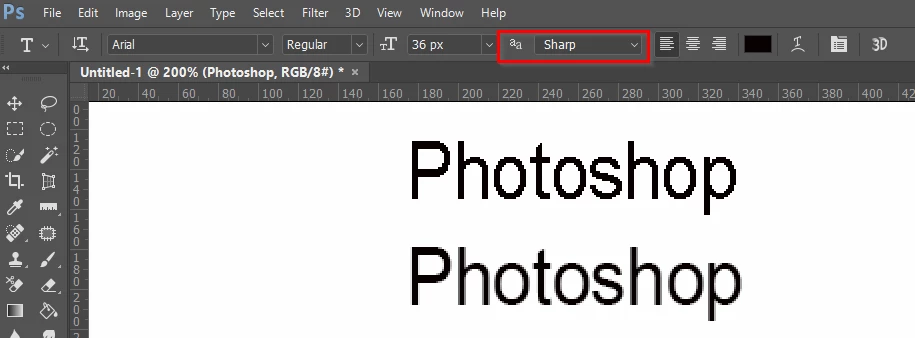
    This shows the same line of text at 36 pixels zoomed to 200%.  The first is with aa set to None and the second aa is set to Sharp

    4 replies

    roberts37488767
    Participant
    May 1, 2017

    how did you zoom to 200%

    Trevor.Dennis
    Community Expert
    Trevor.DennisCommunity ExpertCorrect answer
    Community Expert
    December 31, 2016

    This shows the same line of text at 36 pixels zoomed to 200%.  The first is with aa set to None and the second aa is set to Sharp

    Participant
    December 30, 2016

    The image size is 400 x 150 pixels and the font size is 36.

    Peru Bob
    Community Expert
    Community Expert
    December 30, 2016

    stephanieh46748579 wrote:

    The image size is 400 x 150 pixels and the font size is 36.

    That's a very low resolution image, thus text will be low resolution.

    Try a different font and see if it's better.

    Participant
    December 30, 2016

    I have real a lot about changing the pixels, but I am not very familiar with what that means. I thought the number of pixels mainly effected the overall size of the item.

    Michael J. Hoffman
    Community Expert
    Community Expert
    December 30, 2016

    The size of the image in pixels, if it is too small, could contribute to pixelated text. What is your image size in pixels (Image > Image Size)? What font size are you using?

    Mike