Participant
February 27, 2018
Answered

Gang printing images

  • February 27, 2018
  • 3 replies
  • 921 views

How can I print 4 pictures to a page?

    This topic has been closed for replies.
    Correct answer Nancy OShea

    File > New.  Set the correct paper size and resolution for your printer.  For example: 8.5" x 11" at 300 ppi.

    Go to View > Show > Grid to give yourself lines for alignment.  You can change Grid options in your Preferences. Using grids and guides in Photoshop

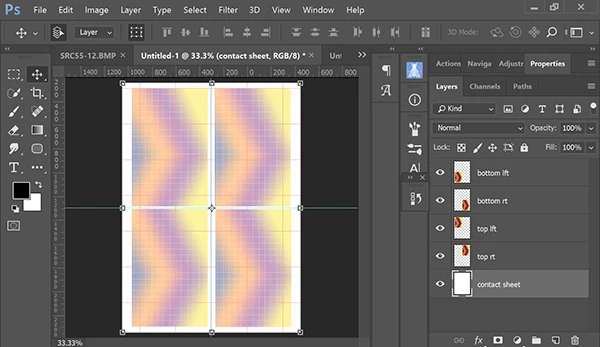
    Place each image on its own layer.  See screenshot.
    3 replies

    Nancy OShea
    Community Expert
    Nancy OSheaCommunity ExpertCorrect answer
    Community Expert
    February 27, 2018

    File > New.  Set the correct paper size and resolution for your printer.  For example: 8.5" x 11" at 300 ppi.

    Go to View > Show > Grid to give yourself lines for alignment.  You can change Grid options in your Preferences. Using grids and guides in Photoshop

    Place each image on its own layer.  See screenshot.

    Nancy O'Shea— Product User & Community Expert
    Derek Cross
    Community Expert
    Community Expert
    February 27, 2018

    Have a look at File > Automate > Contact Sheet II...

    (Maybe overkill for what you want, but worth a look anyway.)

    Abambo
    Community Expert
    Community Expert
    February 27, 2018

    With Photoshop you need to create a new picture holding the four pictures you want to print.

    ABAMBO | Hard- and Software Engineer | Photographer