
Participant
February 16, 2021
Question

General brushes disappeared ?

  • February 16, 2021
  • 4 replies
  • 1970 views

Greetings,


My question is probably dumb but I just can't find a solution.

I just began using Photoshop today so obviously I don't know much about it, I've been trying to follow a tutorial. 


I need to use a specific "general brush" but I just can't find it anymore.
Here is what I need :
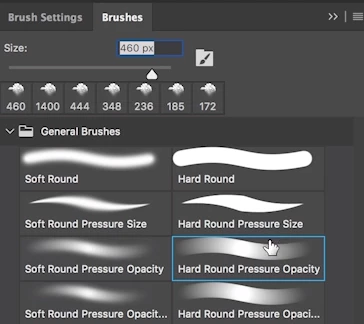
 

And here is what I have, under the same section : 
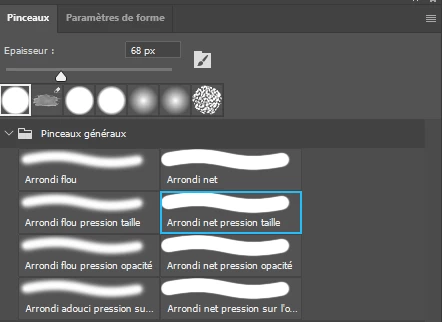
The thing is, I actually had what you can see on the first screenshot earlier today when I completed the first part of the tutorial. I just launched Photoshop again and those general brushes I used are now nowhere to be found. So, I don't know what I did to make them disappear and I don't know how to get them back.


Thanks in advance for your help.

Have a nice day!


This topic has been closed for replies.

4 replies

Participant
July 13, 2024

I'm having the issue, I just downloaded photoshop and have to use this for my digital art course 

 and all I have is this 

 Do I have to download certain brushes and if so would anyone know where I can download it, 


thanks so much any help would be greatly appreciated 

silk-m
Community Expert
Community Expert
July 13, 2024

Hi, Ann
Click on "Pinceaux hérités" from the Brush palette menu. Is "Arrondi net pression opacité" in "Pinceaux par défaut" the brush you want?


in English

--Susumu Iwasaki
Trevor.Dennis
Community Expert
Community Expert
September 14, 2021

Select the Brush tool and right click inside the document window

Click on the little cog icon in the top right corner, and turn on all of the options I havee highlighted

This maximises the information and help about the presets, and is a good way to work when starting out.  I work this way after using Photoshop 25 odd years!


Start typing Hard round pressure opacity in the search bar, and providing it is contained in one of the groups you have in the main panel window, it will show and can be selected.  I'm guessing that you realise that preset is only valid if you are using a tablet and pressure sensitive pen like a Wacom?


Participant
September 14, 2021

im having this same problem, did you solved it?

c.pfaffenbichler
Community Expert
Community Expert
February 16, 2021

Please post a screenshot including the Brush Settings Panel set to Transfer. 

It looks like you lost pressure sensitivity.