
Inspiring
October 13, 2023
Question

Generative Fill - Replace Background

  • October 13, 2023
  • 2 replies
  • 2199 views

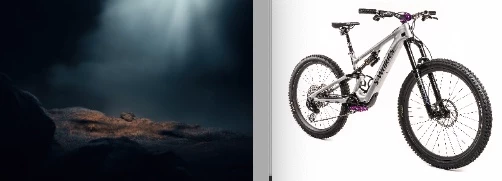
I have original photography -studio shot of a high end bicycle. Image is now on pure white, but has not been outlined to a transparent background, just pure white. I have a separate image of a landscape background. Is it possible to use Gernative Fill to either replace the white background with the landscape image, or to drop the bicycle image onto the landscape file -without the white background. The bicycle has spoked wheels, cables, etc. and a very light grey frame. As a Retoucher, I would use various hands on techniques to outline (silo) the bicycle, but I want to see if Generative Fill can be used in this case, and in similar scenarios. This needs to be very accurate, with no ghosted areas. 
This topic has been closed for replies.

2 replies

FauxtoGuyAuthor
Inspiring
October 13, 2023

I also have a version of the product shot on black specifically to merge with a dark AI generated background. I posted the same product on white (above) as I thought that would be a slam dunk for AI assisted background replacement. Bicycles are a complex litmus test for outlining (we call "Silo"). So I wasn't sure which asset an AI App would have greater success with. I have attached a sample dark background next to a product shot on black with fog. Could Firefly accurately merge this bike image with the landscape shot (or simlar)?


I'm looking to establish a potential workflow where studio product/people images could be merged with stock photo or AI generated backgrounds. Is Firefly capable of complex background replacement at this level or do we still need to rely on human generated masks/paths for these tasks?


Trevor.Dennis
Community Expert
Community Expert
October 13, 2023

You'll need to supply much higher resolution images to get a meaning answer.  Whatever answer you eventually get, it probably won't revolve around Generative Fill.  Other than the wheel spokes, it would take you long to make a clipping path with the pen tool.

FauxtoGuyAuthor
Inspiring
October 13, 2023

I have 8K images. What I posted was just for reference. Don't need an 8K image to answer the question. Much hoopla lately about generative fill. What could be an easier test than an image on white? Does it work or not? I've been using photoshop for over 30 years and know how to silo any image. My question is about generative fill, plain & simple. Can it perform the task? If so, how specifically?

Bojan Živković11378569
Community Expert
Community Expert
October 13, 2023

If you expect to provide two images and ask Generative Fill to blend them together, to remove white background then to match colors and lighting then its not possible at this stage I believe.