
Inspiring
February 8, 2024
Answered

Generative fill wrong result

  • February 8, 2024
  • 2 replies
  • 1842 views

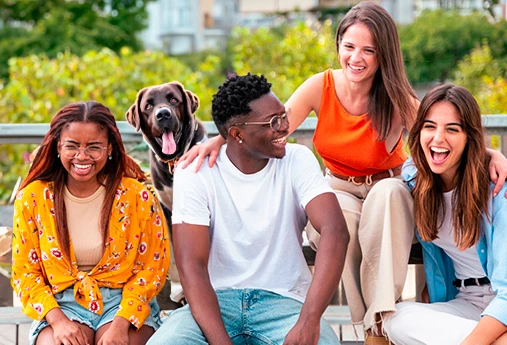
Here's the original photo (a free adobe stock photo):

I selected the man on the left rear including both his legs, then I typed into generative fill "a dog", I get this result:

I tried "blurred fence and trees in the background", "tiger" and both also resulted in a new person there. The only exception is to type nothing, in which case the person is deleted:

Deleting a person is very useful, but why can't it replace the person with other things?


This is done with PS 25.4.0 running on windows 11
This topic has been closed for replies.
Correct answer Kevin Stohlmeyer

Hi @avpromedia honestly I think the ask was too complex for the Gen Fill AI at this stage of development. However it can be done - you had it part way there with removing the person. Next make a new selection and add the dog behind:


2 replies

Legend
February 8, 2024

I would start at the File Info to see if there is a setting on copyright. This is loacted under File on the Menu bar. I have had issues with some Stock Images in the past.

Kevin Stohlmeyer
Community Expert
Community Expert
February 8, 2024

@westdr1dw copyright has nothing to do with Generative Fill AI.

Kevin Stohlmeyer
Community Expert
Community Expert
February 19, 2024

Missed the point.

Back when cell phone services started the carriers were primarily local. They would steal the signals from other carriers and charge roaming fees. The carrier I was using stating they blocked my phone where it was impossible to steal my signal and would try to charge me roaming services. Their engineers claimed not possible. I would sit in my driveway and watch it toggle back and forth. 

Bottom line is when it comes to absolutes I am a skeptic. When you see an absolute on a test, probably not the correct answer. You dismissed the possibility.


@westdr1dw I dismissed knowing how the AI was trained and what parameters are taken into consideration. Copyright is not one of them.

Kevin Stohlmeyer
Community Expert
Kevin StohlmeyerCommunity ExpertCorrect answer
Community Expert
February 8, 2024

Hi @avpromedia honestly I think the ask was too complex for the Gen Fill AI at this stage of development. However it can be done - you had it part way there with removing the person. Next make a new selection and add the dog behind:


Known Participant
June 12, 2024

The dog doesn't look right to me. Whats wrong with its jaw, why are paying customers of adobe expected to put up with these rediculous results. Not only does AI not know the difference between a dog and a human being, it also doesn't know what either of them look like. If you zoom in and inspect the faces of an AI generated dog or human they look very strange and not lifelike at all. What really is the point of AI in the creative industry, I really can't see any benefit.

Kevin Stohlmeyer
Community Expert
Community Expert
June 12, 2024

@default2rkbo39it64o thanks for your reply - this was created back in February using Model 2. Model 3 has been released since with more improvements. That being said no one is forcing you to use AI if you don't see any benefit.