

natrev
Legend
August 16, 2017
Answered

Get Transparency Status on TIFF images?

  • August 16, 2017
  • 3 replies
  • 3467 views

Hi EveryOne!

Sorry for the same question again.

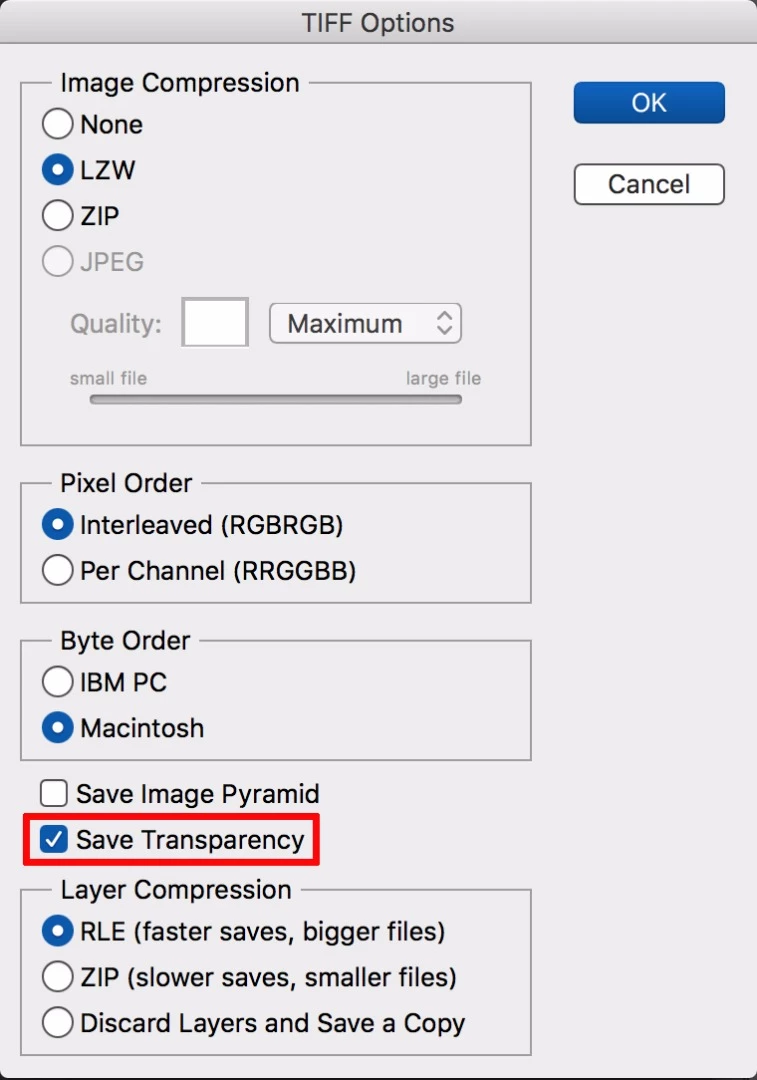
Is this possible to get transparency status on TIFF image using javascript? (or) is this possible via bridge script?

Whether it is checked ON/OFF( true / false ).

Any help or suggestion much appreciated.

-yajiv
This topic has been closed for replies.
Correct answer c.pfaffenbichler

I suspect this may be a fairly inefficient method, but you could give it a try:

// based on code by paul riggott;

// 2017, use it at your own risk;

var file = File.openDialog("Please select tif file.","tif File:*.tif");

main(file);

function main(file){

file.open("r");

file.encoding = 'BINARY';

filestring = file.read();

file.close();

if (filestring.indexOf("Transparency") != -1) {alert ("has transparency")}

};

3 replies

Stephen Marsh
Community Expert
Community Expert
August 17, 2017

A Bridge script here:

Find Layered TIFF Files

August 16, 2017

I just wrote this code snippet which hopefully parses the TIFF file more reliably... Use it at your own risk...

//  "TIFF - Wikipedia"

//      <https://en.wikipedia.org/wiki/TIFF>

//  "TIFF™ Revision 6.0 Final — June 3, 1992"

//      <https://web.archive.org/web/20160305010142/http://partners.adobe.com/public/developer/en/tiff/TIFF6.pdf>

//

function main ()

{

    function readInt (file, byteCount, bigEndian)

    {

        var bytes = file.read (byteCount);

        var intValue = 0;

        for (var index = 0; index < byteCount; index++)

        {

            intValue = (intValue << 8) + bytes.charCodeAt (bigEndian ? index : byteCount - index - 1);

        }

        return intValue;

    }

    //

    function isTiffFile (f)

    {

        return (f.type === 'TIFF') || f.name.match (/\.tiff?$/i);

    }

    var tiffFilter =

        (File.fs === "Macintosh") ?

            function (f) { return (f instanceof Folder) || isTiffFile (f); } :

            "TIFF Files:*.tif,All Files:*.*";

    var tiffFile = File.openDialog ("Open TIFF file:", tiffFilter);

    if (tiffFile)

    {

        var readonly = tiffFile.readonly;   // Let's work around an odd Photoshop CS bug after a file selection dialog !!

        if (tiffFile.open ('r'))

        {

            tiffFile.encoding = 'BINARY';

            var byteOrder = tiffFile.read (2);

            switch (byteOrder)

            {

                case 'II':  // IBM PC

                case 'MM':  // Macintosh

                    var bigEndian = (byteOrder === 'MM');

                    var magicNumber = readInt (tiffFile, 2, bigEndian);

                    if (magicNumber === 42) // Arbitrary but carefully chosen number...

                    {

                        var hasTransparency = false;

                        var dirOffset = readInt (tiffFile, 4, bigEndian);

                        do

                        {

                            tiffFile.seek (dirOffset);

                            var dirCount = readInt (tiffFile, 2, bigEndian);

                            for (var dirIndex = 0; dirIndex < dirCount; dirIndex++)

                            {

                                var entryTag = readInt (tiffFile, 2, bigEndian);

                                var entryType = readInt (tiffFile, 2, bigEndian);

                                var entryCount = readInt (tiffFile, 4, bigEndian);

                                var entryValueOrOffset = readInt (tiffFile, 4, bigEndian);

                                if (entryTag === 338)   // ExtraSamples

                                {

                                    if (entryType === 3)    // Short

                                    {

                                        var values = [ ];

                                        var entryTypeSize = 2;

                                        var entryValueSize = entryCount * entryTypeSize;

                                        var saveOffset = tiffFile.tell ();

                                        if (entryValueSize > 4)

                                        {

                                            tiffFile.seek (entryValueOrOffset);

                                            for (var valueIndex = 0; valueIndex < entryCount; valueIndex++)

                                            {

                                                values.push (readInt (tiffFile, entryTypeSize, bigEndian));

                                            }

                                        }

                                        else

                                        {

                                            tiffFile.seek (-4, 1);  // Rewind 4 bytes

                                            for (var valueIndex = 0; valueIndex < entryCount; valueIndex++)

                                            {

                                                values.push (readInt (tiffFile, entryTypeSize, bigEndian));

                                            }

                                        }

                                        tiffFile.seek (saveOffset);

                                        for (valueIndex = 0; valueIndex < values.length; valueIndex++)

                                        {

                                            if (values[valueIndex] === 1)   // Associated alpha data (with pre-multiplied color)

                                            {

                                                hasTransparency = true;

                                            }

                                        }

                                    }

                                    else

                                    {

                                         throw new Error ("Invalid entry type (3 expected):\n" + entryType);

                                    }

                                }

                            }

                            dirOffset = readInt (tiffFile, 4, bigEndian);

                        }

                        while (dirOffset);

                        alert ("Transparency:\n" + hasTransparency);

                    }

                    else

                    {

                        alert ("Unknown magic number:\n" + magicNumber);

                    }

                    break;

                default:

                    alert ("Unknown byte order:\n" + byteOrder);

                    break;

            }

            tiffFile.close ();

        }

        else

        {

            alert ("Cannot open TIFF file.");

        }

    }

}

//

main ();

//

[Edit]: Case of extra standard alpha channels is now correctly taken into account.

HTH,

--Mikaeru

natrev
natrevAuthor
Legend
August 17, 2017

Thank you Chris, 

Thank you Mikaeru69,

I have learned new thing from both of your knowledge.

I have question on mind, Same as is it possible to get Layer compression whether its Zip or RLE.

I tried but I am not able to find the solution. Any help or suggestion much appreciated.

-yajiv

natrev
natrevAuthor
Legend
August 17, 2017

One way is to look at the metadata.

#target photoshop;

main();

function main(){

var inputFolder = Folder.selectDialog ("Please select folder to process...");

if(inputFolder == null) return;

var myFiles = inputFolder.getFiles(/\.(tif)$/i);

for(var f = 0;f < myFiles.length;f++){

    $.writeln(decodeURI(myFiles.name) + " " + getTifCompession(myFiles));

    }

};

function getTifCompession(file){

if (ExternalObject.AdobeXMPScript == undefined) ExternalObject.AdobeXMPScript = new ExternalObject('lib:AdobeXMPScript');

var xmpf = new XMPFile(file.fsName, XMPConst.UNKNOWN, XMPConst.OPEN_FOR_READ);

var xmp = xmpf.getXMP();

try{

var comp = xmp.getProperty( XMPConst.NS_TIFF, "Compression" ).toString();

var result = '';

switch( Number(comp) ){ 

     case 1:  result = "none"; break; 

     case 5:  result = "lzw";  break;

     case 7:  result = "jpg";  break;

     case 8:  result =  "zip";  break;

     default: result =  "unknown"; 

}

return result;

}catch(e){return undefined;}

};


Hi SuperMerlin,

Thank you for the prompt response. The above coding is working fine and get the Image compression value (LZW, NONE,ZIP,JPEG).

However, I am asking about the Layer Compression whether ZIP or RLE.

-yajiv

c.pfaffenbichler
Community Expert
c.pfaffenbichlerCommunity ExpertCorrect answer
Community Expert
August 16, 2017

I suspect this may be a fairly inefficient method, but you could give it a try:

// based on code by paul riggott;

// 2017, use it at your own risk;

var file = File.openDialog("Please select tif file.","tif File:*.tif");

main(file);

function main(file){

file.open("r");

file.encoding = 'BINARY';

filestring = file.read();

file.close();

if (filestring.indexOf("Transparency") != -1) {alert ("has transparency")}

};