
Participant
December 29, 2020
Question

Glow effect not working right

  • December 29, 2020
  • 3 replies
  • 1523 views

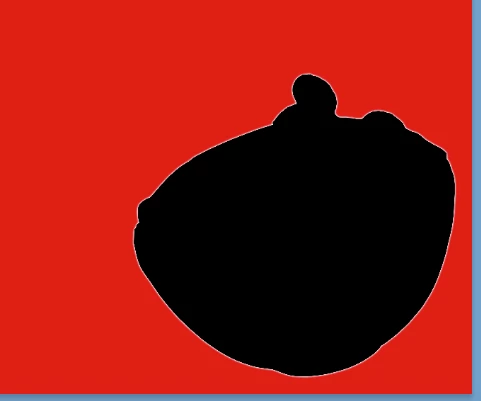
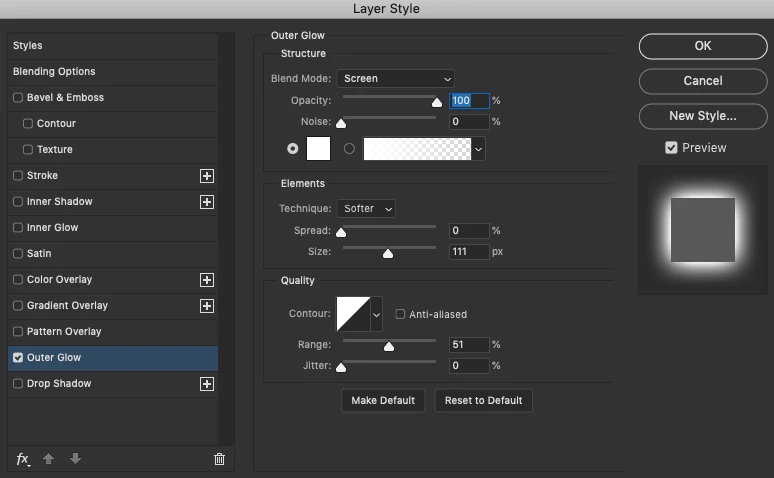
I have been trying to add an outer glow effect to an object however it is not working properly, the effect seems to not be 'glowing' and instead just looks like more of stroke, especially when made thicker. i have attahed screenshots of what it looks like and the settings. i have tried messing with the outlow options but nothing seems to be fixing it.
This topic has been closed for replies.

3 replies

mglush
Community Expert
Community Expert
December 29, 2020

Hi! Do you have Preserve Transparency turned on for that layer in your Layer's panel? That would hinder the glow from showing. If you do, uncheck the box and the glow should show up. If not, please show us a screenshot of your window with the all the panels visible.

Thanks!

Michelle

Jeff Arola
Community Expert
Community Expert
December 29, 2020

Turn down the Opacity and increase the Size.


John T Smith
Community Expert
Community Expert
December 29, 2020

Please post the exact name of the Adobe program you use so a Moderator may move this message to that forum

Leon5CEAAuthor
Participant
December 29, 2020

Sorry, I was using old version of photoshop when the problem first occured, i then updated to the latest 2021 version pf photoshop but had the same problem