Exit
  • Global community
    • Language:
      • Deutsch
      • English
      • Español
      • Français
      • Português
  • 日本語コミュニティ
  • 한국 커뮤니티
0

Glyph replaced my letter "o"

New Here ,
May 22, 2022 May 22, 2022

When I type my letter "o" in my text, it types a specific "o" glyph instead of the normal letter.

I can change the glyph with type layer glyph alternates, but it is very annoying to do this operation each time I type "o".

How do I replace this glyph with the normal letter "o" please ?


TOPICS
Windows
435
Translate
Report
Community guidelines
Be kind and respectful, give credit to the original source of content, and search for duplicates before posting. Learn more
community guidelines

correct answers 1 Correct answer

New Here , May 23, 2022 May 23, 2022

Hi Jane,

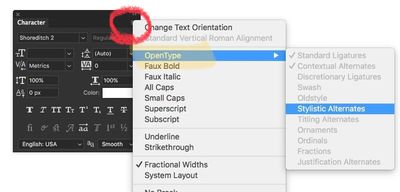
Ok so there was this icon which I enabled by mistake. Now I have disabled it and my letter "o" is back to normal.

Thank you very much !

Marc

Translate
Adobe
Community Expert ,
May 22, 2022 May 22, 2022

Hi @Marc24554250o64w 

Please select the text with the Type tool and show a screenshot that includes the Character panel (Window menu). Click the panel menu and then click OpenType to expand it. 


F8E7F89A-357C-411C-816E-A653A686B9E8.jpeg


Jane


Translate
Report
Community guidelines
Be kind and respectful, give credit to the original source of content, and search for duplicates before posting. Learn more
community guidelines
New Here ,
May 23, 2022 May 23, 2022

Hi Jane,

Ok so there was this icon which I enabled by mistake. Now I have disabled it and my letter "o" is back to normal.

Thank you very much !

Marc

Translate
Report
Community guidelines
Be kind and respectful, give credit to the original source of content, and search for duplicates before posting. Learn more
community guidelines
Community Expert ,
May 23, 2022 May 23, 2022

You're welcome, @Marc24554250o64w , and I'm glad it's sorted for you 😊


Jane


Translate
Report
Community guidelines
Be kind and respectful, give credit to the original source of content, and search for duplicates before posting. Learn more
community guidelines
Community Expert ,
May 23, 2022 May 23, 2022
LATEST

Marc, en effet, avec l'option supérieur/exposant activée, les glyphes qui correspondent passent d'office sans cette position, il n'y a rien de m...que là dedans. Photoshop est plein de boutons et de fonctions qui apportent un résultat différent. Voilà pourquoi il convient de poster une capture d'écran montrant le plus possible votre interface. Belle journée.

Translate
Report
Community guidelines
Be kind and respectful, give credit to the original source of content, and search for duplicates before posting. Learn more
community guidelines