Inspiring
July 20, 2021
Answered

GPU - GeForce RTX 2060

  • July 20, 2021
  • 2 replies
  • 6589 views

Hello,

I've had a problem for a few days now, the GPU is no longer accepted and I have to uncheck it under preference. Today's update did not change anything.


Photoshop 22.4.3

GeForce RTX 2060

 

This topic has been closed for replies.
Correct answer Ged_Traynor

Yes,

I can't open a file, I get an error message and I can't close the Photoshop window. To close Photoshop, I have to close it with the "Task Manager".
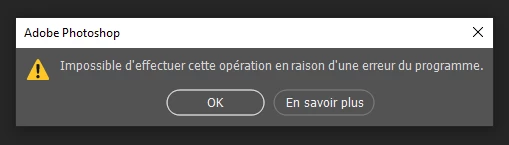


Take a look here

https://helpx.adobe.com/photoshop/kb/program-error-opening-psd.html

2 replies

TypooAuthor
Inspiring
July 20, 2021

I added photoshop.exe and snifer.exe in the Manage Settings 3D, restarted several times. the problem is still there.

Ged_Traynor
Community Expert
Community Expert
July 20, 2021

Hi

I have the RTX 2060 super and Photoshop detects that fine for me with both 22.4.2 and 22.4.3, do you use the studio driver or the game ready version. The studio version is recommended for Photoshop and when installing try performing a clean install from the custom > advanced menu.

TypooAuthor
Inspiring
July 20, 2021

Hello,

Thank you for your answer, it's nice.

I have reinstalled the Studio driver in the game place. I uninstalled and reinstalled Photoshop, but the Problem is still there. I can't open a file.

TypooAuthor
Inspiring
July 20, 2021

You have "Use Graphics Processor" disabled, try enabling it, also click on Advanced Settings and make sure the drawing mode is set to Advanced and that Use OpenCL is enabled


Yes, I had to disable to work with the images, since otherwise everything is blocked. Here is the image of the settings, but the problem is still there.