
Avi Shpayer
Participant
July 17, 2020
Question

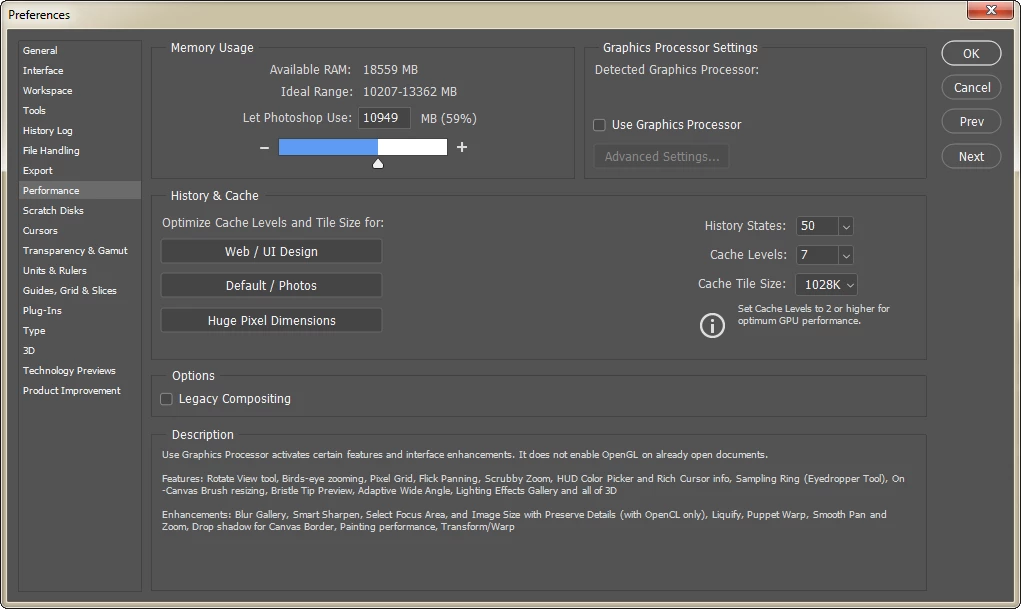
GPU Not showing in Performance settings after updating Photoshop to version 21.2 [Edit: 21.2.1]

  • July 17, 2020
  • 2 replies
  • 2013 views

GPU Not showing in Performance settings after updating Photoshop to version 21.2 [Edit: now 21.2.1 also].

Reverting to an older version enables the use of the GPU again.

I went through all the GPU Troubleshooting guide and having the latest driver didn't resolve the issue.


The GPU under "Detected Graphics Processor" appears empty/blank.


Using Windows 7.

GPU: GTX 980ti.
This topic has been closed for replies.

2 replies

July 21, 2020

Hi

Try updating to version 21.2.1, it has fixed the issue for me, GPU is now been detected

Avi Shpayer
Participant
July 21, 2020

Hi,

I updated Photoshop to the new version 21.2.1. The GPU still appears missing. There is a small change in the "Help > System info" menu - The GPU is listed correctly:

  • glgpu[0].GLName="NVIDIA GeForce GTX 980 Ti"

Unlike the previous version (21.2) where the GPU didn't even appear in the System Info list.


I tried doing a clean install, still, the GPU doesn't appear.

July 21, 2020

Did you try going into the Nvidia control panel and adding Photoshop.exe and Sniffer.exe to the 3D settings

July 17, 2020

Hi

It's an issue with version 21.2 and I have reported here

https://feedback.photoshop.com/photoshop_family/topics/bug-in-photoshop-version-21-2-not-detecting-older-gpus

Adobe are looking into the issue and hopefully will provide a fix in the next update