
Participating Frequently
May 14, 2020
Answered

Gradient Editor in CC

  • May 14, 2020
  • 2 replies
  • 939 views

Longing for the simple foreground to transparent gradient selector from the past. I just want to create a white-to-transparent gradient on a layer. In the editor, I can't see how to do that. Have to pick two colors, and even then, the Gradient tool lays down nothing and the Gradient Editor selector at the top of the interface just shows a transparency grid.
This topic has been closed for replies.
Correct answer josephlavine

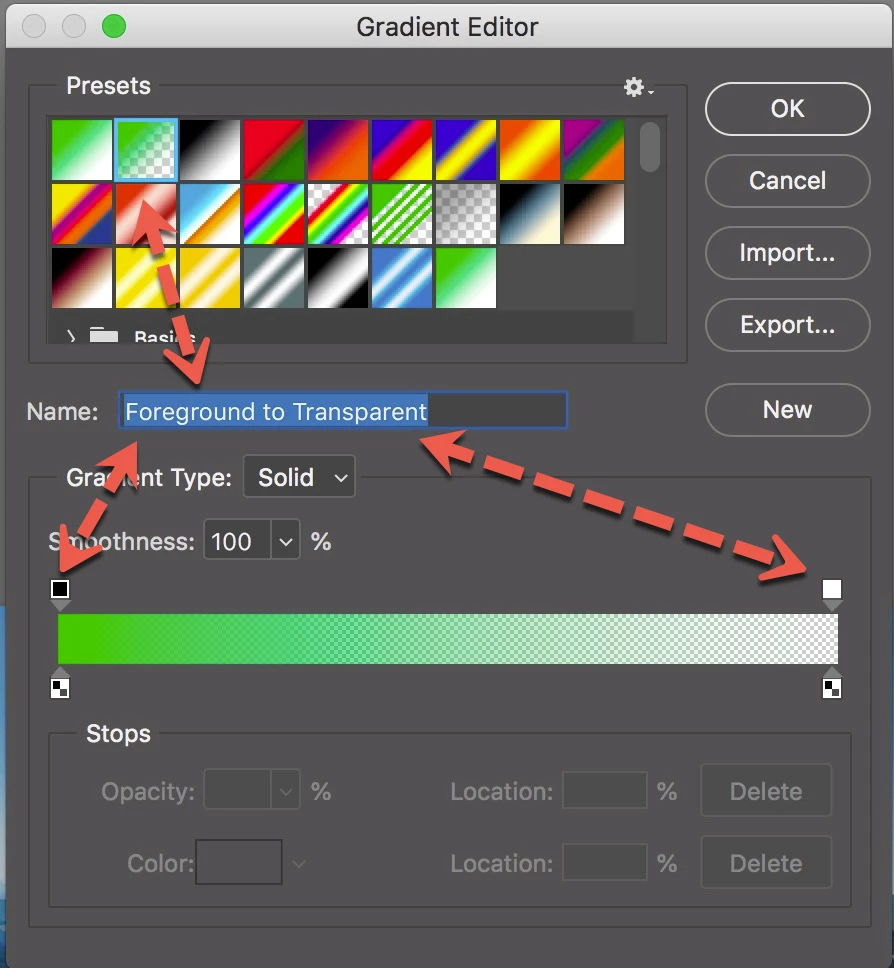
Chuck's response is spot-on; both ends cannot be transparent unless you are creating a gradient that goes from transparent to color, and back to transparent. Hopefully, the attached screen capture helps. warmly/j

2 replies

josephlavine
Community Expert
josephlavineCommunity ExpertCorrect answer
Community Expert
May 14, 2020

Chuck's response is spot-on; both ends cannot be transparent unless you are creating a gradient that goes from transparent to color, and back to transparent. Hopefully, the attached screen capture helps. warmly/j

Chuck Uebele
Community Expert
Community Expert
May 14, 2020

You have to have one of the top gradient stops set to 0% and one set to 100%. You have both set to 0%.