
Participating Frequently
May 26, 2023
Answered

Gradient fill in quick mask not working

  • May 26, 2023
  • 5 replies
  • 12494 views

Recently my Photoshop got upgraded to version 24.5.0 and creating a gradient mask using quick mask no longer works.

Before the upgrade I could do QG, do a gradient fill and Q and a gradient mask is created.

With the new version, when I do QG and do a gradient fill, the quick mask is turned off and the gradient fill happens in a new layer as shown below!
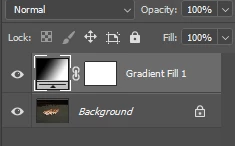
How do I get back to the previous behaviour?


Correct answer Mihaela Ps

Hello  @Green Baron we are working toward a fix for this issue. Please look for it in the June update of Photoshop. Thanks

5 replies

New Participant
May 29, 2024

At this point I need alternatives to PS and IL. All of a sudden I am unable to fade a photo using the mask and gradient. This is highly frustrating that functionality will change. i do not even have the option to hange to classic.- it is that option by default, yet this no longer works, Is there a workaround/fix or do i need to just jumpship?

danielm34790650
New Participant
December 12, 2023

It's Dec now. Any fix for this? Works at home when I use ACDsee 😉

Tried changing to Classic gradient and still no workie. Windows 11, latest Photoshop.

----------

Adobe Photoshop Version: 25.2.0 20231121.r.196 12a6c2a x64
Number of Launches: 205
Operating System: Windows 10 64-bit
Version: 10 10.0.19045.3758
System architecture: AMD CPU Family:15, Model:1, Stepping:0 with MMX, SSE Integer, SSE FP, SSE2, SSE3, SSE4.1, SSE4.2, AVX, AVX2, HyperThreading
Physical processor count: 8
Logical processor count: 16

danielm34790650
New Participant
December 12, 2023

Mihaela PsCorrect answer
Adobe Employee
June 6, 2023

Hello  @Green Baron we are working toward a fix for this issue. Please look for it in the June update of Photoshop. Thanks

New Participant
October 20, 2023

Why not just revert back to the way it has working great for the past 25+ years? Now it is broken and my workflow is ruined and I can't find a way to do it now.

New Participant
December 1, 2023

Exactly! Just give us the option to use the new too or the old way.

ClaudiaR99
Community Manager
Community Manager
May 26, 2023

Hello @Green Baron thank you for bringing this to our attention. I'd like to understand a bit more of the steps in your workflow. Could you let me know what is it that you are trying to achieve and the steps taken? 

Thanks! Claudia

Participating Frequently
May 27, 2023

Hi Claudia,

I am trying to create a gradient mask for an adjustment layer.

My workflow is

  1. Go into quick mask mode
  2. Do a gradient fill
  3. Exit quick mask mode
  4. Create an adjust layers with a gradient mask.


In the new version, when I execute step 2, it will exit quick mask mode and create a new layer with a gradient fill instead of remaining in quick mask mode and create a gradient in quick mask 


Participating Frequently
May 27, 2023

The above will work as expected for a Brush but does not work now for Gradient fill

Jeff Arola
Community Expert
May 26, 2023

With the Gradient Tool selected enable Classic Gradient in the tool options bar before using in the Quick Mask Mode.


Participating Frequently
June 4, 2023

Doesn't work in the Windows version