Iuigidesu
Inspiring
April 28, 2024
Answered

Gradient from background and foreground can't be automated?

  • April 28, 2024
  • 2 replies
  • 1197 views

Hi, it's me again, thanks for the help on my last post.
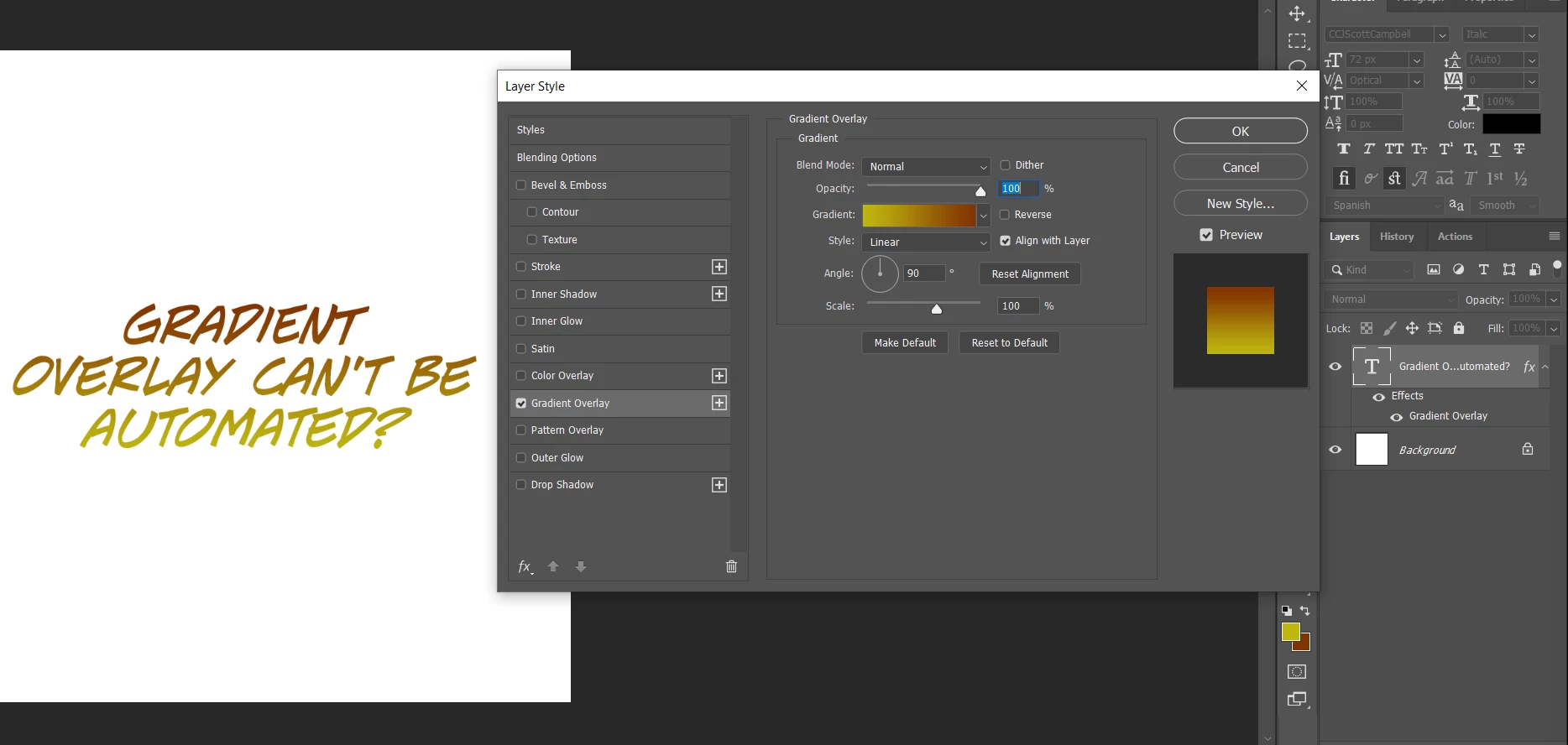
I've been working on this text layers that need a gradient overlay based on some colors, so what I'm doing is picking color 1 as background and color 2 as foreground, and when I add a gradient overlay, theres a preset that let's me use the background/foreground colors as gradient, so I wanted to automate that, I recorded the action and it does pretty much it, however, is not using my current background/foreground colors, but the ones from the time i recorded the action, and I was wondering if there's a way to automate that? So I can pick two colors and run an action/script that adds them as a gradient overlay, I don´t care about the angle or style, the basic 90 degree linear gradient works.
I found some scripts about gradients, but not about text overlay.

Here's a little representation of what I'm doing manually.
Thanks!!

This topic has been closed for replies.
Correct answer Stephen Marsh

Sorry, @Stephen Marsh , I thought I figured the stroke thing, but now i started actually working on it, turns out you can't even add a stroke as an action, it'll record all the other effects, so now I got to add manually the stroke, which isn't really helpful, so I was wondering how to make the script to add a stroke? The layers I'm working on use the exact same stroke size (6px) and black or white color, I'd love some help on this, you told me last time to send a sample, so I'll add it. Thanks!!!


@Iuigidesu 


Try this:


/*
Stroke & Gradient Overlay Using Foreground to Background.jsx
v1.0 - 2nd May 2024, Stephen Marsh
https://community.adobe.com/t5/photoshop-ecosystem-discussions/gradient-from-background-and-foreground-can-t-be-automated/td-p/14585544
*/

var s2t = function (s) {
	return app.stringIDToTypeID(s);
};
var descriptor = new ActionDescriptor();
var descriptor2 = new ActionDescriptor();
var descriptor3 = new ActionDescriptor();
var descriptor4 = new ActionDescriptor();
var descriptor5 = new ActionDescriptor();
var descriptor6 = new ActionDescriptor();
var descriptor7 = new ActionDescriptor();
var descriptor8 = new ActionDescriptor();
var descriptor9 = new ActionDescriptor();
var descriptor10 = new ActionDescriptor();
var descriptor11 = new ActionDescriptor();
var descriptor12 = new ActionDescriptor();
var descriptor13 = new ActionDescriptor();
var list = new ActionList();
var list2 = new ActionList();
var reference = new ActionReference();
reference.putProperty( s2t( "property" ), s2t( "layerEffects" ));
reference.putEnumerated( s2t( "layer" ), s2t( "ordinal" ), s2t( "targetEnum" ));
descriptor.putReference( s2t( "null" ), reference );
descriptor2.putUnitDouble( s2t( "scale" ), s2t( "percentUnit" ), 100.000000 );
descriptor3.putBoolean( s2t( "enabled" ), true );
descriptor3.putBoolean( s2t( "present" ), true );
descriptor3.putBoolean( s2t( "showInDialog" ), true );
descriptor3.putEnumerated( s2t( "mode" ), s2t( "blendMode" ), s2t( "normal" ));
descriptor3.putUnitDouble(s2t("opacity"), s2t("percentUnit"), 100.000000);
///// Gradient settings /////
descriptor4.putString( s2t( "name" ), "Foreground to Background" );
descriptor4.putEnumerated( s2t( "gradientForm" ), s2t( "gradientForm" ), s2t( "customStops" ));
descriptor4.putDouble(s2t("interfaceIconFrameDimmed"), 4096.000000);
// Foreground colour
var fR = foregroundColor.rgb.red;
var fG = foregroundColor.rgb.green;
var fB = foregroundColor.rgb.blue
descriptor6.putDouble( s2t( "red" ), Math.round(fR) );
descriptor6.putDouble( s2t( "grain" ), Math.round(fG) );
descriptor6.putDouble( s2t( "blue" ), Math.round(fB) );
descriptor5.putObject( s2t( "color" ), s2t( "RGBColor" ), descriptor6 );
descriptor5.putEnumerated( s2t( "type" ), s2t( "colorStopType" ), s2t( "userStop" ));
descriptor5.putInteger( s2t( "location" ), 0 );
descriptor5.putInteger( s2t( "midpoint" ), 50 );
list.putObject(s2t("colorStop"), descriptor5);
// Background colour
var bR = backgroundColor.rgb.red;
var bG = backgroundColor.rgb.green;
var bB = backgroundColor.rgb.blue
descriptor8.putDouble( s2t( "red" ), Math.round(bR) );
descriptor8.putDouble( s2t( "grain" ), Math.round(bG) );
descriptor8.putDouble( s2t( "blue" ), Math.round(bB) );
descriptor7.putObject( s2t( "color" ), s2t( "RGBColor" ), descriptor8 );
descriptor7.putEnumerated( s2t( "type" ), s2t( "colorStopType" ), s2t( "userStop" ));
descriptor7.putInteger( s2t( "location" ), 4096 );
descriptor7.putInteger( s2t( "midpoint" ), 50 );
list.putObject( s2t( "colorStop" ), descriptor7 );
descriptor4.putList( s2t( "colors" ), list );
descriptor9.putUnitDouble( s2t( "opacity" ), s2t( "percentUnit" ), 100.000000 );
descriptor9.putInteger( s2t( "location" ), 0 );
descriptor9.putInteger( s2t( "midpoint" ), 50 );
list2.putObject( s2t( "transferSpec" ), descriptor9 );
descriptor10.putUnitDouble( s2t( "opacity" ), s2t( "percentUnit" ), 100.000000 );
descriptor10.putInteger( s2t( "location" ), 4096 );
descriptor10.putInteger( s2t( "midpoint" ), 50 );
list2.putObject( s2t( "transferSpec" ), descriptor10 );
descriptor4.putList( s2t( "transparency" ), list2 );
descriptor3.putObject(s2t("gradient"), s2t("gradientClassEvent"), descriptor4);
// Gradient angle
descriptor3.putUnitDouble( s2t( "angle" ), s2t( "angleUnit" ), 65.000000 );
descriptor3.putEnumerated(s2t("type"), s2t("gradientType"), s2t("linear"));
// Boolean to reverse the gradient direction
descriptor3.putBoolean( s2t( "reverse" ), true );
descriptor3.putBoolean( s2t( "dither" ), false );
descriptor3.putBoolean( s2t( "align" ), true );
descriptor3.putUnitDouble( s2t( "scale" ), s2t( "percentUnit" ), 100.000000 );
descriptor11.putUnitDouble( s2t( "horizontal" ), s2t( "percentUnit" ), 0.000000 );
descriptor11.putUnitDouble( s2t( "vertical" ), s2t( "percentUnit" ), 0.000000 );
descriptor3.putObject( s2t( "offset" ), s2t( "paint" ), descriptor11 );
descriptor2.putObject(s2t("gradientFill"), s2t("gradientFill"), descriptor3);
///// Stroke settings /////
descriptor12.putBoolean( s2t( "enabled" ), true );
descriptor12.putBoolean( s2t( "present" ), true );
descriptor12.putBoolean( s2t( "showInDialog" ), true );
descriptor12.putEnumerated( s2t( "style" ), s2t( "frameStyle" ), s2t( "outsetFrame" ));
descriptor12.putEnumerated( s2t( "paintType" ), s2t( "frameFill" ), s2t( "solidColor" ));
descriptor12.putEnumerated( s2t( "mode" ), s2t( "blendMode" ), s2t( "normal" ));
descriptor12.putUnitDouble(s2t("opacity"), s2t("percentUnit"), 100.000000);
// Stroke thickness
descriptor12.putUnitDouble(s2t("size"), s2t("pixelsUnit"), 5.000000); 
// Stroke red value
descriptor13.putDouble( s2t( "red" ), 0 );
// Stroke green value
descriptor13.putDouble( s2t( "grain" ), 0 );
// Stroke blue value
descriptor13.putDouble( s2t( "blue" ), 0 );
descriptor12.putObject( s2t( "color" ), s2t( "RGBColor" ), descriptor13 );
descriptor12.putBoolean( s2t( "overprint" ), false );
descriptor2.putObject( s2t( "frameFX" ), s2t( "frameFX" ), descriptor12 );
descriptor.putObject( s2t( "to" ), s2t( "layerEffects" ), descriptor2 );
executeAction( s2t( "set" ), descriptor, DialogModes.NO );


This adds a black stroke.


You can either manually change the style to use white after it is applied, or create a second version of the above but change 0 to 255:


// Stroke red value
descriptor13.putDouble( s2t( "red" ), 255 );


Repeating for the blue and green values entries.  

2 replies

Stephen Marsh
Community Expert
Community Expert
April 30, 2024

@Iuigidesu 


How did the script work for you?

Iuigidesu
IuigidesuAuthor
Inspiring
May 1, 2024

Hey, thanks, it's super cool and also super fast, however it cleans all the original effects, and all the layers I work on must keep their original stroke, but I use an action to put it again, other than that, works amazing, thanks again!!!!

Stephen Marsh
Community Expert
Community Expert
May 1, 2024

Yes, it wasn't clear to me that you had existing effects (looking at your screenshot I can see that now). The expectation is that this is a brand new effect.


Due to the way that Adobe programmed effects, it is very difficult to modify existing effects unless one is very advanced in AM code scripting.


EDIT: The other option would be to post a layered sample file with the required effects applied, then I could modify the gradient code while retaining the existing effects.

Stephen Marsh
Community Expert
Community Expert
April 28, 2024

Yes, sadly actions often record absolute final values, even if we try to use a "foreground to background" gradient preset.


You can substitute the action step for an "action helper script":


/*
Gradient Overlay Using Foreground to Background.jsx
v1.0 - 29th April 2024, Stephen Marsh
https://community.adobe.com/t5/photoshop-ecosystem-discussions/gradient-from-background-and-foreground-can-t-be-automated/td-p/14585544
*/

#target photoshop

var c2t = function (s) {
	return app.charIDToTypeID(s);
};
var s2t = function (s) {
	return app.stringIDToTypeID(s);
};
var descriptor = new ActionDescriptor();
var descriptor2 = new ActionDescriptor();
var descriptor3 = new ActionDescriptor();
var descriptor4 = new ActionDescriptor();
var descriptor5 = new ActionDescriptor();
var descriptor6 = new ActionDescriptor();
var descriptor7 = new ActionDescriptor();
var descriptor8 = new ActionDescriptor();
var descriptor9 = new ActionDescriptor();
var descriptor10 = new ActionDescriptor();
var descriptor11 = new ActionDescriptor();
var list = new ActionList();
var list2 = new ActionList();
var reference = new ActionReference();
reference.putProperty( s2t( "property" ), s2t( "layerEffects" ));
reference.putEnumerated( s2t( "layer" ), s2t( "ordinal" ), s2t( "targetEnum" ));
descriptor.putReference( s2t( "null" ), reference );
descriptor2.putUnitDouble( s2t( "scale" ), s2t( "percentUnit" ), 100.000000 );
descriptor3.putBoolean( s2t( "enabled" ), true );
descriptor3.putBoolean( s2t( "present" ), true );
descriptor3.putBoolean( s2t( "showInDialog" ), true );
descriptor3.putEnumerated( s2t( "mode" ), s2t( "blendMode" ), s2t( "normal" ));
descriptor3.putUnitDouble( s2t( "opacity" ), s2t( "percentUnit" ), 100.000000 );
descriptor4.putString( s2t( "name" ), "Foreground to Background" );
descriptor4.putEnumerated( s2t( "gradientForm" ), s2t( "gradientForm" ), s2t( "customStops" ));
descriptor4.putDouble(s2t("interfaceIconFrameDimmed"), 4096.000000);
// Foreground colour
var fR = foregroundColor.rgb.red;
var fG = foregroundColor.rgb.green;
var fB = foregroundColor.rgb.blue
descriptor6.putDouble( s2t( "red" ), Math.round(fR) );
descriptor6.putDouble( s2t( "grain" ), Math.round(fG) );
descriptor6.putDouble( s2t( "blue" ), Math.round(fB) );
descriptor5.putObject(s2t("color"), s2t("RGBColor"), descriptor6);
descriptor5.putEnumerated( s2t( "type" ), s2t( "colorStopType" ), s2t( "userStop" ));
descriptor5.putInteger( s2t( "location" ), 0 );
descriptor5.putInteger( s2t( "midpoint" ), 50 );
list.putObject(s2t("colorStop"), descriptor5);
// Background colour
var bR = backgroundColor.rgb.red;
var bG = backgroundColor.rgb.green;
var bB = backgroundColor.rgb.blue
descriptor8.putDouble( s2t( "red" ), Math.round(bR) );
descriptor8.putDouble( s2t( "grain" ), Math.round(bG) );
descriptor8.putDouble( s2t( "blue" ), Math.round(bB) );
descriptor7.putObject(s2t("color"), s2t("RGBColor"), descriptor8);
descriptor7.putEnumerated( s2t( "type" ), s2t( "colorStopType" ), s2t( "userStop" ));
descriptor7.putInteger( s2t( "location" ), 4096 );
descriptor7.putInteger( s2t( "midpoint" ), 50 );
list.putObject( s2t( "colorStop" ), descriptor7 );
descriptor4.putList( s2t( "colors" ), list );
descriptor9.putUnitDouble( s2t( "opacity" ), s2t( "percentUnit" ), 100.000000 );
descriptor9.putInteger( s2t( "location" ), 0 );
descriptor9.putInteger( s2t( "midpoint" ), 50 );
list2.putObject( s2t( "transferSpec" ), descriptor9 );
descriptor10.putUnitDouble( s2t( "opacity" ), s2t( "percentUnit" ), 100.000000 );
descriptor10.putInteger( s2t( "location" ), 4096 );
descriptor10.putInteger( s2t( "midpoint" ), 50 );
list2.putObject( s2t( "transferSpec" ), descriptor10 );
descriptor4.putList( s2t( "transparency" ), list2 );
descriptor3.putObject(s2t("gradient"), s2t("gradientClassEvent"), descriptor4);
// Gradient angle
descriptor3.putUnitDouble( s2t( "angle" ), s2t( "angleUnit" ), 90.000000 );
descriptor3.putEnumerated(s2t("type"), s2t("gradientType"), s2t("linear"));
// Boolean to reverse the gradient direction
descriptor3.putBoolean( s2t( "reverse" ), true );
descriptor3.putBoolean( s2t( "dither" ), false );
descriptor3.putEnumerated( c2t( "gs99" ), s2t( "gradientInterpolationMethodType" ), s2t( "perceptual" ));
descriptor3.putBoolean( s2t( "align" ), true );
descriptor3.putUnitDouble( s2t( "scale" ), s2t( "percentUnit" ), 100.000000 );
descriptor11.putUnitDouble( s2t( "horizontal" ), s2t( "percentUnit" ), 0.000000 );
descriptor11.putUnitDouble( s2t( "vertical" ), s2t( "percentUnit" ), 0.000000 );
descriptor3.putObject( s2t( "offset" ), s2t( "paint" ), descriptor11 );
descriptor2.putObject( s2t( "gradientFill" ), s2t( "gradientFill" ), descriptor3 );
descriptor.putObject( s2t( "to" ), s2t( "layerEffects" ), descriptor2 );
executeAction( s2t( "set" ), descriptor, DialogModes.NO );


https://prepression.blogspot.com/2017/11/downloading-and-installing-adobe-scripts.html