
Gradient Map Adjustment Layer "Opacity" doesn't work
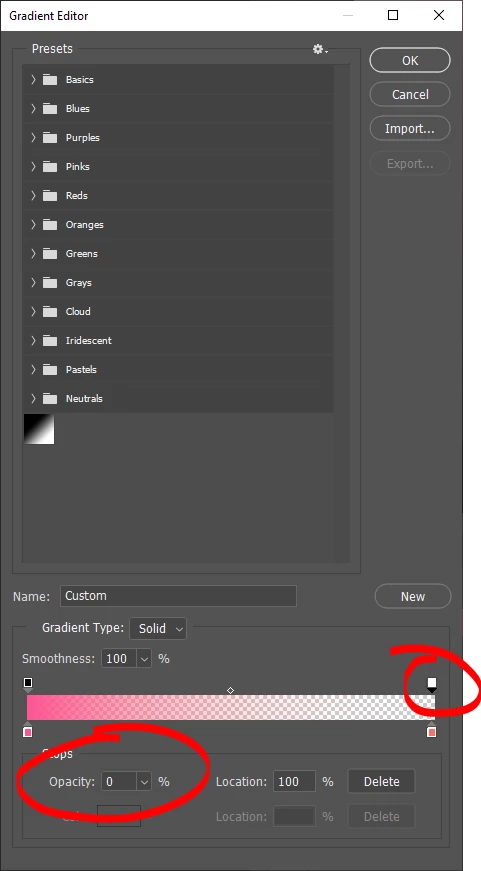
Gradient Map Adjustment Layer Editor has 2 kinds of sliders - Color and Opacity. The Color sliders work fine - place one at the luminance value desired and select a color to be mapped to that value. AFAIK Opacity SHOULD work in a similar way - place one at the luminance value desired and select an opacity level, which should determine the "intensity" of the gradient remapping at that particular value. So my understanding is if you want blacks to be fully affected by the specified gradient map and whites to be completely unaffected, you would add a 100% opacity slider at the bottom end, and a 0% slider at the top end, then the gradient remapping opacity values would interpolate in betweeen. BUT assigning 0% to an opacity slider has NO effect, so there is no way to achieve this result. FRUSTRATING.
See screen below - the preview SUGGESTS the gradient remapping at the top end of the scale would be fully transparent, showing the checkerboard beneath, but that is just not how it responds on the actual image. The gradient at those luminance values comes through at 100% as though the opacity slider doesn't even exist.
 AdChoices