
Participant
September 10, 2024
Answered

Gradient mask tools/handles keep disappearing. How to turn on gradient mask tools/handles?

  • September 10, 2024
  • 1 reply
  • 2156 views

Hello Photoshop users,


I'm looking for a solution to this problem relating to the Gradient tool. Many thanks for anyone's input in advance!


I've created a blur mask using: ( Layer > Layer Mask > Reveal All ), applying a Gaussian Blur smart filter, and using the Gradient tool on the Layer Mask.


My Layer Mask in Layers panel:
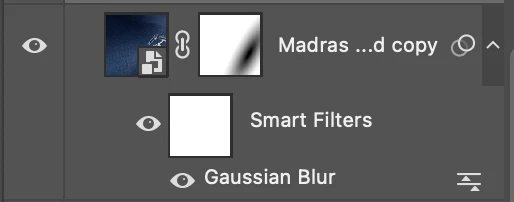
 

But when trying to edit the gradient layer mask by clicking on it, with the Gradient tool selected and active, the handles for editing radius, size, midpoint etc don't show. This means I have to click and drag out another gradient every time I want to make a minor edit.


The edit handles I'm reffering to for Gradients:
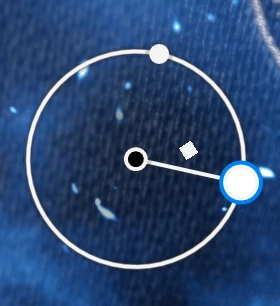
 

So the question is, how can I make the Gradient handles/corners/buttons appear when I need to make a change to my gradient?


Thanks for your time!


Let me know if there's a more suitable forum to ask this question. I couldn't find an asnwer to this online so far which worked.


Cheers,

Ciaran

Correct answer Semaphoric

The controls only stay there for Gradient Fill layers; masks use "Classic" gradients. To do what you want, put a Gradient Fill layer below the blurred layer, using Foreground to Transparent, with the Reverse box checked.


Hold down the Option key and position the cursor between the Gradient and Blurred layers; you should see the cursor change to a small box and a bent arrow. Click to create a Clipping Mask. The blurred layer will now use the Gradient as a mask and the Gradient maintains the editing controls.

1 reply

Semaphoric
Community Expert
SemaphoricCommunity ExpertCorrect answer
Community Expert
September 10, 2024

The controls only stay there for Gradient Fill layers; masks use "Classic" gradients. To do what you want, put a Gradient Fill layer below the blurred layer, using Foreground to Transparent, with the Reverse box checked.


Hold down the Option key and position the cursor between the Gradient and Blurred layers; you should see the cursor change to a small box and a bent arrow. Click to create a Clipping Mask. The blurred layer will now use the Gradient as a mask and the Gradient maintains the editing controls.

Participating Frequently
April 27, 2025

Hi,I am looking for a somewhat simiar issue.I am on a MAC Sequoia 15.3.2 and  PS 26.version. All of a sudden my gradient tool(gradient version as oppose to classic gradient)stopped showing the handles and the circle which normally control the size and feathering for the gradient.When drawing on a mask gradient tool works like classic without control handles and  there is no way to adjust it.I reset the tool a few times, went through the settings but did not find anything what could restore it.Is it the case that in a new PS version I can not do "new "gradient on the mask and only do classic gradient?And what is a solution tham to have a gradient with handles on the mask?

Participating Frequently
June 4, 2025

Just want to bump up this problem..So far I did not see any solutions to it and I had to revert to PS 2024 where a gradiant tool works perfect and I can use handles on it.It is a bummer  as I would like to work on PS 2025 ,but I use gradients tool a lot and it is a deal breaker at the moment.Any help would be appreciated.