
Exit
  • Global community
    • Language:
      • Deutsch
      • English
      • Español
      • Français
      • Português
  • 日本語コミュニティ
  • 한국 커뮤니티
0

Gradient Problem

Guest
Jan 23, 2019 Jan 23, 2019

Hey there, I have the following problem:

If I want to blur an image or create a color gradient in general, the whole gradients look like steps.

Can this be softened?

I put the original image as a smart object and then a Gaussian blur over it so that I automatically have the background matching the image.

But unfortunately the gradients are not nice at all, how can I change that?

Thanks for your help.
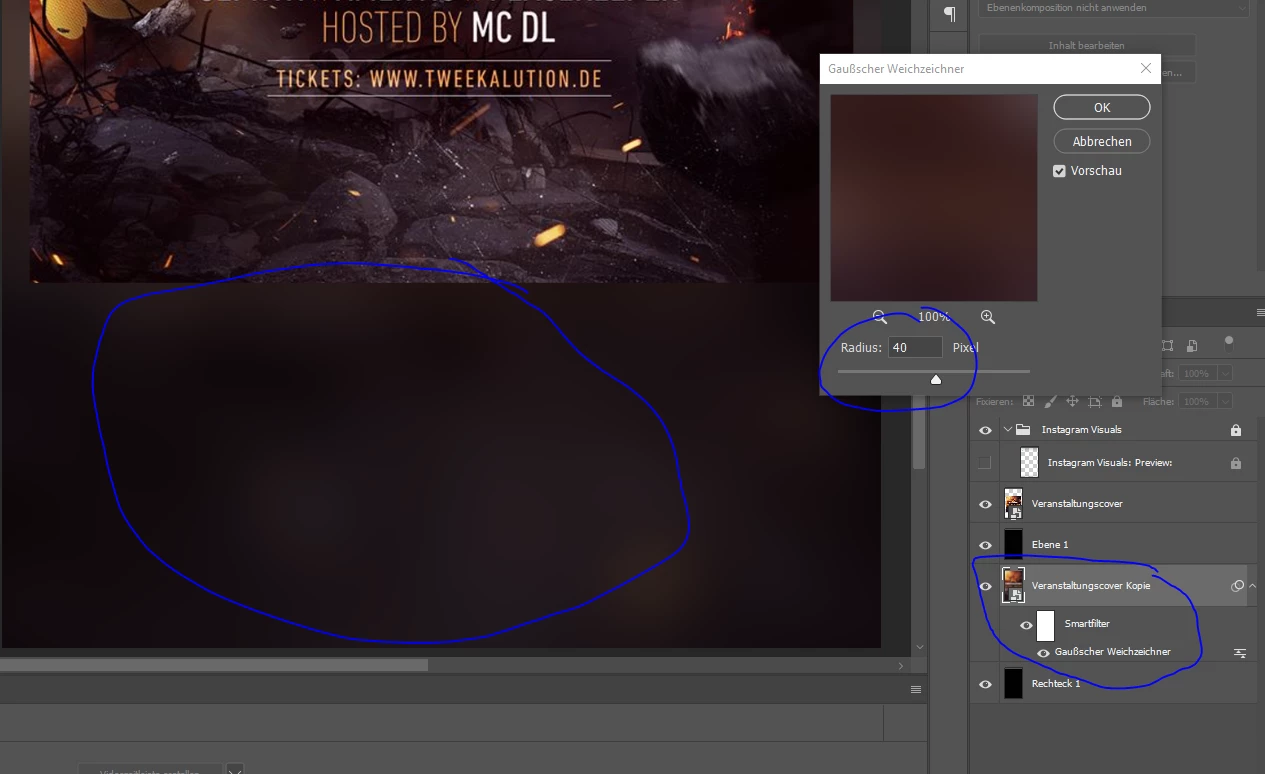
psc.PNG

112
Translate
Report
Community guidelines
Be kind and respectful, give credit to the original source of content, and search for duplicates before posting. Learn more
community guidelines
Adobe
Community Expert ,
Jan 23, 2019 Jan 23, 2019
LATEST

Hi

You can such avoid banding by working in 16 bits/channel.
If your output then has to be 8 bit and you can again see any bands then adding a little noise can help cover it.

Note: You may still see banding on screen even when working in 16 bits/channel mode as most displays still work in 8 bit. You can use the eydropper and info panel to check whether the bands are in the document or just in the display system.
Also make sure you view at 100% zoom as even 16 bit docs are composited in 8 bit fro screen previews at less than 66.7% zoom.

Dave

Translate
Report
Community guidelines
Be kind and respectful, give credit to the original source of content, and search for duplicates before posting. Learn more
community guidelines