Exit
  • Global community
    • Language:
      • Deutsch
      • English
      • Español
      • Français
      • Português
  • 日本語コミュニティ
  • 한국 커뮤니티
0

Gradient Tool Fade to Transparency does not work

New Here ,
Oct 06, 2022 Oct 06, 2022

I have "transparency" selected. I have the "white to transparent" gradient selected. this used to work. Now it fades to a solid color. 

TOPICS
Windows
7.9K
Translate
Report
Community guidelines
Be kind and respectful, give credit to the original source of content, and search for duplicates before posting. Learn more
community guidelines

correct answers 1 Correct answer

Community Expert , Oct 21, 2022 Oct 21, 2022

I cannot replicate the issue.

If you are using the gradient on a background layer, it will not be transparent. 

With the Gradient tool active, you could try right clicking on the icon in the Options bar and reset tool.
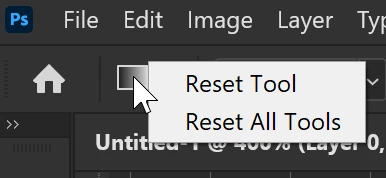
image.png

Translate
Adobe
Community Expert ,
Oct 06, 2022 Oct 06, 2022

What version of photoshop version of windows are you using?


Can you provide a screenshot of the Gradient Tool settings in the tool options bar?

Translate
Report
Community guidelines
Be kind and respectful, give credit to the original source of content, and search for duplicates before posting. Learn more
community guidelines
Community Expert ,
Oct 06, 2022 Oct 06, 2022

Please watch this video and tell us what is different on your side https://youtu.be/mzxLy5HegY8


If still things does not work, the only thing I can suggest you is to try with preference reset https://helpx.adobe.com/photoshop/using/preferences.html

Step by step instructions how to use built in Foreground color to transparency gradient in Photoshop.
Translate
Report
Community guidelines
Be kind and respectful, give credit to the original source of content, and search for duplicates before posting. Learn more
community guidelines
Community Expert ,
Oct 07, 2022 Oct 07, 2022

Hi, Rachel, in order to help you, we need to get more info. 

Are you working on a layer? Is it transparent? A screenshot of the entire interface, showing also your layers panel could help us help you.

Are you well on Ps 23.5.1?

Translate
Report
Community guidelines
Be kind and respectful, give credit to the original source of content, and search for duplicates before posting. Learn more
community guidelines
New Here ,
Oct 21, 2022 Oct 21, 2022

I have noticed recently that the gradient is not completely transparent anymore, I have to go back and use the eraser or mask tool to clean up where it is supposed to be transparent. 

Translate
Report
Community guidelines
Be kind and respectful, give credit to the original source of content, and search for duplicates before posting. Learn more
community guidelines
Community Expert ,
Oct 21, 2022 Oct 21, 2022

Which version of Photoshop @HectorHMunro ?

Here is screenshot of white to transparent gradient in latest 24.0 version of Ps, everything works as expected.

white to transparent gradient.jpg

Translate
Report
Community guidelines
Be kind and respectful, give credit to the original source of content, and search for duplicates before posting. Learn more
community guidelines
Community Expert ,
Oct 21, 2022 Oct 21, 2022

I cannot replicate the issue.

If you are using the gradient on a background layer, it will not be transparent. 

With the Gradient tool active, you could try right clicking on the icon in the Options bar and reset tool.

image.png

Translate
Report
Community guidelines
Be kind and respectful, give credit to the original source of content, and search for duplicates before posting. Learn more
community guidelines
Community Beginner ,
Mar 23, 2023 Mar 23, 2023

Thank you, Barbara.  This fixed my issue!!!

Translate
Report
Community guidelines
Be kind and respectful, give credit to the original source of content, and search for duplicates before posting. Learn more
community guidelines
New Here ,
Dec 06, 2024 Dec 06, 2024

It idnt fix it for me

Translate
Report
Community guidelines
Be kind and respectful, give credit to the original source of content, and search for duplicates before posting. Learn more
community guidelines
New Here ,
Dec 21, 2024 Dec 21, 2024

Make sure the lay under has a solid color. Example I had to put a solid black layer under the mask layer to get rid of the transparency. 

Translate
Report
Community guidelines
Be kind and respectful, give credit to the original source of content, and search for duplicates before posting. Learn more
community guidelines
New Here ,
Feb 07, 2025 Feb 07, 2025
LATEST

I had the same problem and discovered that if You use Gradient Overlay in Blending Options of layer, it (layer) shoud have Fill on 0%.

Translate
Report
Community guidelines
Be kind and respectful, give credit to the original source of content, and search for duplicates before posting. Learn more
community guidelines