
Participant
May 24, 2023
Answered

Gradient Tool now creates unwanted new layer

  • May 24, 2023
  • 4 replies
  • 9343 views

If I select an area, say with a rectagular marquee, and then hit my grandient tool to add a gradient within my selection, then draw my grandient, Photoshop will create a new Gradient Fill 1 layer.  Why?  I don't want this, I want the gradient on the layer I had selected.  Frustrating.
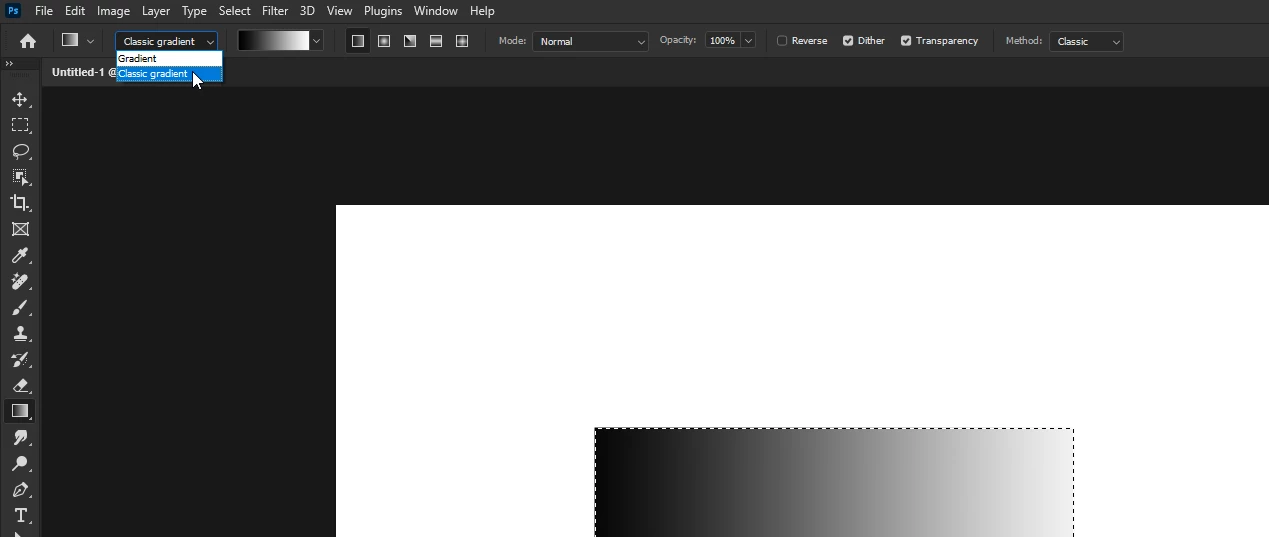
Correct answer Ged_Traynor

@Chris29379353jpz4 change this option to classic gradient

4 replies

Stephen_Davies
Known Participant
February 4, 2025

Glad you've asked the question as this was very annoying. But *why* did they chage it in the first place? No-one asked for this?!

c.pfaffenbichler
Community Expert
Community Expert
February 4, 2025

Do you think no-one asked for editable gradients? 

Participant
October 3, 2023

Nothing is working for me. The layer is automatically created when using the Gradient Tool with "Method: Classic" and with "Layers Panel Options/Use Default Masks on Fill Layers" deselected. So frustrating, not the way I work at all! Why would anyone want to add unnecessary layers? How do you turn it off!


J. Stuart Johnson
Inspiring
October 10, 2023

Choose "Classic Gradient" from the drop down on the far left.  The options are: "Gradient or  Classic Gradient."   


"Method" drop down on the right determines how the transition between colors is calculated, referred to as: the Interpolation Method.  Classic in this case refers to the previous (i.e. CS6 ) method of color interpolation.


The Adobe Docs, explains in detail:  https://helpx.adobe.com/photoshop/using/gradient-interpolation.html

logynnhailley
Participant
October 26, 2023

Using Classic Gradient DOES NOT HELP. Every thread about this topic has that marked as the right answer and it's wrong!

I need the tool to make a gradient from the color picker foreground color, to the color picker background color, as a raster image inside a selection. This "correct answer" is wrong because it doesn't explain how to switch back to that functionality. This is really frustrating.


Please tell me how to set the gradient preferences to:
- create a RASTER gradient in a selected area of the layer I already chose.
- use the COLOR PICKER foreground and background colors to make the gradient. 


I did not sign up for all this Gradietn Preset insanity to just make a gradient. I put the colors I want in the color picker. Forcing me to use these options is a massive interuption of my workflow.


If you can't set it back to the old way it's easier to just scribble it in with a paintbrush and blur it. The new design is terrible as a default setting. This should be something people have to set up if they want it as a default. YOu've added a 20 step detour to an intuitive process that used to take just a couple clicks. PLEASE STOP DOING THIS.

Ged_Traynor
Community Expert
Ged_TraynorCommunity ExpertCorrect answer
Community Expert
May 24, 2023

@Chris29379353jpz4 change this option to classic gradient

Participant
May 24, 2023

Oh for crying out loud.  THANK YOU!  

ClaudiaR99
Community Manager
Community Manager
May 24, 2023

Hello @Chris29379353jpz4 the gradient tool has been updated to work non-destructively by default hence it will create a gradient fill layer when the tool is set to Gradient mode. 

Switching to Classic gradient is how you can work with the tool as it used to. This setting should be remembered when restarting Photoshop. 

Thanks!

Earth Oliver
Legend
May 24, 2023

look in your options bar for new options to change behavior...

Participant
May 24, 2023

I have.  Nothing.