
Participating Frequently
September 17, 2019
Answered

Gradients messed up with artboards

  • September 17, 2019
  • 10 replies
  • 14888 views

I have multiple copies of an artboard to create variations of an idea. There is a gradient fill layer acting as a background for the artboards. Each artboard is supposed to have full gradient range but its acting as if the gradient is shared across all the artboards, thus each artboard getting a part of the gradient. Also moving the artboards is further screwing up the gradient where it seems to be re-sharing the gradient based on the new locations of the artboards.


I am attaching the psd file as well as a video of how moving the artboards is behaving.
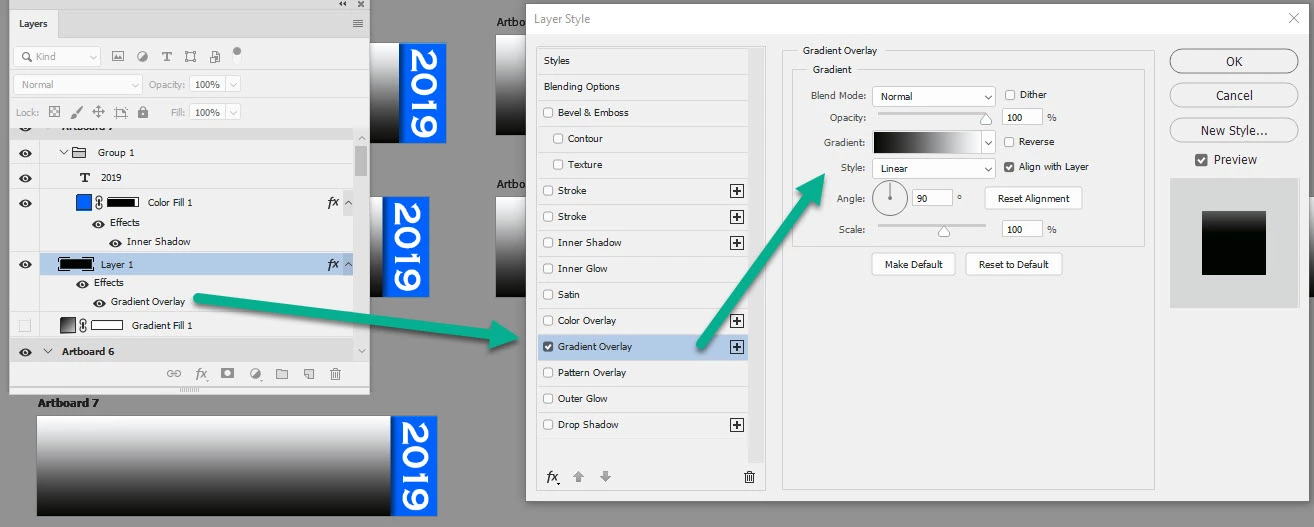
Correct answer davescm

Hi

To have the full gradient on each artboard, rather than across the canvas, use a traditional pixel layer and add the gradient in Layer Styles

Dave

10 replies

R3DSH1FT
Participant
May 8, 2025

Still an issue all these years later. obviously an artboard should act like an independent canvas. UX and HCI cluelesss for its entire product lifespan- its quite amazing. Its ok, Figma Photos will likely come quicker than a fix and then I'll be good.

Participant
May 8, 2025

I've fixed the gradient problem by stopping using Ps for graphics design at all. Aff Designer 2 does its job brilliantly.

Participant
January 3, 2025

Even if the workaround is there, it seems like a futile feature, especially if we want to use the gradient adjustment layer. This is something, if fixed, could be really useful and improve work efficiency.

Participant
May 13, 2024

Im also having this problem. It would be more beneficial to have a fix rather than a workaround…

c.pfaffenbichler
Community Expert
Community Expert
May 13, 2024

You can always post a Feature Request (»Idea«) or Bug Report (»Bug«). 

Participant
February 29, 2024

There's a simpler workaround to this, if anyone's still looking:

* Create your Gradient Fill adjustment layer - don't bother messing with settings yet

* Delete the new layer's mask

* Cmd-A (Ctrl-A) to select the entire artboard

* Create a new Layer Mask (click the "Layer Mask" button at the bottom of the Layers palette) 


* Edit your gradient; based on my testing, it should now match the correct artboard bounds.


Known Participant
August 9, 2023

I experience this everyday since I use artboards for most of my clients projects (mostly social media campaings, with multiple artboard sizes) and is very frustrating have to create layer maks for every gradient fill layer. Especially because if you don't do this, when you export automatically using "file>export>artboards to files" the exported file looks diferrent from the PSD file.


I wonder why the devs think this is appropriate behaviour for the Gradient Layer, since other layer are not shared across multiple artboards. I think it's an overlooked bug that they don't have time to fix because their focusing on releasing new features to justify the subscription model.

c.pfaffenbichler
Community Expert
Community Expert
August 9, 2023

Please provide a meaningful description of your problem and post screenshots including all pertinent Panels to illustrate. 

Participant
December 26, 2020

Let's be honest. It's just a bug and nothing more. I have the same issue and it's creating problems instead of speeding up work.

Every artboard copy just ignores the position of it's original instances' gradient layers. All artboards share the same position.

c.pfaffenbichler
Community Expert
Community Expert
December 28, 2020

It may deserve to be called a bug but @davescm already posted a work-around: 

»To have the full gradient on each artboard, rather than across the canvas, use a traditional pixel layer and add the gradient in Layer Styles«

Participant
October 13, 2021

That doesnt work for me. I apply gradients as layer styles and still does that thing. Definitely bad behaviour 

ralphc37960410
Participating Frequently
December 9, 2020

I was having this same issue. I'm new to using Artboards. I'm sure having a gradient work across multiple Artboards is useful for some projects, it just seems weird to me at the moment. 


So my fix is, fill the mask black, so the gradient is invisible. Then hit command "i" (invert it). Then it causes the mask to be bound by the individual Artboard. 

Sahil.Chawla
Adobe Employee
Adobe Employee
September 19, 2019

Hi there,

That does sound like a strange issue, I have tried downloading the file you've shared and tested it at my end. I am able to reproduce this issue.

Does this happen with any other file?
What version of Photoshop and the operating system you're working with?

Could you try the suggestion shared by Dave and let us know how it goes?

Regards,
Sahil

Participating Frequently
September 20, 2019

Hi


I have not seen this with other files but i am a casual user. I can try recreating another file but you mentioned you can reproduce it on your end. I am using Windows 10 with photoshop 20.0.6 release which is the latest as per my CC app. 


Dave's workaround did work and got me out of my jam, but i would still consider basic gradient layers not adhering to artboard a bug, unless i am misunderstanding the usecase of artboards of course.


davescm
Community Expert
davescmCommunity ExpertCorrect answer
Community Expert
September 17, 2019

Hi

To have the full gradient on each artboard, rather than across the canvas, use a traditional pixel layer and add the gradient in Layer Styles

Dave

c.pfaffenbichler
Community Expert
Community Expert
September 17, 2019
A good option, I would still prefer using Smart Object instances
c.pfaffenbichler
Community Expert
Community Expert
September 17, 2019

It does not seem as if you applied the appropriate Layer Masks to the Gradient Layers. 

Though it might be better to use instances of a Smart Object in the ArtBoards. 

Participating Frequently
September 17, 2019
How would layer masks affect the behavior of gradients across artboards? I thought layers are nested under artboards so thelayer masks should affect onlyu the layer its applied to.. not layers in other artboards. Duplicating an artboard should duplicate all its layers as well right ? May be i am understanding the concept of artboards wrong.
c.pfaffenbichler
Community Expert
Community Expert
September 17, 2019

It seems you do misunderstand. 

Edit: Sorry, it should have been »do«, not »so«.