Answered
Graphical issues in Photoshop v24
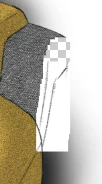
this is a screenshot, when i paint a with a wide brush opacity 10%.
all drivers and program are up to date.
Win10 Pro, HP Laptop 32GB Ram, Graphic card RTX3000.

this is a screenshot, when i paint a with a wide brush opacity 10%.
all drivers and program are up to date.
Win10 Pro, HP Laptop 32GB Ram, Graphic card RTX3000.
Hi @SALJOL cuious if this works for you:
Go to Preferences > Technology Previews... and enable “Older GPU mode (pre 2016)” - Restart Photoshop. Does the problem persist?
Already have an account? Login
Enter your E-mail address. We'll send you an e-mail with instructions to reset your password.
 AdChoices