jeffok714
Participant
February 21, 2023
Question

Graphics Card Question

  • February 21, 2023
  • 1 reply
  • 1096 views

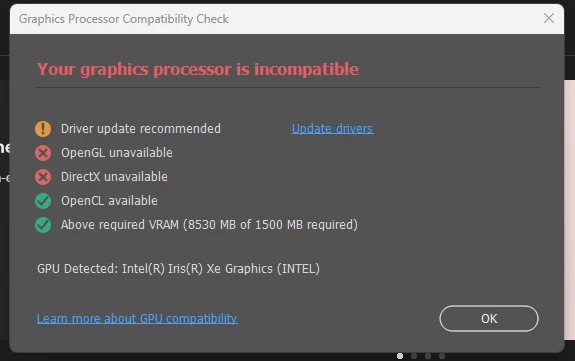
In learning more about Photoshop, I have discovered that my graphics card isn't compatible with the 3d features. It seems that it may be time to upgrade my computer. My question is, which graphics card should I look for when shopping for a new pc? NVIDIA or Intel? Which model?  I use my PC primarily to edit and work with images and some graphic design.

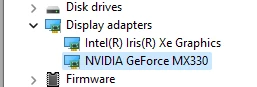
This is what I have now.


This topic has been closed for replies.

1 reply

D Fosse
Community Expert
Community Expert
February 21, 2023

This is a very common problem with laptops. The integrated Intel GPU conflicts with the GPU Photoshop should use, which is the Nvidia GeForce.


If you completely disable the Intel GPU, it should work much better. See section 6 & 7 here:

https://helpx.adobe.com/photoshop/kb/troubleshoot-gpu-graphics-card.html 


Dual graphics is fine for simple applications, but Photoshop uses the GPU for actual data processing, and the result returned to Photoshop for further processing. There can only be one GPU in that equation, you can't send data to one GPU and get it back from the other. It's not a simple downstream flow that can just be redirected.


All that said, the MX330 isn't particularly powerful and it just about meets Photoshop's minimum requirements. But it should work.

Kevin Stohlmeyer
Community Expert
Community Expert
February 21, 2023

I would go one further with what @D Fosse mentioned and go to Photoshop Preferences/Technology Preview and enable "Older GPU Mode" to help once you get the MX330 setup as the primary card.

Keep in mind that the recommended minimum speeds for GPU in PS is 2,000 ops/sec - your MX330 is half that so you will have lag with rendering.

The other observation is Photoshop ended 3D support as of v 22.5 - are you on a newer version?

https://helpx.adobe.com/photoshop/kb/3d-faq.html


jane-e
Community Expert
Community Expert
February 21, 2023

@jeffok714 


See this help page from Adobe about 3D in Photoshop:

https://helpx.adobe.com/photoshop/kb/3d-faq.html#use-3D-in-Photoshop

"We recommend using Photoshop 22.2 if you continue to need access to Photoshop 3D features. That version will remain accessible to you in the Creative Cloud Desktop application for installation for up to two years from August 2021 (however, the operating system requirements for 22.2 will remain as they were in February 2021 when it was originally released). 


Jane