Inspiring
October 29, 2018
Answered

Graphics get clipped in layer comps CC 2019

  • October 29, 2018
  • 2 replies
  • 513 views

Hi,

I just updated from CC 2018 to CC 2019 and sometimes when I'm exporting layer comps, certain objects get clipped. It can either be live type or a vector object. The clipping can occur in only a few of the layer comps but not all within the same PSD. I usually export to JPG but tried exporting to PNG and that didn't help. I've restarted the computer and Photoshop multiple times.

I've attached a pretty exciting screenshot of one of the clippings.

Anyone else have this issue? Anyone have a solve?

2012 iMac

OS High Sierra 10.13.6

CC 2019 Photoshop

Thanks!

This topic has been closed for replies.
Correct answer Trevor.Dennis

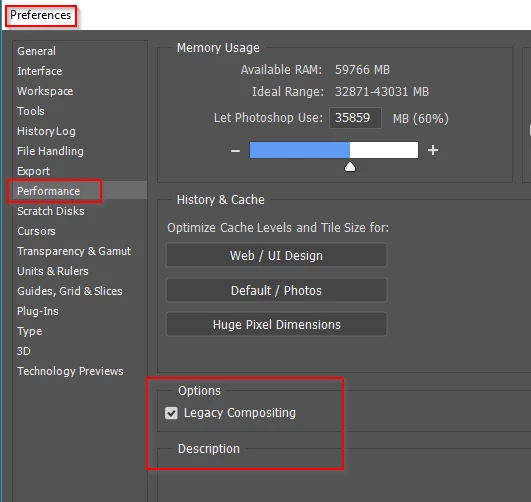
Can you try checking Legacy Compositing, in Preferences > Performance.  I've had to do the same thing here with a newish system, although I am still using an older GTX 970.  I have a feeling this has  a good chance of fixing your issue.  If it does, please let us know.  It helps other people going forward.

2 replies

Trevor.Dennis
Community Expert
Trevor.DennisCommunity ExpertCorrect answer
Community Expert
October 29, 2018

Can you try checking Legacy Compositing, in Preferences > Performance.  I've had to do the same thing here with a newish system, although I am still using an older GTX 970.  I have a feeling this has  a good chance of fixing your issue.  If it does, please let us know.  It helps other people going forward.

Inspiring
October 29, 2018

Trevor,

You are amazing! That solved it!! I cannot thank you enough!!!

melissapiccone
Community Expert
Community Expert
October 29, 2018

I have the same set up (mac) as you and can't reproduce it. Can you share a screenshot of the whole layout?

Melissa Piccone | Adobe Trainer | Online Courses Author | Fine Artist