Participating Frequently
September 23, 2020
Answered

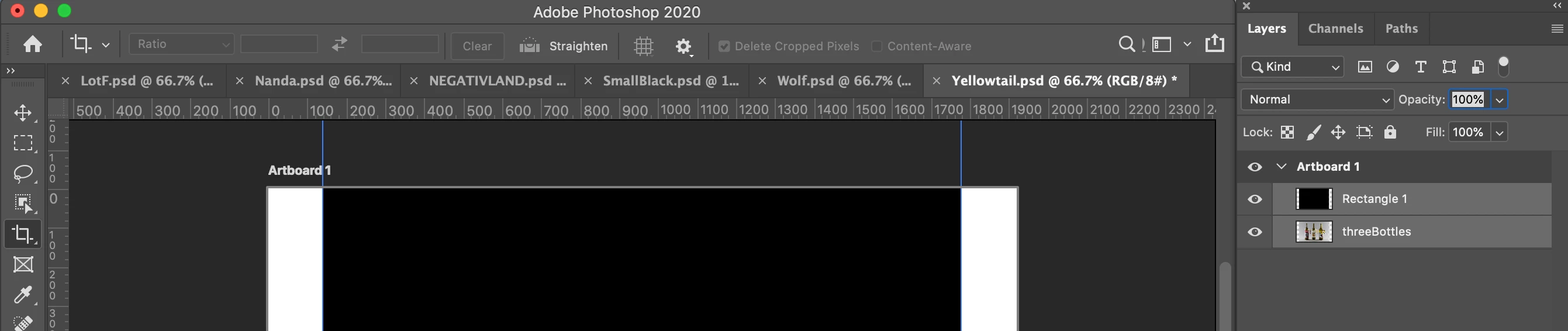
Grayed out crop tool options

  • September 23, 2020
  • 4 replies
  • 3450 views

I'm trying to select "Delete cropped pixels" but I'm unable to select it.

 

This topic has been closed for replies.

4 replies

Legend
September 23, 2020
Make sure your document is in RGB, CMYK, Lab or GrayScale mode.
 
KelsoLaboAuthor
Participating Frequently
September 24, 2020

Thank you for the screenshot! I miss read that. I reset the preferences, quit/restarted PS, made sure all files are in RBG, but it's still grayed out/unselectable.

KelsoLaboAuthor
Participating Frequently
September 24, 2020

https://community.adobe.com/t5/photoshop/photoshop-2015-with-artboards-feature-won-t-crop/td-p/7621029?page=1


Okay, ya I thought this artboard might be the problem. Initially when I tried to select those layers and move them out of the artboard layer, they wouldn't move above it. So I tried to right-click it to delete it (then select artboard only), the delete option is grayed out. FINALLY, I tried 'ungroup artboard' and that fixed all of it. Thanks for all your help!

gener7
Community Expert
Community Expert
September 23, 2020

He means this:

MarekMularczyk
Community Expert
Community Expert
September 23, 2020

Have you tried resetting Photoshop?

Adobe Community ExpertAdobe Certified Professional
KelsoLaboAuthor
Participating Frequently
September 23, 2020

Yep, restarted PS, reopened all the files but had the same result.

MarekMularczyk
Community Expert
Community Expert
September 23, 2020

But did you try resetting Photoshop Preferences?

Adobe Community ExpertAdobe Certified Professional
gener7
Community Expert
Community Expert
September 23, 2020

Try Resetting the Crop Tool first

KelsoLaboAuthor
Participating Frequently
September 23, 2020

Just tried, but nothing changed.