
Copy link to clipboard
Copied
I'm not quite sure how to phrase this, which is also why I haven't been able to search for an answer.
What I'd like to do is, have a grayscale image and then convert the lightness values of that image into lightness values of a given hue, if that makes any sense.
Such that if I choose some red hue, then the areas that are 100% black will be 100% red, and an area that is 50% black will be red with 50% white in it.
Basically like if I had fed the grayscale image to a printer with only red ink, and it then used the lightness values of that image to decide the ink density of the different areas.
Is this possible in photoshop?
Thanks!
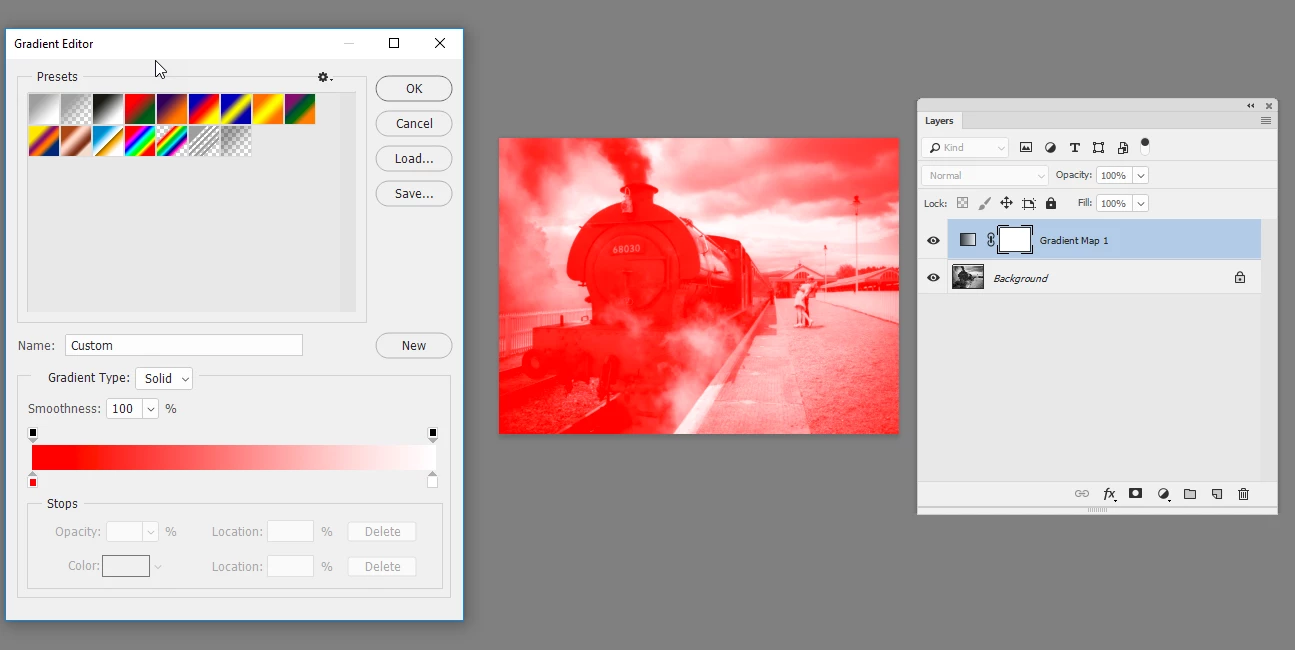
Switch the greyscale image to RGB mode then add a Gradient Map adjustment layer setting the gradient to achieve the colours you require

Dave
Copy link to clipboard
Copied
Switch the greyscale image to RGB mode then add a Gradient Map adjustment layer setting the gradient to achieve the colours you require

Dave
Copy link to clipboard
Copied
Change your Grayscale Image Mode to Duotone.
Adjust options as desired or use one of the Presets as shown below.

Copy link to clipboard
Copied

Convert Grayscale mode to RGB
Hue/Saturation Adjustment Layer set to Colorize
Copy link to clipboard
Copied
Thanks for the replies!
They're all nice options, but davescm​ was right on about what I was looking for ![]()
Get ready! An upgraded Adobe Community experience is coming in January.
Learn more