Known Participant
September 30, 2017
Question

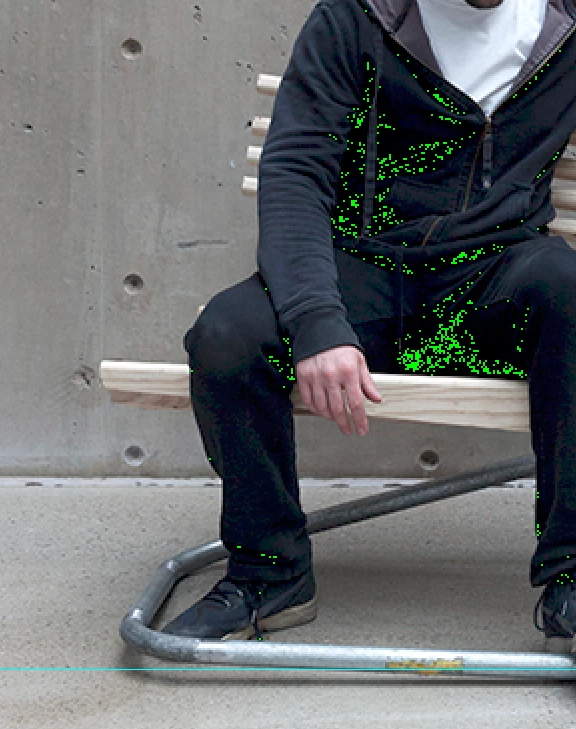
Green pixels ?

  • September 30, 2017
  • 3 replies
  • 2326 views

Hi. I just imported a JPG file into a document. The image has a noise green pixel 'cloud'. If I open the image as a different document this does not happen.

Do anyone experience this problem ?
    This topic has been closed for replies.

    3 replies

    BCBandit
    Participant
    December 2, 2020

    I am having a horrible time with the green pixels.  They come up in RAW and then show up again in PS 2021.  My only option is to clone them out which is terribly time consuming.  I need help!!  Please!?  Just updated to MacOS Big Sur Version 11.0.1

    BCBandit
    Participant
    December 2, 2020

    If not small I get very large discolored squares...

    Known Participant
    October 2, 2017

    I am saying that if i open the JPG in PS as a new document works. If I 'place' it within an already opened file makes those green pixels.

    Thanks!

    davescm
    Community Expert
    Community Expert
    October 2, 2017

    Hi

    I've not come across that.

    What happens if you open it directly in Photoshop then copy it , or drag it into the working document.?

    Can you post a link to the offending jpeg?

    Dave

    Trevor.Dennis
    Community Expert
    Community Expert
    September 30, 2017

    Are you saying that opening the same JPG in another application does not show the issue?

    What Photoshop version are you using?
    What operating system?

    Try turning off GPU acceleration in Preferences > Performance.

    Make sure Cache levels is set to any value other than 1 in the same location.
