/t5/photoshop-ecosystem-discussions/green-screens-make-photoshop-unusable-for-3rd-straight-day/td-p/12050465May 20, 2021
May 20, 2021
Copy link to clipboard
Copied
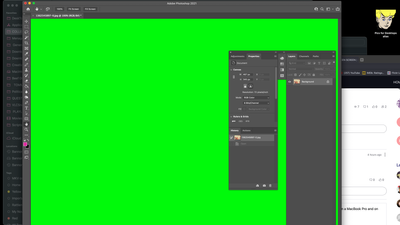
Adobe please fix this quickly. Multiple reports of this now within the community. It's happening all over to many users. As for me my workflow has stopped completely because any image file opened in Photoshop (just updated) results in a bright green screen. I am on a MacBook Pro and using the Big Sur OS. This only started happening three days ago. Please send a fix as the situation is getting catastrophic on my end.
/t5/photoshop-ecosystem-discussions/green-screens-make-photoshop-unusable-for-3rd-straight-day/m-p/12050474#M543516May 20, 2021
May 20, 2021
Copy link to clipboard
Copied
LATEST
Does turning off »Use Graphics Processor« in the Performance Preferences (Photoshop > Preferences > Performance > Graphic Processor Settings) and restarting Photoshop have any bearing on the issue?






 1
Reply
1
Reply





 AdChoices