Participant
July 21, 2024
Question

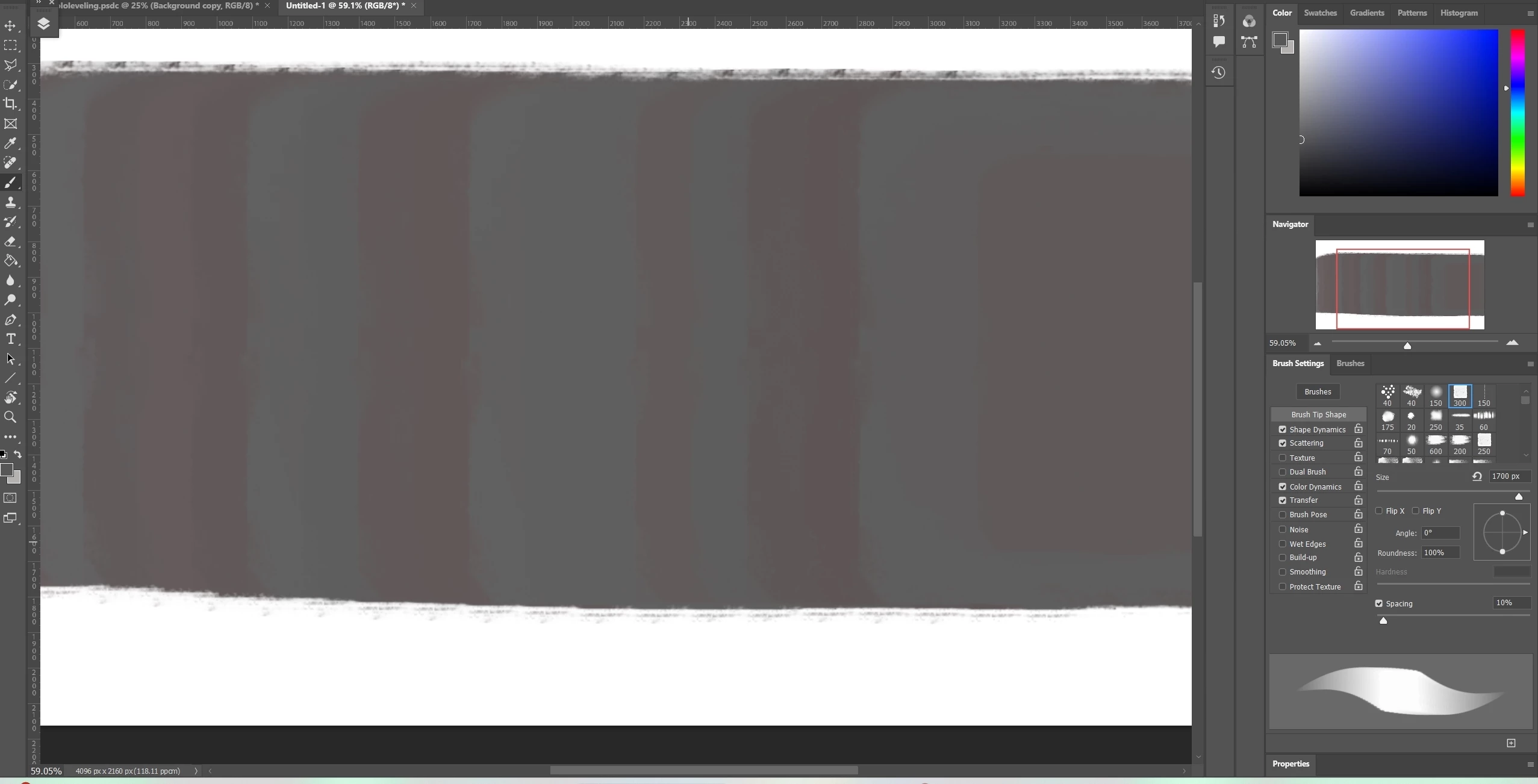
Grey brush stroke look red
  • July 21, 2024
  • 2 replies
  • 273 views

As you can see in this picture my brush strokes appear to have red/pink spaces in between them. Can i get anyone to explain this to me please?

This topic has been closed for replies.

2 replies

c.pfaffenbichler
Community Expert
Community Expert
July 22, 2024

What is the Brush Tool’s Blend Mode? 

Could you please post screenshots taken at View > 100% with the pertinent Panels (Toolbar, Layers, Brush Settings, Options Bar, …) visible? 

Participant
July 23, 2024

thank you for the reply friend, i actually figguered it out, i had colour dynamic enable on a few of my custome brushes! I was being very silly! 😄

D Fosse
Community Expert
Community Expert
July 22, 2024

I don't see any red here. Go to View > 100% (which represents one image pixel by exactly one physical screen pixel), make a new screenshot and post that.

D Fosse
Community Expert
Community Expert
July 23, 2024

(oh, OK, now I see it clear as day...that's what you get for visiting the forum on your phone... 😄 Anyway, he figured it out)