Exit
  • Global community
    • Language:
      • Deutsch
      • English
      • Español
      • Français
      • Português
  • 日本語コミュニティ
  • 한국 커뮤니티
1

Group selection

Community Beginner ,
Mar 03, 2023 Mar 03, 2023

hello, how to select only groups, without selecting layers?


needed for action😰


Or is there some kind of sorting? to show only groups


["Actions" tag added by moderator]



TOPICS
Actions and scripting , Windows
4.9K
Translate
Report
Community guidelines
Be kind and respectful, give credit to the original source of content, and search for duplicates before posting. Learn more
community guidelines

correct answers 1 Correct answer

Community Expert , Mar 04, 2023 Mar 04, 2023
quote

Maybe it's because I don't use artboards? they are not in the hierarchy ... I'm not strong in photoshop, I'm hearing about artboards for the first time)


By @Max_red_cat


If there are no artrboards in the file, the script should have informed you of that fact:
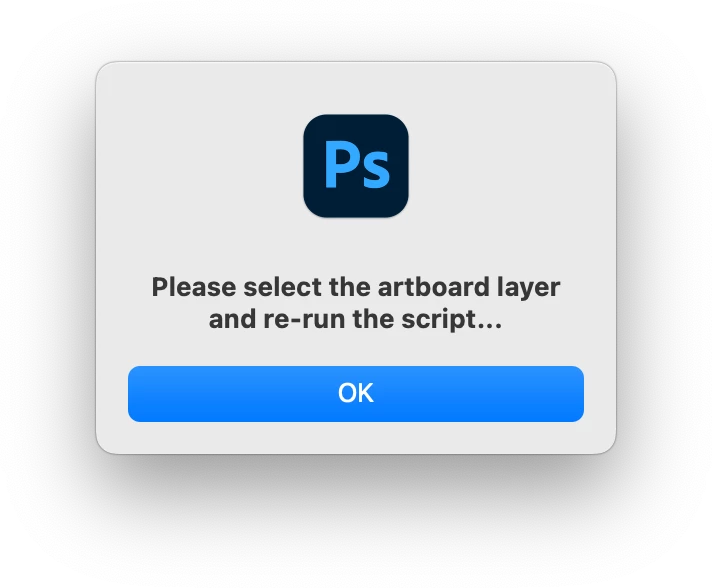
 

alert.png


That would be the problem, you previously wrote about an artboard and the screenshot had the top of the layer structure truncated where the artboard would have been visible:


quote

for example, a small fragment of the layer hierarchy

...
Translate
Adobe
LEGEND ,
Mar 03, 2023 Mar 03, 2023

Its an option with the move tool - Auto Select Group.

kevinstohlmeyer_0-1677879890416.png


You can then record selecting the group (the action shows Layer selected, but it does select the group).

kevinstohlmeyer_1-1677879986499.png

If you are asking about how to select ALL groups (not layers) Im not sure that is possible with an Action, but may be with some clever scripting.

Translate
Report
Community guidelines
Be kind and respectful, give credit to the original source of content, and search for duplicates before posting. Learn more
community guidelines
LEGEND ,
Mar 03, 2023 Mar 03, 2023

That being said, a Layer Panel filter for Groups would be a great idea for an enhancement. You can add that under the Ideas section of the forum and users can upvote it.

Translate
Report
Community guidelines
Be kind and respectful, give credit to the original source of content, and search for duplicates before posting. Learn more
community guidelines
Community Beginner ,
Mar 03, 2023 Mar 03, 2023

I will write in more detail, I want to create an action: select only groups - add a prefix to each group

Translate
Report
Community guidelines
Be kind and respectful, give credit to the original source of content, and search for duplicates before posting. Learn more
community guidelines
Community Expert ,
Mar 03, 2023 Mar 03, 2023

@Max_red_cat wrote:

I will write in more detail, I want to create an action: select only groups - add a prefix to each group


I'm away from the computer for a couple of days, however this can be scripted as it is beyond an action.


Can you type out before/after example layer group names or screenshot before/after images of the layers panel?


Is the prefix static, or is it incremental?


Are the groups nested within other groups or artboards?

Translate
Report
Community guidelines
Be kind and respectful, give credit to the original source of content, and search for duplicates before posting. Learn more
community guidelines
Community Beginner ,
Mar 03, 2023 Mar 03, 2023

for example, a small fragment of the layer hierarchy, the selected group is the final version

there is only one artboard, groups can be nested within groups, but the main thing is to rename the older groups, nested ones can remain unchanged

prefix is ​​always static "[merge]"

Translate
Report
Community guidelines
Be kind and respectful, give credit to the original source of content, and search for duplicates before posting. Learn more
community guidelines
Community Expert ,
Mar 04, 2023 Mar 04, 2023

@Max_red_cat – you have shown a layer group:


[merge] mouse-shadow


And then there are other groups, such as:


body

tail

etc.


If I understand your request correctly, then all top-level groups within the artboard should be renamed to have the prefix:


[merge] body

[merge] tail

etc?


(I asked for a before/after screenshot, however, I should have specified two separate screenshots to make it crystal clear what was wanted).

Translate
Report
Community guidelines
Be kind and respectful, give credit to the original source of content, and search for duplicates before posting. Learn more
community guidelines
Community Expert ,
Mar 03, 2023 Mar 03, 2023

Maybe @r-bin , @c.pfaffenbichler or @Chuck Uebele can help in meantime.

Translate
Report
Community guidelines
Be kind and respectful, give credit to the original source of content, and search for duplicates before posting. Learn more
community guidelines
Community Expert ,
Mar 04, 2023 Mar 04, 2023

@Max_red_cat 


Select the artboard and then run the following script:


/*
Add prefix to top-level groups within the selected artboard.jsx
https://community.adobe.com/t5/photoshop-ecosystem-discussions/group-selection/td-p/13624612
v1.0 - 4th March 2023, Stephen Marsh
*/

#target photoshop

function main() {

    // Check if the active layer is an artboard
    if (isArtboard() === true) {

        // Set the layers variable to the layers contained within the artboard
        var theLayers = activeDocument.activeLayer.layers;

        // Forward loop over the layers
        for (var i = 0; i < theLayers.length; i++) {
            // Check if the layer is a top-level group
            if (theLayers[i].typename === "LayerSet" && theLayers[i].parent == activeDocument.activeLayer) {
                // Add the prefix to the name
                theLayers[i].name = "[merged] " + theLayers[i].name;
            }
        }
    } else {
        alert("Please select the artboard layer and re-run the script...");
    }
}
activeDocument.suspendHistory('Add prefix to top-level groups...', 'main()');

//// Functions ////

function isArtboard() {
    // modified from a script by greless with hints from jazz-y!
    // returns true or false
    try {
        var d = new ActionDescriptor();
        var r = new ActionReference();
        r.putEnumerated(stringIDToTypeID('layer'), stringIDToTypeID('ordinal'), stringIDToTypeID('targetEnum'));
        var options = executeActionGet(r);
        return options.hasKey(stringIDToTypeID('artboard')); // test for the required key
    } catch (e) {
        alert("Error!" + "\r" + e + ' ' + e.line);
    }
}


https://prepression.blogspot.com/2017/11/downloading-and-installing-adobe-scripts.html


Translate
Report
Community guidelines
Be kind and respectful, give credit to the original source of content, and search for duplicates before posting. Learn more
community guidelines
Community Beginner ,
Mar 04, 2023 Mar 04, 2023

@Stephen Marsh 
I turn on the script, but nothing happens, only the history shows that the event was completed, but no tags were added =(

Max_red_cat_0-1677957766688.png


Translate
Report
Community guidelines
Be kind and respectful, give credit to the original source of content, and search for duplicates before posting. Learn more
community guidelines
Community Beginner ,
Mar 04, 2023 Mar 04, 2023

Maybe it's because I don't use artboards? they are not in the hierarchy ... I'm not strong in photoshop, I'm hearing about artboards for the first time)


Translate
Report
Community guidelines
Be kind and respectful, give credit to the original source of content, and search for duplicates before posting. Learn more
community guidelines
Community Expert ,
Mar 04, 2023 Mar 04, 2023
quote

Maybe it's because I don't use artboards? they are not in the hierarchy ... I'm not strong in photoshop, I'm hearing about artboards for the first time)


By @Max_red_cat


If there are no artrboards in the file, the script should have informed you of that fact:


alert.png


That would be the problem, you previously wrote about an artboard and the screenshot had the top of the layer structure truncated where the artboard would have been visible:


quote

for example, a small fragment of the layer hierarchy, the selected group is the final version

there is only one artboard, groups can be nested within groups, but the main thing is to rename the older groups, nested ones can remain unchanged

prefix is ​​always static "[merge]"


So, you only wish to prefix all top-level layer groups? If so, try this version:


/*
Add prefix to top-level groups.jsx
https://community.adobe.com/t5/photoshop-ecosystem-discussions/group-selection/td-p/13624612
v1.0 - 4th March 2023, Stephen Marsh
*/

#target photoshop

function main() {
    // Capture the initial layer visibility and layer selection
    var currentLayersState = getLayersVisiblity();
    // Set the layer groups variable
    var theLayerSets = activeDocument.layerSets;
    // Forward loop over the layer groups
    for (var i = 0; i < theLayerSets.length; i++) {
        // Check if the layer is a group and a top level group
        // if (theLayerSets[i].typename === "LayerSet" && theLayerSets[i].parent == activeDocument) {
        if (theLayerSets[i].typename === "LayerSet") {
            theLayerSets[i].name = "[merged] " + theLayerSets[i].name;
        }
    }
    // Restore the initial layer visibility and selection
    setLayersVisiblity(currentLayersState);
}
activeDocument.suspendHistory('Add prefix to top-level groups...', 'main()');


//// Functions ////

function getLayersVisiblity() {
    // by jazz-y
    var s2t = stringIDToTypeID,
        t2s = typeIDToStringID;
    (r = new ActionReference()).putProperty(s2t('property'), p = s2t('targetLayersIDs'));
    r.putEnumerated(s2t('document'), s2t('ordinal'), s2t('targetEnum'));
    var targetLayers = executeActionGet(r).getList(p),
        seletion = [],
        visiblity = {};
    for (var i = 0; i < targetLayers.count; i++) seletion.push(targetLayers.getReference(i).getIdentifier());
    (r = new ActionReference()).putProperty(s2t('property'), p = s2t('numberOfLayers'));
    r.putEnumerated(s2t('document'), s2t('ordinal'), s2t('targetEnum'));
    var len = executeActionGet(r).getInteger(p);
    for (var i = 1; i <= len; i++) {
        (r = new ActionReference()).putProperty(s2t('property'), p = s2t('layerSection'));
        r.putIndex(s2t('layer'), i);
        if (t2s(executeActionGet(r).getEnumerationValue(p)) == 'layerSectionEnd') continue;
        (r = new ActionReference()).putProperty(s2t('property'), p = s2t('layerID'));
        r.putIndex(s2t('layer'), i);
        var id = executeActionGet(r).getInteger(p);
        (r = new ActionReference()).putProperty(s2t('property'), p = s2t('visible'));
        r.putIndex(s2t('layer'), i);
        var visible = executeActionGet(r).getBoolean(p);
        visiblity[id] = visible;
    }
    return {
        selection: seletion,
        visiblity: visiblity
    };
}

function setLayersVisiblity(layersStateObject) {
    // by jazz-y
    var s2t = stringIDToTypeID;
    for (var a in layersStateObject.visiblity) {
        makeVisible = layersStateObject.visiblity[a] ? "show" : "hide";
        (r = new ActionReference()).putIdentifier(s2t('layer'), a);
        (d = new ActionDescriptor()).putReference(s2t('target'), r);
        executeAction(s2t(makeVisible), d, DialogModes.NO);
    }
    if (layersStateObject.selection.length) {
        var r = new ActionReference();
        for (var i = 0; i < layersStateObject.selection.length; i++)
            r.putIdentifier(s2t("layer"), layersStateObject.selection[i]);
        (d = new ActionDescriptor()).putReference(s2t("target"), r);
        d.putBoolean(s2t("makeVisible"), false);
        executeAction(s2t("select"), d, DialogModes.NO);
    } else {
        (r = new ActionReference()).putEnumerated(s2t("layer"), s2t('ordinal'), s2t('targetEnum'));
        (d = new ActionDescriptor()).putReference(s2t('target'), r);
        executeAction(s2t('selectNoLayers'), d, DialogModes.NO);
    }
}


Translate
Report
Community guidelines
Be kind and respectful, give credit to the original source of content, and search for duplicates before posting. Learn more
community guidelines
Community Beginner ,
Mar 04, 2023 Mar 04, 2023

it works! thanks man, you are the best!


Translate
Report
Community guidelines
Be kind and respectful, give credit to the original source of content, and search for duplicates before posting. Learn more
community guidelines
Community Expert ,
Mar 04, 2023 Mar 04, 2023
quote

it works! thanks man, you are the best!


By @Max_red_cat


You're welcome!

Translate
Report
Community guidelines
Be kind and respectful, give credit to the original source of content, and search for duplicates before posting. Learn more
community guidelines
Community Expert ,
Mar 05, 2023 Mar 05, 2023

I forgot to post this at the time, however, the good old Layer Name Edit script from Paul Riggott is also an option:


custom.png


https://github.com/Paul-Riggott/PS-Scripts/blob/master/Layer%20Name%20Edit.jsx

Translate
Report
Community guidelines
Be kind and respectful, give credit to the original source of content, and search for duplicates before posting. Learn more
community guidelines
Explorer ,
May 03, 2023 May 03, 2023
LATEST

we made a Photoshop plug-in that can do this. The unlimited version is 12$. 


F65312BD-42F0-43FD-9430-B6DA6DAB8F97.png

Full Version (12$):
https://exchange.adobe.com/apps/cc/c36e02fb/swift


Trial Version (Limited to 5 Actions):
https://exchange.adobe.com/apps/cc/412c1dcd/swift-trial-version


Its also a big help with getting the layers renamed after you select them.

5E534D0D-A72E-4BFE-8481-DE13FA6438F5.png91FD7FA9-A623-4FBB-9144-B90B6F021455.png

Translate
Report
Community guidelines
Be kind and respectful, give credit to the original source of content, and search for duplicates before posting. Learn more
community guidelines