
GetUWired
Participant
February 3, 2021
Answered

Grouping layers no longer automatically opens group naming window

  • February 3, 2021
  • 2 replies
  • 480 views

I'm not sure if this is a recent development or if, when I updated, all my settings got wiped (which they did!) but I'm looking to go back to having photoshop bring up the folder naming window right after I group something. Right now it just groups my layers and gives the folder a generic group name. I then have to manually rename all my folders which is a huge pain. I've searched through my preference settings but I'm lost as to what I could turn on or off to change this. 


Does anyone have a fix or suggestion? 


Thanks! 
This topic has been closed for replies.
Correct answer c.pfaffenbichler

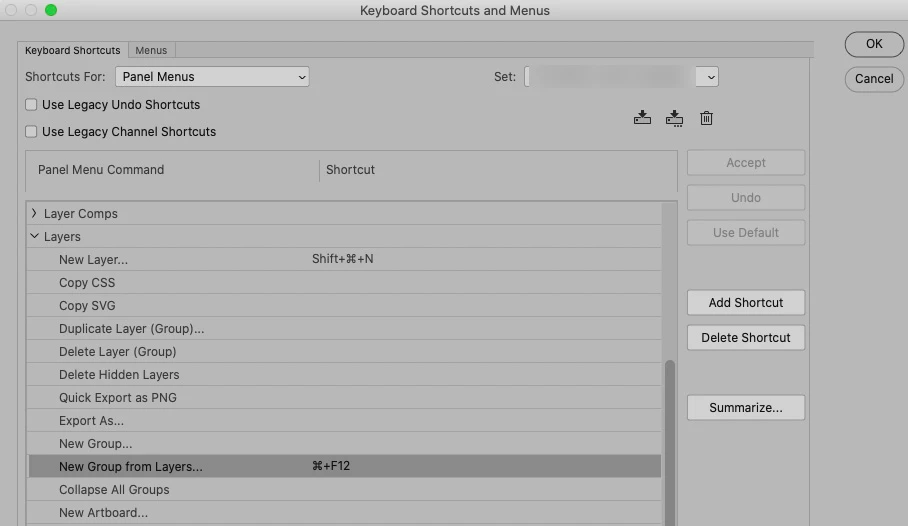
Have you tred assigning a shortcut to »New Group from Layers«? 

That seems to raise the dialog when invoked bia keyboard shortcut. 

2 replies

c.pfaffenbichler
Community Expert
c.pfaffenbichlerCommunity ExpertCorrect answer
Community Expert
February 3, 2021

Have you tred assigning a shortcut to »New Group from Layers«? 

That seems to raise the dialog when invoked bia keyboard shortcut. 

GetUWired
GetUWiredAuthor
Participant
February 3, 2021

I'll give this a try, thank you! I'm sure this is the issue. I upgraded from 2020, but here's the issue. I set up photoshop ages ago based on Deke McClelland's recommendations, and they were great. I probably did my setup back in PS 2017 and every update so far hasn't cleared out my settings. But for some reason when I upgraded to 2021, it cleared out everything. All preferences, plugins, workspaces...everything gone. So now I'm having to try and get it all back together based on stuff I did 3-4 years ago. 


So I went and fixed my hotkeys and yes, that's exactly what I had done. I did change up my hotkey settings ages ago and had long since forgotten! So thank you very much for that reminder and fix 😃 

c.pfaffenbichler
Community Expert
Community Expert
February 3, 2021

When upgrading to a new version make sure not to uninstall the previous one in the process. 

When the new version has been proven to work as expected and the custom settings have been transferred successfully one can still uninstall the old version manually. 

c.pfaffenbichler
Community Expert
Community Expert
February 3, 2021

Please explain what you are doing exactly

Do you group via keyboard shortcut, …? 

GetUWired
GetUWiredAuthor
Participant
February 3, 2021

First I grab a few layers using cmd+click or shift+click and then use cmd+G to group them. Before I updated photoshop to 2021, when I used cmd+G to group, a window would open that allowed me to name that new folder I was creating. Now it doesn't. I'm trying to find a way to bring that feature back. 

c.pfaffenbichler
Community Expert
Community Expert
February 3, 2021

Just checked for Photoshop 2020 and the beahviour is apparanetly the same. 

From which version did you upgrade?