Answered
Hand Tool
There's a way to "throw" an image across the screen with the Hand Tool. Click on the image, drag it across the screen, then letting go of the image. It should keep going. What setting do I have to adjust to get this effect?
Thanks

There's a way to "throw" an image across the screen with the Hand Tool. Click on the image, drag it across the screen, then letting go of the image. It should keep going. What setting do I have to adjust to get this effect?
Thanks
Hi
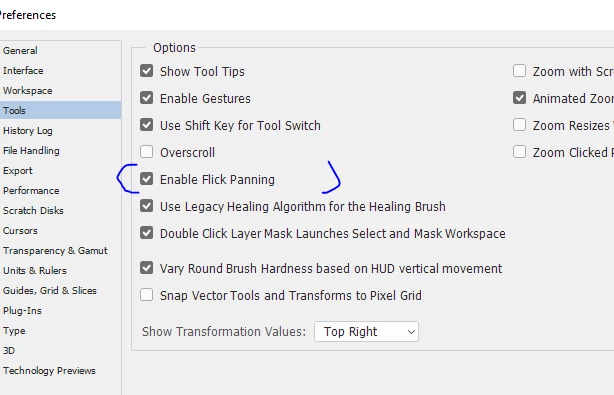
Preferences - Tools - Enable Flick Panning
Dave
Already have an account? Login
Enter your E-mail address. We'll send you an e-mail with instructions to reset your password.
 AdChoices