

Stuart46779977
Known Participant
November 12, 2019
Answered

Handles On Crop Tool

  • November 12, 2019
  • 3 replies
  • 554 views

Hi folks, can anyone advise how to change (what I think are) the annoying thick/fat handles and corners on the crop tool post the 2020 update ? I've posted a picture below of what I mean.
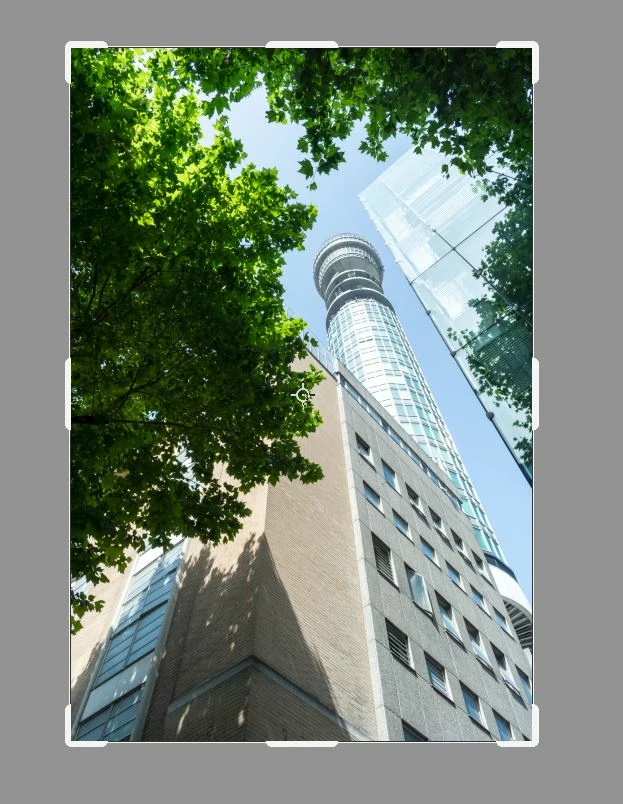


What I'm referring to is the fact that the thick handles/corners mean you can't make fine adjustments less than the thickness of the handles when using the corner or middle of the four sides as your refernce for the crop.


Many thanks in advance


Stuart

This topic has been closed for replies.
Correct answer PECourtejoie

Hello, Photoshop 22; that has just been released today, does have fix the large crop handles as seen in its fixed issues list https://helpx.adobe.com/photoshop/kb/fixed-issues.html#photoshop-desktop-fixed-issues 

I recommend to install it while keeping the older version installed, as explained in: https://helpx.adobe.com/be_en/download-install/using/install-previous-version.html


If you are not seeing it, go to help>check for updates in your CC application.


3 replies

PECourtejoie
Community Expert
PECourtejoieCommunity ExpertCorrect answer
Community Expert
October 20, 2020

Hello, Photoshop 22; that has just been released today, does have fix the large crop handles as seen in its fixed issues list https://helpx.adobe.com/photoshop/kb/fixed-issues.html#photoshop-desktop-fixed-issues 

I recommend to install it while keeping the older version installed, as explained in: https://helpx.adobe.com/be_en/download-install/using/install-previous-version.html


If you are not seeing it, go to help>check for updates in your CC application.


Peru Bob
Community Expert
Community Expert
November 13, 2019

Make the selection, select  > inverse, and delete.

Are you using Photoshop or Photoshop Elements?

Peru Bob
Community Expert
Community Expert
November 13, 2019

Try using the rectangular selection tool instead.

Stuart46779977
Known Participant
November 13, 2019

Hi Bob, thanks for your suggestion but I'm at a complete loss how using the rectangular selction tool allows me to crop the whole file (all layers etc) in the same the Crop tool would ?