


- Home
- Photoshop ecosystem
- Discussions
- Having Error 25 Expected When using index.Of in fu...
- Having Error 25 Expected When using index.Of in fu...

Copy link to clipboard
Copied
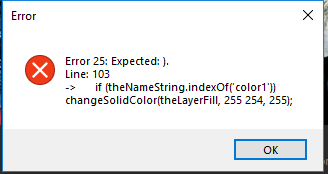
Hi i manage all my day trying to get thing out but i don't understand this error.
Here is my code:
f= File.openDialog("select file");
var theLayers = app.activeDocument.layers;
fillWhichColor(f.name , theLayers[1]);
function fillWhichColor(theNameString,theLayerFill)
{
if (theNameString.indexOf('color1')) changeSolidColor(theLayerFill, 255 254, 255);
if (theNameString.indexOf('color2')) changeSolidColor(theLayerFill, 210, 135, 94);
if (theNameString.indexOf('color3')) changeSolidColor(theLayerFill, 130, 140, 87);
if (theNameString.indexOf('color4')) changeSolidColor(theLayerFill, 247, 211, 192);
if (theNameString.indexOf('color5')) changeSolidColor(theLayerFill, 237, 216, 63);
if (theNameString.indexOf('color6')) changeSolidColor(theLayerFill, 237, 48, 48);
if (theNameString.indexOf('color7')) changeSolidColor(theLayerFill, 208, 212, 233);
if (theNameString.indexOf('color8')) changeSolidColor(theLayerFill, 109, 179, 220);
}
////// change color of solid color layer //////
function changeSolidColor (theIdentifier, theR, theG, theB) {
// =======================================================
var idsetd = charIDToTypeID( "setd" );
var desc4 = new ActionDescriptor();
var idnull = charIDToTypeID( "null" );
var ref1 = new ActionReference();
ref1.putIdentifier ( stringIDToTypeID( "contentLayer" ), theIdentifier );
desc4.putReference( idnull, ref1 );
var idT = charIDToTypeID( "T " );
var desc5 = new ActionDescriptor();
var idClr = charIDToTypeID( "Clr " );
var desc6 = new ActionDescriptor();
var idRd = charIDToTypeID( "Rd " );
desc6.putDouble( idRd, theR );
var idGrn = charIDToTypeID( "Grn " );
desc6.putDouble( idGrn, theG );
var idBl = charIDToTypeID( "Bl " );
desc6.putDouble( idBl, theB );
var idRGBC = charIDToTypeID( "RGBC" );
desc5.putObject( idClr, idRGBC, desc6 );
var idsolidColorLayer = stringIDToTypeID( "solidColorLayer" );
desc4.putObject( idT, idsolidColorLayer, desc5 );
executeAction( idsetd, desc4, DialogModes.NO );
};


 1 Correct answer

for сс2018+
change
fillWhichColor(f.name , theLayers[1]);
to
fillWhichColor(f.name , theLayers[1].id);


Explore related tutorials & articles
 10
Replies
10
10
Replies
10


Copy link to clipboard
Copied
looks like you are missing a comer ",".
Copy link to clipboard
Copied
Thank you @JJMack, i fixed it, but another error:

Copy link to clipboard
Copied
My app document is in CMYK mode, do you think that's the reason ? i am searching but there are no topic in this forum how to change color shape using script in CMYK mode. JJMack
Copy link to clipboard
Copied
The message state that one of your argument 2 is not a numeric. That the function requires a number. theIdentifier seems to be a variable argument the second argument which most likely has a none numeric value. In the code you show I do not see where the variavle is set,
Copy link to clipboard
Copied
The code i used is from this topic:
change colors in vector shapes - photoshop script
Actually theIdentifier is the layer that contain shape vector need to be filled color.
I don't know how to fix it.
Copy link to clipboard
Copied
Did you modify that script code? That code seems to set the variable with a get integer of the layer id from the layer descriptor.
var theIdentifier = layerDesc.getInteger(stringIDToTypeID ("layerID"));
The variable should be a whole number in that case. The error you get seem to state otherwise.
Post the actual code you are using.
Copy link to clipboard
Copied
for сс2018+
change
fillWhichColor(f.name , theLayers[1]);
to
fillWhichColor(f.name , theLayers[1].id);
Copy link to clipboard
Copied
Thanks All,
you are all right, JJMack is right, i miss undertood about theIdentifier, it must be an LayerID (it mean an Number Interger). I also find that "Layer ID" and "Layer indice" are totally different. When you move an layer X, that indice i Layer will change, but the ID of that Layer will not change Layer.id
So i fixed it with r-bin instruction:
fillWhichColor(f.name , theLayers[1].id);
I use CC2017 but it work anyway, that's pretty cool.

Copy link to clipboard
Copied
I'm not 100% sure, but I think the javascript command indexOf doesn't work with extendscript.
Copy link to clipboard
Copied
I am using CC2017 , indexOf is working.
theNameString = "color1-1123335";
alert(theNameString.indexOf('color1')); give me 0
alert(theNameString.indexOf('color2')); give me -1


Get ready! An upgraded Adobe Community experience is coming in January.
Learn more
 AdChoices