 Adobe Community

- Home
- Photoshop ecosystem
- Discussions
- Re: HDR toning panel not displayed
- Re: HDR toning panel not displayed

Copy link to clipboard
Copied
Apologies, this could be obvious. I'm fluent in elements but just starting out in photoshop CC. I want to try the HDR toning adjustment. However, when I select the option, nothing happens. There is no new HDR toning window popup to make my adjustments. HDR toning shows up in my history and if I have layers, it will ask me if I'm okay flattening my image - but that's it. Everything else has worked as expected thus far. Am I missing something stupid?


 1 Correct answer


Found the cause: Turn Quick Mask mode off. (It's the 2nd icon from the bottom on the Tools panel.) Think it's a bug.

Explore related tutorials & articles
 18
Replies
18
18
Replies
18



Copy link to clipboard
Copied
Hi tarac,
Please change the color mode of the image to RGB or Grayscale mode.
Image menu > Mode
Refer: Adjust HDR exposure and toning in Photoshop
Regards,
Mohit
Copy link to clipboard
Copied
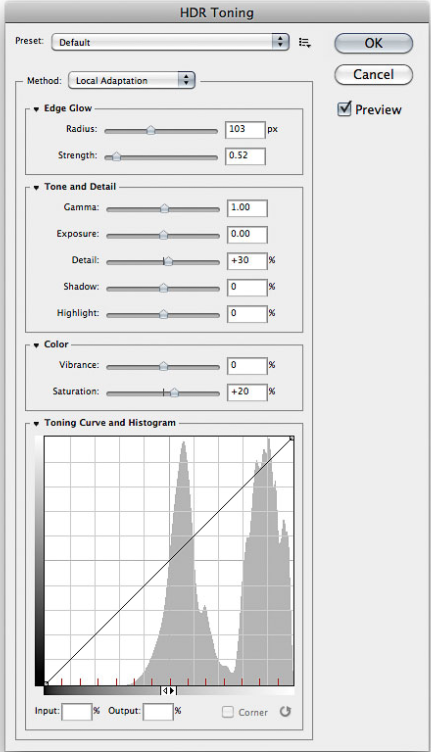
The photo is in RGB, sRGB to be specific. I believe if the photo were not in RGB or grayscale the HDR Exposure option would be greyed out and not selectable. This is not the case. I can select the HDR Exposure option and the fact that it has been selected even shows up in my history. The problem is once I select the HDR toning option, I don't get the adjustment panel I included an image of below (image taken from the web for reference). The question is, is this window hidden somewhere and I don't have my view setup correctly or is the tool not working?
Copy link to clipboard
Copied
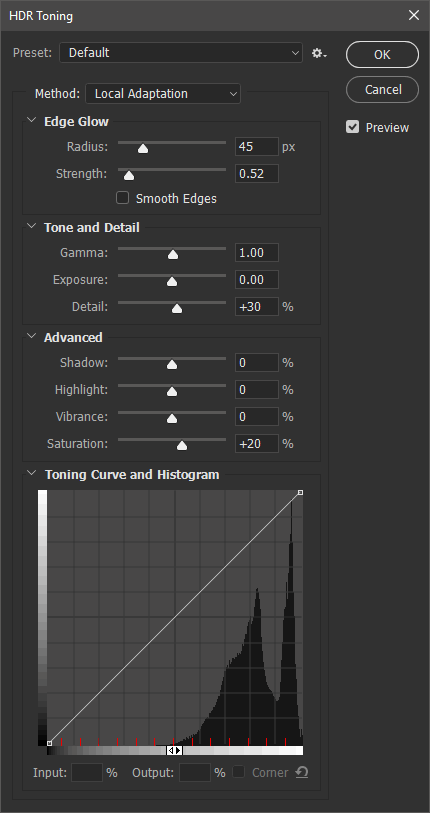
Is the window not showing the histogram? You need to click the exposure arrow to the immediate right of "Toning Curve and Histogram" to see it. (The same applies to all the options.) I believe by default it's not showing. An example of my window. (Windows 10; darkest color theme.)
Copy link to clipboard
Copied
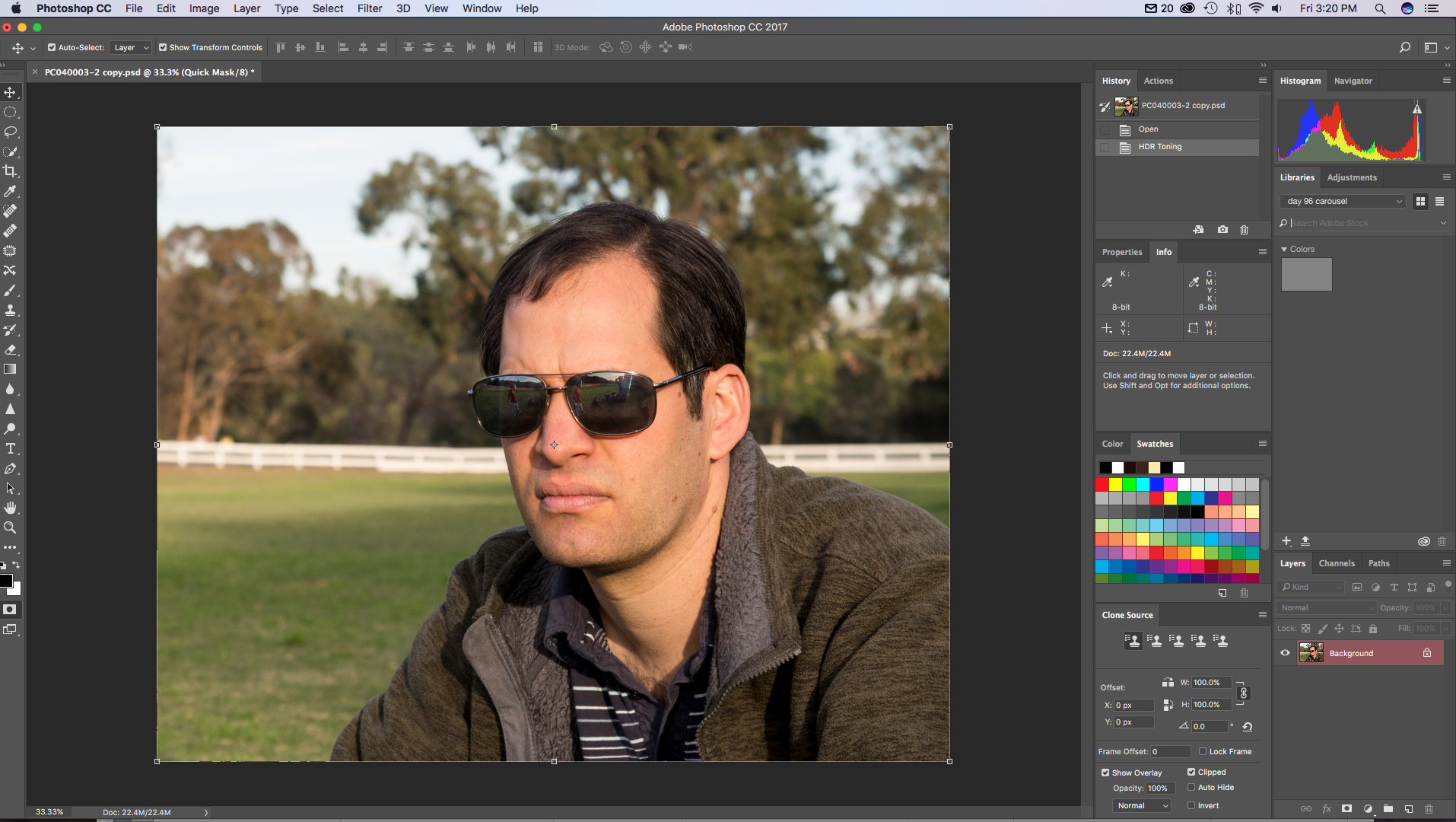
Thanks for trying to help. The image that you posted is exactly what I'm looking for - I don't have any of the components of that menu. This is what my screen looks like with (what I think is) everything expanded immediately after selecting HDR Toning from the menu. I don't see any other menus to expand out to see the HDR toning menu (though I'd much prefer that to be the solution than a bug in the software). As you can see in the screen capture, my image is flattened and in the history you can see that the "HDR toning" adjustment has been selected but there no menu to actually do anything. I've watched several video tutorials and it looks like I should be able to select Adjustments, HDR Toning and the HDR Toning menu will pop up next to the other menus. For some reason, mine does not. Please excuse the lousy photo. I just pulled one up as an example.
Copy link to clipboard
Copied
You should see my images if you think yours is bad (which it's not). 
You don't have a dual-monitor (or more) display setup, do you? Any chance the dialog was dragged off? I just tried repro'ing this on my dual-monitor setup and the dialog stayed right where I last put it (on the second monitor).
Try resetting preferences (instructions are around the middle):
Before you do that, though, make sure to take a screen shot of your workspace as everything will go back to defaults. This way, you can quickly set up your workspace to the way it was before.
Copy link to clipboard
Copied
So the preferences reset didn't solve the problem (and my workspace is back to the default so I definitely did that correctly) and I don't have a second monitor. Maybe I'll try to reinstall the app.
Copy link to clipboard
Copied
Hmm... resetting preference nor reinstalling the program worked unfortunately.
Here's a video screen grab if this helps. You can see, I select the adjustment, nothing happens except that "hdr toning" shows up in my history. I then selected the "shadows/highlights" adjustment and everything worked as expected. It looks like all my menus are expanded and I don't have a second monitor.

Copy link to clipboard
Copied
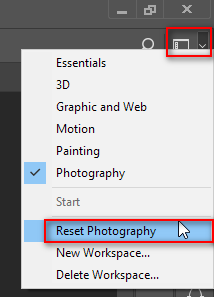
Try resetting your whichever workspace you use, using the menu at the top right:
From your video it is not clear if there are any clicks or keystrokes occurring between the selection of HDR Toning from the menu and when the history step shows up.
If you have to press Enter (or maybe the spacebar) to get the HDR Toning to apply but you never see the HDR Toning panel, then that is a symptom of the HDR Toning panel being offscreen as if you had a second monitor or a different resolution monitor at one point but don't, now, or it is at the very edge and you can't quite see it. Are there multiple workspaces on a Mac and the window is on another virtual screen? I have a PC and don't quite know how Macs might be different in this regard. Can transparency be applied to some windows in an interface and you've somehow set the transparency to 0 or 1%? Is there a way to reset that?
If the HDR Toning step applies immediately without clicking or typing anything after selecting HDR Toning from the menu, then perhaps there is a keyboard macro that is clicking the Ok button for you.
Copy link to clipboard
Copied
Found the cause: Turn Quick Mask mode off. (It's the 2nd icon from the bottom on the Tools panel.) Think it's a bug.
Copy link to clipboard
Copied
Good catch. Should HDR Toning be disabled in Quick Mask mode like half the other Adjustments menu items are?
Copy link to clipboard
Copied
I want to say no but not sure; other similar adjustments like levels can affect Quick Mask mode. I'll have to make a mental note of this.
Copy link to clipboard
Copied
Are you going to report this? I can.
Copy link to clipboard
Copied
Sure, go ahead.
Copy link to clipboard
Copied
I filed a bug report for this with Adobe.
Copy link to clipboard
Copied
YAY! Thank you so much. Phew!

Copy link to clipboard
Copied
Are you selecting HDR Toning from the Image>Adjustment menu? If you do, and the HDR Toning window does not show up, are you hitting Enter at that point? That would apply whatever settings were supposed to show up in the window, and put you in the state shown in your screen capture above. (Without hitting Enter or clicking on the OK button on the window, the History panel would not look as yours.)
Copy link to clipboard
Copied
I attached a video below of my process. I hope this helps troubleshoot!
Copy link to clipboard
Copied
That is bizarre, especially if you had reset preferences. Out of curiosity, did you try this on another image as well?


 AdChoices