
Participant
February 23, 2020
Question

Healing Brush & Clone Stamp Tool - Weird Behaviour

  • February 23, 2020
  • 1 reply
  • 319 views

Hi All,


I'm hoping someone powerful in the ways of Photoshop can help?


Basically the Healing Brush and Clone Stamp Tool seem to create an unwanted line that reverts to the top left hand corner of any image when I release the left mouse button. This wasn't an issue last week before photoshop released the newest version with "bug fixes"


Any ideas before I smash this laptop in half? I attach an image below as an example. Thanks in advance to anyone who knows the go to answer!
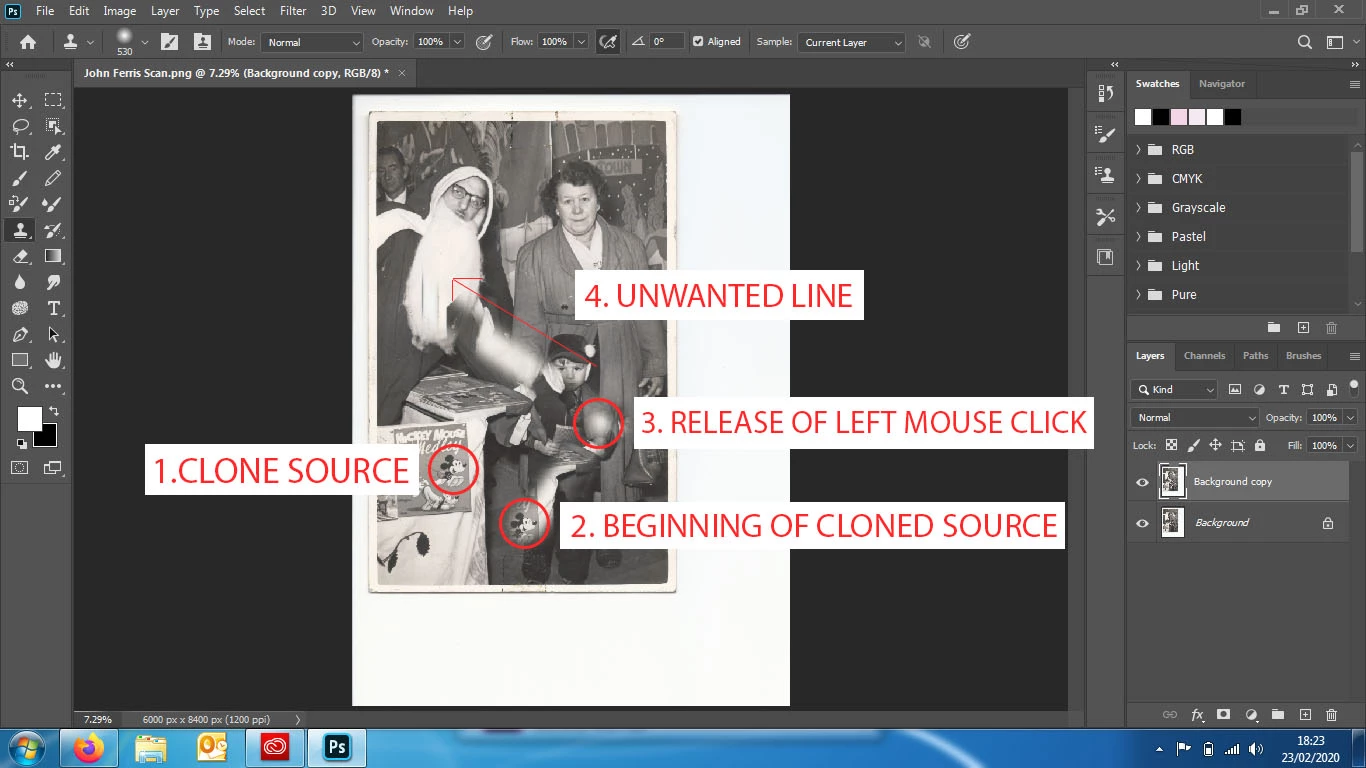
 

This topic has been closed for replies.

1 reply

Peru Bob
Community Expert
Community Expert
February 23, 2020

Try resetting the tools and/or preferences:


To manually restore preferences to default:

To restore preferences quickly using a keyboard shortcut:

  • Press and hold Alt+Control+Shift (Windows) or Option+Command+Shift (Mac OS) as you start Photoshop. You are prompted to delete the current settings. The new preferences files are created the next time you start Photoshop.

Note: Using the keyboard shortcut, preference files for custom shortcuts, workspaces, and color settings will also be reset to default.


from here:

https://helpx.adobe.com/photoshop/using/preferences.html#restore_preferences