Known Participant
November 24, 2017
Answered

Healing brush tool: How to get rid of black outline?

  • November 24, 2017
  • 1 reply
  • 2236 views

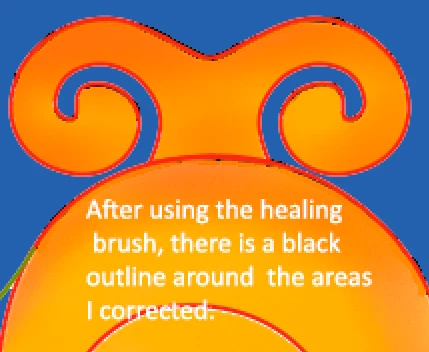
I'm making a digital design which starts with an AI vector that is then painted in Corel Essentials 5, saved, and finally, re-opened in Photoshop to clean up.  I'm trying to fill in white areas along the vector outline with the healing brush tool, but it keeps leaving a black outline.  It's almost as if the healing brush is picking up the original black vector line, but I'm not working on the original vector line layer - the original vector layer is turned off as well as above the layer I'm trying to correct (I tried deleting it too, but it didn't help).  I usually set the Healing Brush Mode to Replace and Sample to Current Layer, but after encountering this problem, I've tried every configuration to no avail.  Any suggestions?

    This topic has been closed for replies.
    Correct answer JJMack

    Are you healing to a new empty top ayer? If not you should try using that method so your healing will not destroy you original layers.

    1 reply

    JJMack
    Community Expert
    JJMackCommunity ExpertCorrect answer
    Community Expert
    November 24, 2017

    Are you healing to a new empty top ayer? If not you should try using that method so your healing will not destroy you original layers.

    JJMack
    Known Participant
    November 24, 2017

    Thank you!  I was able to accomplish the task as you suggested.  Just wondering though - why was I getting the black outline?

    JJMack
    Community Expert
    Community Expert
    November 24, 2017

    I have no idea of what your document structure looks like or how you were healing.

    JJMack