



bfrankphoto
Inspiring
January 17, 2020
Question

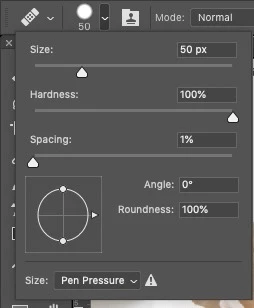
Healing Brush use with Wacom Tablet - Brush Size stuck on Pen Pressure

  • January 17, 2020
  • 1 reply
  • 2531 views

Using photoshop CC19 (20.0.8) and a Wacom tablet. Using the healing brush, the size is adjusting based on pen pressure. I really don't want that. I want opacity, not brush size adjusted with pen pressure. With the brush size, there is a spot to turn off brush size to pen pressure, but as soon as I close that little window to start working on the image, the setting reverts. Any suggestions?


This topic has been closed for replies.

1 reply

JJMack
Community Expert
Community Expert
January 17, 2020

There are setting to do that don't turn on pen pressure to control size  and opacity and make sure the pen control icons in the brush option bar are not on. Hardness set to 100%

JJMack
bfrankphoto
Inspiring
January 17, 2020

I'm trying to use the healing brush, not the paint brush.


JJMack
Community Expert
Community Expert
January 17, 2020

make sure the control icon is off not on like these and like you have it.

JJMack