
Participant
December 25, 2024
Answered

Help: Backing Up and Importing Workspace in Mac Photoshop 2025

  • December 25, 2024
  • 2 replies
  • 1986 views

Hi all,

I'm working on macOS with Photoshop 2025 and would like to back up and import my workspace (app layout).

Despite my research, I haven’t been able to find any answers. The files don’t seem to be in the Application Support folders as they were in older versions of Photoshop.

Could anyone advise on how to locate and back up these files?

Thank you!
 

Correct answer Jeff Arola

On a Mac the custom Workspace you saved for Photoshop 2025 (ps ver 26.10) will be in

Macintosh HD/Users/UserName/Library/Preferences/Adobe Photoshop 2025 Settings/WorkSpaces


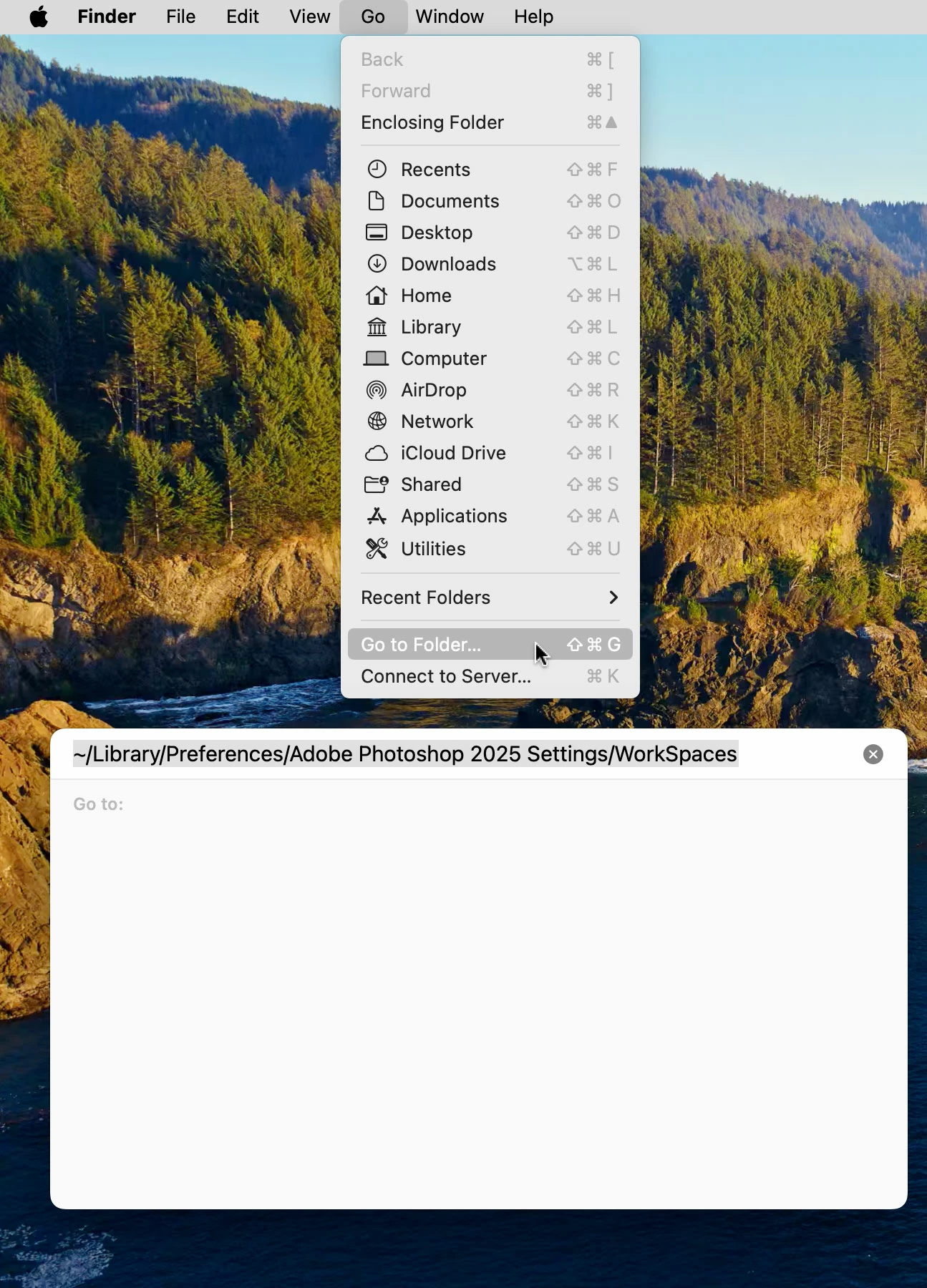
The User Library files are hidden by default, so the easiest way to get there is to click on your desktop, then in the Go menu click Go to Folder and paste the following

~/Library/Preferences/Adobe Photoshop 2025 Settings/WorkSpaces


https://helpx.adobe.com/x-productkb/global/access-hidden-user-library-files.html

2 replies

Jeff Arola
Community Expert
Community Expert
September 16, 2025

ChrisOgden,


What operating system are you using?

Participant
September 18, 2025

Hi, i'm having the same problem and i'm on macOS Sequoia version 15.6. Thanks.

Jeff Arola
Community Expert
Jeff ArolaCommunity ExpertCorrect answer
Community Expert
September 18, 2025

On a Mac the custom Workspace you saved for Photoshop 2025 (ps ver 26.10) will be in

Macintosh HD/Users/UserName/Library/Preferences/Adobe Photoshop 2025 Settings/WorkSpaces


The User Library files are hidden by default, so the easiest way to get there is to click on your desktop, then in the Go menu click Go to Folder and paste the following

~/Library/Preferences/Adobe Photoshop 2025 Settings/WorkSpaces


https://helpx.adobe.com/x-productkb/global/access-hidden-user-library-files.html

Ged_Traynor
Community Expert
Community Expert
December 25, 2024
Participating Frequently
September 15, 2025

Thanks, but in Photoshop 2025, there no longer seems to be a Workspace Prefs.psp, nor anyway to load our old workspaces. Creating a "new" workspace, named "TestWorkspace", doesn't create a .psw file any more either. Adobe seems to have removed functionality (again), and not given any way to work around nor apply our old data (again). Ugh.  

Participant
September 18, 2025

Hi, I'm having the same question/problem. I searched the whole internet and can not seem to find a solution. I need to change to a new MacBook for work and like to keep using my personalized Photoshop workspace.

Can someone please help us out? I'm working on version 26.10.0.