
Known Participant
October 11, 2023
Question

Help configuring new MacBook

  • October 11, 2023
  • 3 replies
  • 844 views

I own a portrait studio. There are two photographesr that shoot. We are extremely busy and shoot 40+ sessions a week. Each session I shoot I cull through 300ish photos per session. My RAW files 55MB each. I open them all in ACR and cull there. I edit all the photos the other photographer takes although those are already culled. Looking to be able to open hundreds of files into ACR with no lag, run actions quickly, and just be able to work with 0 lag time. I currently don't have any issues other than my scratch disk size but my HD is small on my current macbook so I am upgrading primarily for that reason....I use dropbox so currently I have to have everything as "online only" until I edit and cull from memory cards which stinks. 


Also wondering if I could get a Macbook Air like below for less money that would still do the job? I'd like at least 2TB of storage.


Currently I have 16"/2021 M1 Max, 64GB ram, but only a 512HD
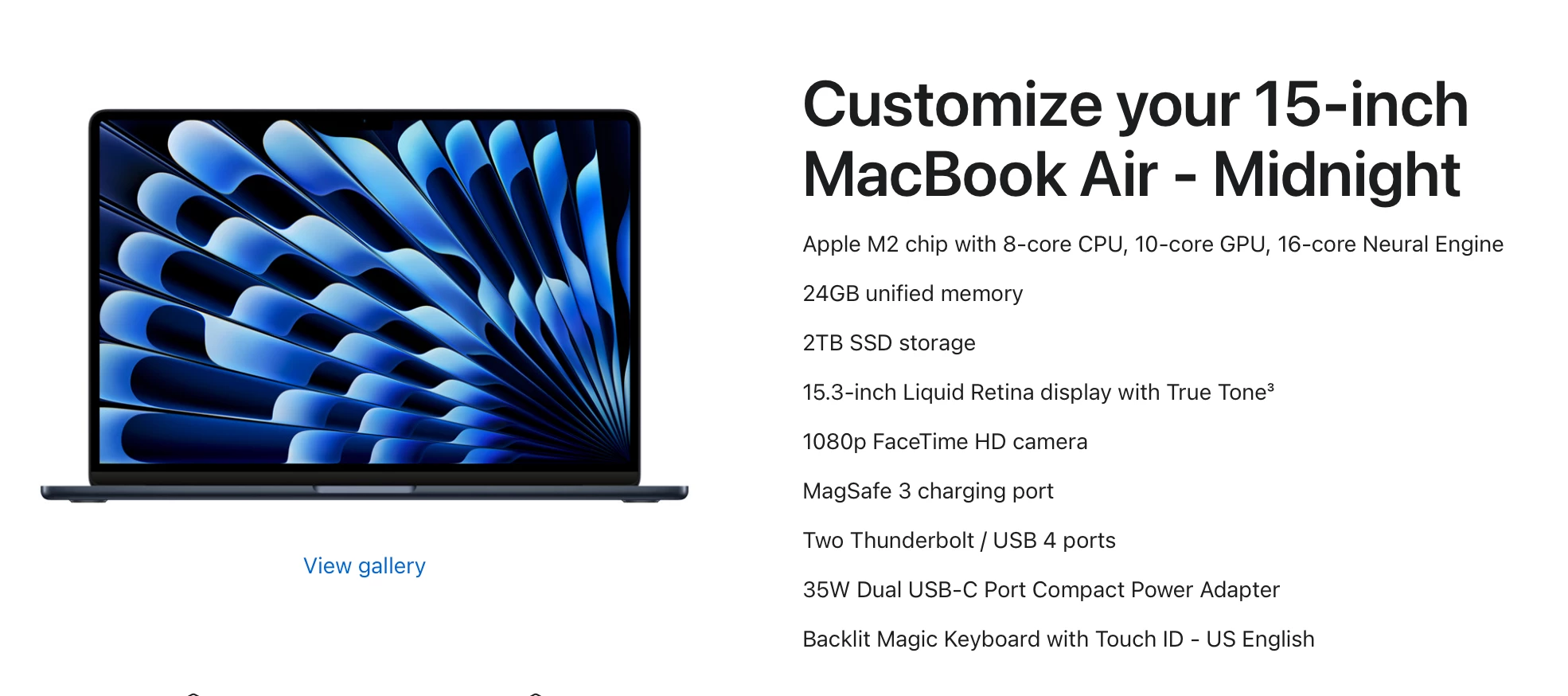


This topic has been closed for replies.

3 replies

Legend
October 12, 2023

I'm a working pro and my production machine is currently an M1 mini, 16GB RAM, 256GB SSD, with a desk full of hard drives hanging off it. I use 5D IV and 5Dsr cameras so large RAW files, and edit in 16 bit. I'd love a Mac Studio but the budget just isn't there 😞
Regardless, this machine is much faster than any Intel Mac I've used in the past. I'd just go for whatever your budget allows. Thunderbolt external SSDs are a quick way to expand storage.

Known Participant
October 12, 2023
I use the R5 so stupid large files but this is good to know!
Conrad_C
Community Expert
Community Expert
October 12, 2023

If you’re on a budget, there’s a middle ground for external SSDs that you can aim for.


USB 2, 480Mbps — slow older standard, avoid

USB 3, 5Gbps — might work fine, but is slow older standard

USB 3, 10Gbps — this is the sweet spot. Fast enough for photography, now very common and affordable.

USB 3 2x2, 20Gbps — Very new, not currently supported by Macs.

Thunderbolt 4/USB 4, 40Gbps — Very expensive, might not need all the speed just for photo editing.

Conrad_C
Community Expert
Community Expert
October 11, 2023
quote

Also wondering if I could get a Macbook Air like below for less money that would still do the job? I'd like at least 2TB of storage.

By @anejiparker


The M2 MacBook Air is quite a good Mac. The one disadvantage that might apply to you is that the MacBook Air has no fan. For most people, that’s no problem, the Mac can rest while Photoshop waits for them to do the next thing. But you are processing hundreds of files at once with batch edits in ACR, and Photoshop actions. That might keep the Mac CPU busy enough to elevate its temperature. On a MacBook Pro, the fan comes on, temperature is held down, and the Mac can proceed at full speed. On the MacBook Air, extended high performance work may cause the processor to slow down so that it can cool down.


But we don’t know if that will affect you. One way to find out is by downloading utility software that can monitor temperature and fan speed, such as TGPro, Stats, or iStatMenus. The next time you work on a huge batch on your M1 Max, see if CPU temperature gets too close to 100° C and fan speeds get loud. If they do, the MacBook Air might not be a good idea. If they don’t go up that high, if CPU temp stays under 90° and fan speed stays at or near minimum even most of the way through an edit or a run of Photoshop actions, then the MacBook Air should be able to handle that work without slowing down.


I also don’t have enough space inside my MacBook Pro for Photoshop scratch, so to hold off on having to buy a new expensive laptop, when working on photos I attach two fast large external SSDs. One holds original photos, and the other is assigned as Photoshop scratch. It’s a cheap way out, but it’s clumsy, so if it is a priority for you to be able to pick up and move the laptop without a bunch of stuff hanging off it, then yes, buy a new Mac with 2TB or more of the expensive internal storage.

Known Participant
October 11, 2023

Seriously amazing answer! thanks!!! 

Conrad_C
Community Expert
Community Expert
October 11, 2023

I also forgot to mention…on your current 64GB M1 Max, also monitor the Memory tab in Activity Monitor as you work. If Memory Pressure is often green (mostly empty graph), the 24GB Unified Memory on the Air should be OK. But if the Memory Pressure graph often gets half filled up or more, and tends to turn orange or even red sometimes as you work through a shoot, that would mean you really do need 64GB of Unified Memory, and the 24GB maximum on the Air would not be enough and should no longer be considered.

D Fosse
Community Expert
Community Expert
October 11, 2023

Yes, 2 TB should be considered absolute minimum these days, just for managing the system. The Photoshop scratch disk alone may need 500 GB or more, depending on workflow. Storage goes elsewhere.


"Unified memory" just means that the GPU will use shared system memory. The rule of thumb for Apple silicon is to double the amount you would normally need. The GPU can eat up a lot of memory! You should at least have 32, but 64 is more comfortable.


But what I mainly wonder is, with this kind of throughput, why aren't you using Lightroom Classic? It's streamlined for high-volume high-speed work, this is what it was born to do. Using ACR seems very cumbersome and backwards.


Known Participant
October 11, 2023

I have tried to switch to LR but I am just so used to ACR and it seems so similar to me. All the LR catalogs seem cumbersome to me! haha I have downloaded LR Classic several times and always end up frustrated and back to PS. Maybe in January when things are a little slower I will try again. 


What are the benefits of LR?