
o0-felicia-0o
Participant
September 20, 2017
Answered

Help! Display Driver Error/Crash

  • September 20, 2017
  • 2 replies
  • 471 views

Help please!

I'm working with Ps CS6 Extended, I keep getting this display driver error, upon clicking okay Photoshop immediately freezes/stops working then shuts itself down.
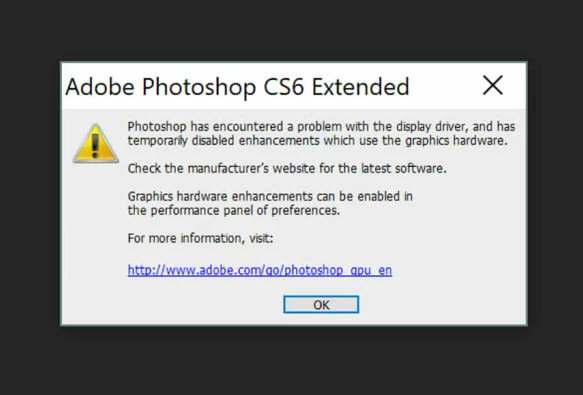
My laptop is a Microsoft Surface Book, Intel Core i5 processor, NVIDIA GeForce GPU so this shouldn't be happening. Everything is up to date, both my laptop and Photoshop, and was working perfectly until this started happening a day ago. The only thing I can think of that I changed recently is that I increased the History States - but even if this is the problem, I'm unable to change it; every time I try to open Preferences Photoshop crashes on me again.

I've tried to skip loading optional /plug-ins upon starting but it still crashes.

Please help I'm working on time sensitive projects and need to get back to work        :'u

This topic has been closed for replies.
Correct answer JJMack

If PS will no longer start reset your Photoshop Preferences. Start PS and immediately press and hold Ctrl+Alt+Shitf.  Photoshop should ask if you want your Preferences deleted. Reply YES Photoshop will then most likely start up.

2 replies

o0-felicia-0o
Participant
September 28, 2017

Can anyone help please, the problem has since gotten worse, Ps wont even open now it shuts down upon launching

JJMack
Community Expert
JJMackCommunity ExpertCorrect answer
Community Expert
September 28, 2017

If PS will no longer start reset your Photoshop Preferences. Start PS and immediately press and hold Ctrl+Alt+Shitf.  Photoshop should ask if you want your Preferences deleted. Reply YES Photoshop will then most likely start up.

JJMack
o0-felicia-0o
Participant
October 3, 2017

Thank you, this seems to have done the trick.

JJMack
Community Expert
Community Expert
September 20, 2017