
Participant
November 30, 2018
Question

Help - Eraser tool erasing outside cursor circle

  • November 30, 2018
  • 3 replies
  • 1462 views

Hi. Running Windows 10 with updated CS6 version of Photoshop. The eraser tool started unexpectedly erasing outside the circle area. I've seen the other posts about this and no answers that worked but they are all very old posts, so hoping someone found an answer and fix.

I have reset the preferences, I have updated, I have checked all the preference boxes for cursors and other various things  such as hardness, etc. all to no avail. I am now at the end of my rope. Anyone find the fix for this?
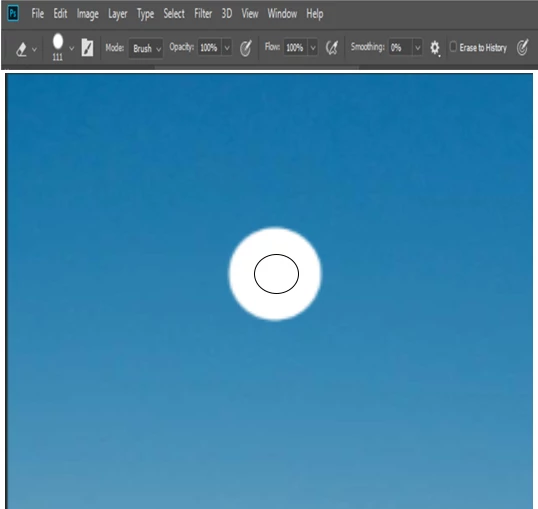
Thanks much!

    This topic has been closed for replies.

    3 replies

    PECourtejoie
    Community Expert
    Community Expert
    November 30, 2018

    Hello, I remember similar problems when using a Windows setting that changed the DPI or the screen size magnification...

    Participant
    December 5, 2018

    Do you remember a fix for it? I did have to change the preference settings to allow Photoshop to control the DPI, so maybe that was it. I'm testing it now.

    c.pfaffenbichler
    Community Expert
    Community Expert
    November 30, 2018

    Another source of problems could lie outside of Photoshop with (cursor related) OS settings or plug-ins.

    But your screenshot seems to display a distortion of the menu and the Option Bar – so what’s up with that?

    Please post a more meaningful screenshot (taken at View > 100% and including all pertinent Panels like Layers, Brushes, Brush Presets, …).

    November 30, 2018

    c.pfaffenbichler  wrote

    But your screenshot seems to display a distortion of the menu and the Option Bar – so what’s up with that?

    I'm confused OP mentions CS6, yet screenshot has brush smoothing as an option

    c.pfaffenbichler
    Community Expert
    Community Expert
    November 30, 2018

    Good observation!

    Community Expert
    November 30, 2018

    In photoshop CC there is an option to show a full size brush tip, I can 't check photoshop CS6...