Help Needed UI
Hey Everyone,
I'm writing my first script for Photoshop, it's a pretty big one for making a product for my shop. It has a lot of steps in it and it requires some inputs on the user 'me'. I've already done all the mathematics for my script and now I only need to write in the documentation for Photoshop. However, I'm really struggling with creating the UI and inputs from the UI which is my next step. I'm a new coder and I'm still trying to grasp a lot of concepts and trying to get better. I wanted to try making this task as a script, it will help a lot with my business and it will also help me improve my coding skill.
This is the UI I had in mind, this is the first iteration I've designed.
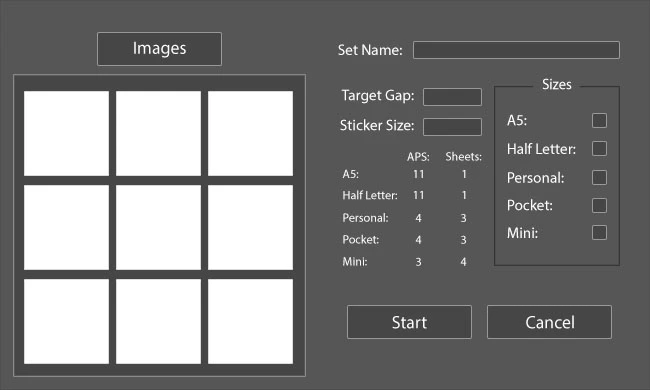
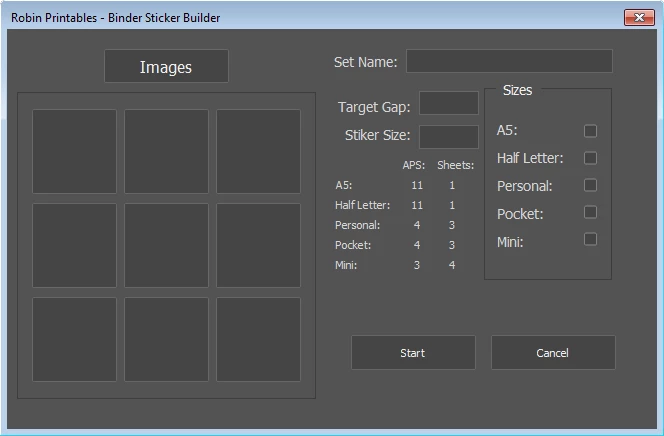
I've currently been working with the UI documentation found in the JavaScript Tools Guide CC but it's hard to fully understand how to make it all. Currently all I've managed to successfully make is the Sizes Panel with A5-Mini text and check-boxes. However, I'm unable to put in set parameters for the Panel successfully. I've been putting in the parameters of pixels found exactly in Photoshop and it's just appearing strange. I'm not quite sure how to do it successfully and when I put in parameters for it all the groups within it fall apart.
var dlg = new Window("dialog", "Robin Printables - Binder Sticker Builder", [100, 100, 650, 390]);
// Panel to hold all of the Insert Size Checkboxes
dlg.sizePnl = dlg.add("panel", [494, 86, 126, 180], "Sizes");
// A5 Insert Size Checkbox
dlg.sizePnl.a5 = dlg.sizePnl.add("group", undefined, "A5 Checkbox");
dlg.sizePnl.a5.a5Cb = dlg.sizePnl.a5.add("checkbox", undefined, "A5:");
dlg.sizePnl.a5.a5Cb.value = true;
// Half Letter Insert Size Checkbox
dlg.sizePnl.halfLetter = dlg.sizePnl.add("group", undefined, "Half Letter Checkbox");
dlg.sizePnl.halfLetter.hlCb = dlg.sizePnl.halfLetter.add("checkbox", undefined, "Half Letter:");
dlg.sizePnl.halfLetter.hlCb.value = true;
// Personal Insert Size Checkbox
dlg.sizePnl.personal = dlg.sizePnl.add("group", undefined, "Personal Checkbox");
dlg.sizePnl.personal.plCb = dlg.sizePnl.personal.add("checkbox", undefined, "Personal:");
dlg.sizePnl.personal.plCb.value = true;
// Pocket Insert Size Checkbox
dlg.sizePnl.pocket = dlg.sizePnl.add("group", undefined, "Pocket Checkbox");
dlg.sizePnl.pocket.ptCb = dlg.sizePnl.pocket.add("checkbox", undefined, "Pocket:");
dlg.sizePnl.pocket.ptCb.value = true;
// Mini Insert Size Checkbox
dlg.sizePnl.mini = dlg.sizePnl.add("group", undefined, "Mini Checkbox");
dlg.sizePnl.mini.mCb = dlg.sizePnl.mini.add("checkbox", undefined, "Mini:");
dlg.sizePnl.mini.mCb.value = true;
I've tried adding a second panel to the window but it's not appearing at all. I'm not sure if I'm fully understanding and I would love a clarification on what I'm doing wrong. Here is the code for my second panel:
// Panel to hold all of the Sticker and Gap Inputs
dlg.stkrPnl = dlg.add("panel", undefined, "Stickers")
// Group for Gap input with Static Text and an Edit Box
dlg.stkrPnl.gapGrp = dlg.stkrPnl.add("group", undefined, "Gap Input")
dlg.stkrPnl.gapGrp.gapSt = dlg.strkPnl.gapGrp.add("statictext", undefined, "Target Gap:")
dlg.stkrPnl.gapGrp.gapEt = dlg.stkrPnl.gapGrp.add("edittext", undefined, "0.0")
// Group for Sticker input with Static Text and an Edit Box
dlg.stkrPnl.stkrGrp = dlg.stkrPnl.add("group", undefined, "Sticker Input")
dlg.stkrPnl.stkrGrp.stkrSt = dlg.stkrPnl.stkrGrp.add("statictext", undefined, "Sticker Size:")
dlg.stkrPnl.stkrGrp.stkrEt = dlg.stkrPnl.stkrGrp.add("edittext", undefined, "0.0")
If anyone can help or point me in the right direction on where to get help I'd love it.
Thanks
 AdChoices