If you never saved a Photoshop file and only a PDF file, you have two possibilities for recovering the document.
When you saved as a PDF in Photoshop, did you select Preserve Photoshop Editing Capabilities as shown below? If you did, then nothing was actually lost: Simply open the PDF in Photoshop, and you will see all of your original Photoshop layers, including text and vector shapes.
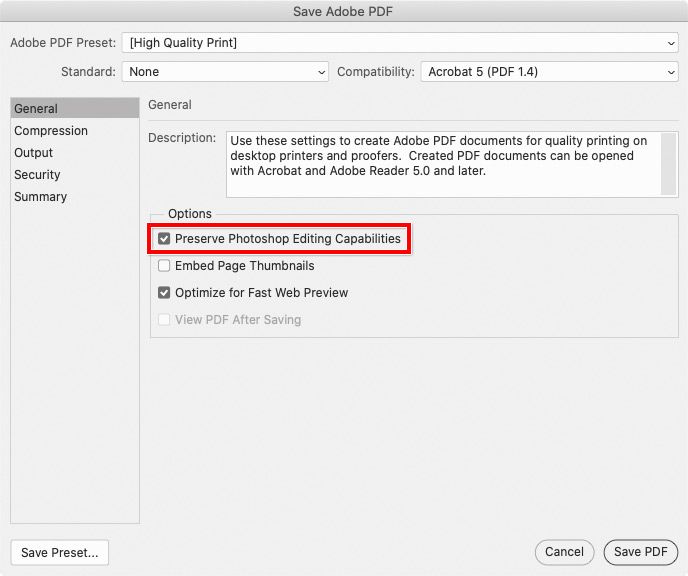
If you did not select Preserve Photoshop Editing Capabilities, you can try using Adobe Acrobat to extract the image and send it back to Photoshop:
1. Open the PDF file in Acrobat DC (not Acrobat Reader), and click Edit PDF.
2. With the Selection tool in the toolbar at the top, select the image on the page.
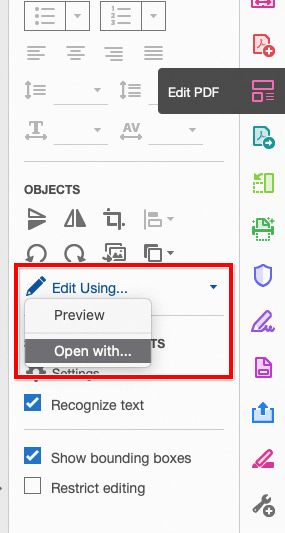
3. In the Edit PDF tools, click Edit Using. If Photoshop is in the list, choose Photoshop. If Photoshop is not in the list, choose Open With, and then select Photoshop.
4. The image opens in Photoshop. However, I do not think this method will preserve any layers. When I try this, it’s always a flat Photoshop document.







 3
Replies
3
Replies


 AdChoices