
Help: Photoshop files jump back to the 1st desktop only by saving.
Hello, I hope I can find help here.
Now I have a fixed arrangement of my icons (files) on the desktop: work files on the 1st monitor and 2nd monitor for leisure stuff.
The problem is: as soon as I change a Photoshop file and then save it, the icon automatically jumps to the left side (1st monitor) under the next desktop icon. I've never had that before and it's really annoying for me. I've even reinstalled Windows. But that didn't help either.
Does anyone know how I can turn this off? Is there a setting in Photoshop? I use the latest version available. So I have a subscription to Adobe. Since I also work a lot with Photoshop, it's annoying when I save in between and the file keeps jumping back to the 1st monitor and I have to search for it.
I've tried a lot. Even in "View", when you right-click on the desktop, the option "Automatically arrange icons" is deactivated. As I wrote, I reinstalled Windows. I searched through the settings, but I don't know what to do. And I found out 3 more things:
- This is NOT the case with links! It has to be the original file, i.e. a document, image or Photoshop file.
- And I have the same problem in normal folders too!!! I can't even put the file in a folder. Then, for example, position 2 jumps to the very back of the folder....
- Also only tested with 1 monitor, same thing.
Totally strange... It's ONLY with Photoshop files. Not with any other files like documents, Excel files or anything else. Maybe Photoshop can't cope with the new Windows Update 24h2? Or is there a setting in Photoshop that I have to deactivate?
Thanks in advance for the help.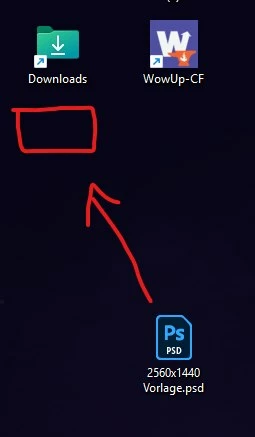
 AdChoices