Known Participant
April 27, 2017
Answered

Help Recoloring Gold Necklace

  • April 27, 2017
  • 4 replies
  • 1611 views

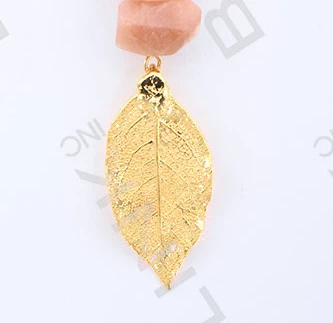
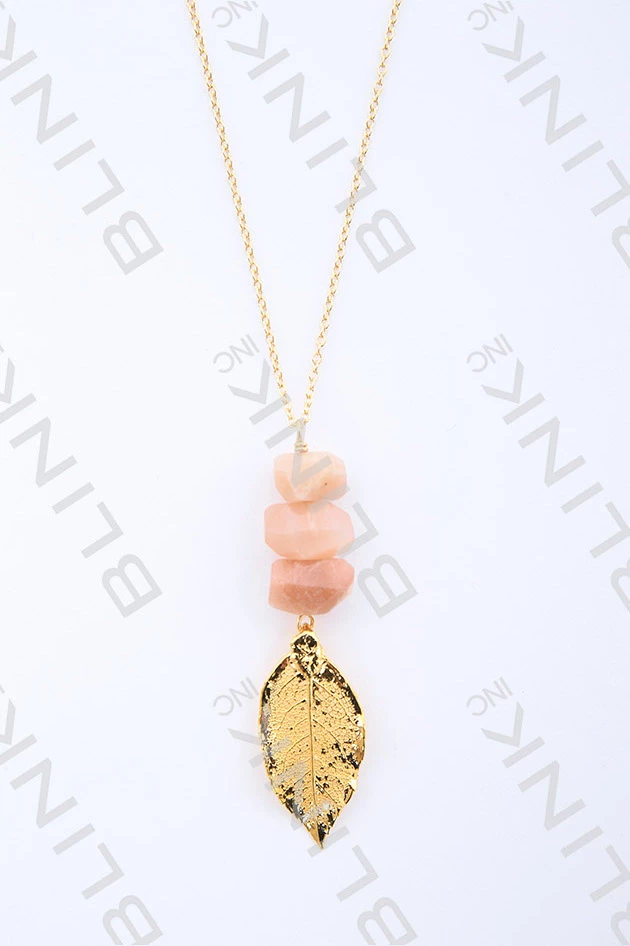
I am hoping to replace the blackish shadows on the edges of the gold leaf with the gold from the middle of the leaf. I have tried in Photoshop, Lightroom and Illustrator and cannot easily accomplish this. I would love some suggestions. This image is a proof and I am waiting to purchase the hi-res photo until I can resolve this issue in case the photos need to be reshot. Thanks in advance for your help!

    This topic has been closed for replies.
    Correct answer davescm

    It would be better on a high res sample but try this:

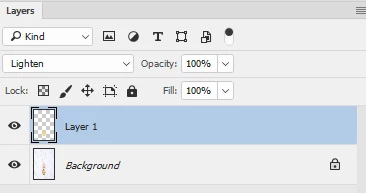
    Use the clone stamp onto a new layer with blending mode set to lighten.

    Uncheck "Aligned" in the clone stamp options, sample from a good area,  and stamp away (as opposed to brushing) over the image where there is black. The lighter areas will not be affected.

    Dave

    4 replies

    Michael Riordan
    Inspiring
    April 28, 2017

    Gaak! Took so long making and saving a video that it was answered 3 times in the meantime! Oh well. Posting anyway because.


    Michael

    Michael Riordan

    Owner/Adobe Certified Instructor

    Digital DesignLab


    [removed]

    Known Participant
    April 28, 2017

    Fantastic. Thanks so much Michael! Really appreciate everyone's quick and thorough tutorials.

    davescm
    Community Expert
    davescmCommunity ExpertCorrect answer
    Community Expert
    April 27, 2017

    It would be better on a high res sample but try this:

    Use the clone stamp onto a new layer with blending mode set to lighten.

    Uncheck "Aligned" in the clone stamp options, sample from a good area,  and stamp away (as opposed to brushing) over the image where there is black. The lighter areas will not be affected.

    Dave

    Known Participant
    April 28, 2017

    Fantastic! Thank you!

    Semaphoric
    Community Expert
    Community Expert
    April 27, 2017

    This is made using a mask created using Image > Calculations on the Red and Green channels with Linear Light blending. The mask is applied to a Color Fill layer set to Lighter Color mode:


    Color Fill is a blunt instrument, but this is just to show how the mask looks applied.

    Known Participant
    April 28, 2017

    Thanks so much!

    Trevor.Dennis
    Community Expert
    Community Expert
    April 27, 2017

    Is that the highest resolution you have?  If you paste the full res version here, it would make it easier.

    Trevor.Dennis
    Community Expert
    Community Expert
    April 27, 2017

    Looking at it again, I can see that it is a stock photo, so unlikely to come in a larger size.  Goodness knows why they would try to sell pictures of jewellery with all that damage though.  So my approach would be to produce from scratch with Photoshop.  I can't see what is going on near the chain, so had to guess.

    1. Make the outline with the pen tool and fill with the gold colour. (Note you can Free Transform a path to make it bigger) Give this layer a bevel & emboss and check Texture.  Choose a texture from the drop down list and adjust settings for best effect.
    2. Make a new layer and stroke the outline with a hard brush, and give it a bevel & emboss using the W shaped gloss contour curve.
    3. Paint the veins with the brush size set to Fade, and adjust the fade amount for the required taper.
    4. I used a couple of custom shape layers near the clasp, but like I said above, it was just a guess.  Give them the same bevel & emboss.
    5. The chain was made with a brush I made for another project, but there are tons of gold chains on Google images.

    This sort of project is good practice, and way more fun than tarting up photographs.  It took me longer to write this thread than to make the pendent (well almost )

    D Fosse
    Community Expert
    Community Expert
    April 28, 2017

    Goodness knows why they would try to sell pictures of jewellery with all that damage though.

    I think this is just a rare accident. This piece appears to have a very grainy and broken-up surface, and that's what you see.

    Normally when shooting gold or silver you have two options. One is to shoot in "white-out conditions", using a tent to diffuse all light. That would probably have been the best option here.

    Very often though, the result looks dull and flat. To add some sparkle and contrast, a better way is often to use a large soft box in a dark room, so that you get a play of light and dark. Carefully set up, this usually shows jewellery and similar objects in the most flattering way.

    So they probably had a standard setup that works 99.9% of the time - only not here...