Participant
March 12, 2021
Answered

Help! Toolbar mouseover menu

  • March 12, 2021
  • 2 replies
  • 745 views

How can I make these annoying new popups go away that appear when you hover over a tool. Terrible improvement.

This topic has been closed for replies.
Correct answer Trevor.Dennis

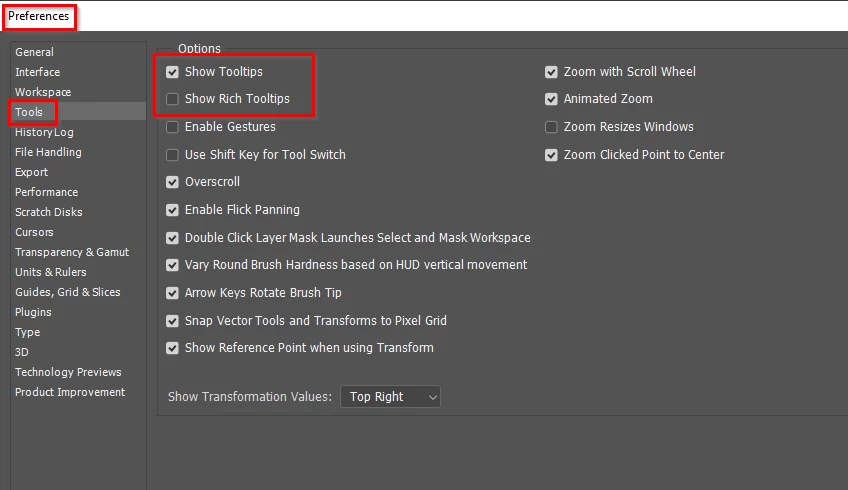
I like to work with the small pop-ups enabled so have Show Tooltips checked.  I wonder if you have Rich Tooltips checked?  That throws up big windows with all sorts of annoying goings on.
2 replies

Bojan Živković11378569
Community Expert
Community Expert
March 12, 2021

Pop-ups explained by @Trevor.Dennis are not new nor improvement in latest release, perhaps you are talking about some other pop-ups (wondering which ones).

Ruud5E45Author
Participant
March 12, 2021

No, it was what Trevor explained. Thank you Bojan.
They are new to me. I may have encountered them before on my workstation and disabled that feature when I first saw it and have forgotten about it. They bothered me on my new laptop and couldn't find the menu.

Have been working with Photoshop for 25 years. Most new (hobby/consumer) features on Photoshop are of no use to me. The best version was 4.0. It had everything, lean and mean. 

Cheers!

Trevor.Dennis
Community Expert
Trevor.DennisCommunity ExpertCorrect answer
Community Expert
March 12, 2021

I like to work with the small pop-ups enabled so have Show Tooltips checked.  I wonder if you have Rich Tooltips checked?  That throws up big windows with all sorts of annoying goings on.

Ruud5E45Author
Participant
March 12, 2021

Thank you so much Trevor. Found it. Sorted!