Inspiring
January 26, 2019
Answered

Help With Action

  • January 26, 2019
  • 2 replies
  • 722 views

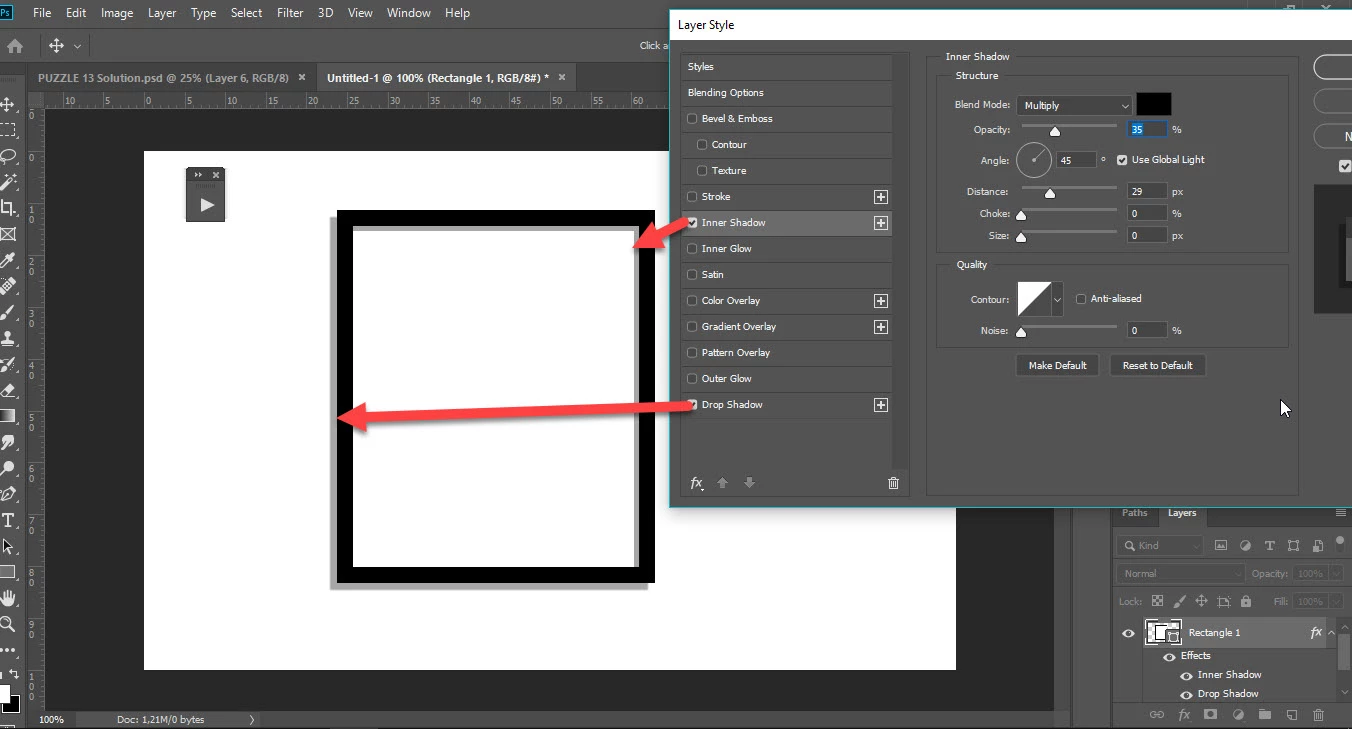
I am trying to create an action to make a photo frame like the one below.

What I am finding difficult is how to create the outer and inner shadows.

Any help appreciated

    This topic has been closed for replies.
    Correct answer Bojan Živković11378569

    For Inner Shadow use Inner Shadow in Layer Style dialog.
    2 replies

    Trevor.Dennis
    Community Expert
    Community Expert
    January 27, 2019

    A wee addition to what the lads have said, and that is to work out the settings that give you the required results, and save it as a new Layer style.  Make sure the layer is selected, and choose New Style from the Style Panel menu (to right corner).

    You can then apply the named style in the Action.   Note this will tie the Action to your system with that style loaded.

    IanBarberAuthor
    Inspiring
    January 27, 2019

    Thank You

    I am getting somewhere now

    Chuck Uebele
    Community Expert
    Community Expert
    January 27, 2019

    Just a normal drop shadow using layer style.

    IanBarberAuthor
    Inspiring
    January 27, 2019

    I can get the outer shadow to show but for some reason, the inner top and inner right shadow is not showing. Can you attach the psd ?. I am wondering if my preferences need resetting

    Bojan Živković11378569
    Community Expert
    Community Expert
    January 27, 2019

    For Inner Shadow use Inner Shadow in Layer Style dialog.
