
Participating Frequently
February 8, 2023
Answered

Help with colour

  • February 8, 2023
  • 3 replies
  • 2657 views

Hello. Please help.


I think I'm being very basic here but be gentle!


So my computers are now set up correctly etc etc and the right profiles. I have done all that.

I have used photoshop for my certain design work where colour management isn't needed for many many years, but only for online so I've never needed to worry about this.


I am wondering about what to use swatch/colour picker wise? So I'm designing in rgb and I intend my work to be sent away to be printed and I have the external printers output requirements. (It won't be spot colour.)


I just want to know am I supposed to use the Pantone solid/solid uncoated or the cmyk coated/uncoated to select my colours on screen? And on that note, which Pantone books do you recommend to refer to? I have pantone uncoated/coated, do I need the bridge fan or the cmyk fans?


Any help on this would be much appreciated.
 

This topic has been closed for replies.
Correct answer D Fosse

I'm not at home so can't post screen shots right now.


I don't understand. Everywhere I read says work in rgb and then send off and the printer will convert etc.


I thought I should be working in CMYK and using CMYK coated. 

I can't get my head around this.


This is really simple. Work in RGB, keep your master file RGB.


You can't convert to CMYK until you know which specific CMYK profile to use, and the printer needs to tell you that.


A CMYK profile specifies and describes a certain print process - an offset press calibrated to a certain standard, using certain inks on certain paper stock. This is all defined in the icc profile. 


When you know which CMYK profile to use, make a copy of the file. Then you can soft proof to the CMYK profile, to see what colors are out of gamut and not printable. You set this up in View > Proof Setup. Based on that, you may want to make adjustments to compensate. Or not.


Then you can make the final conversion to CMYK and send that.


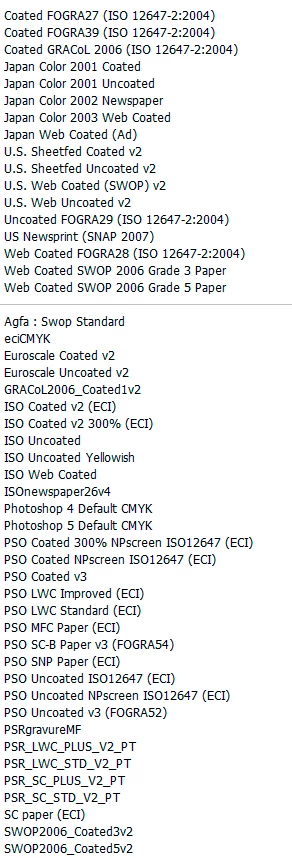
(some of these are outdated/obsolete and not used anymore, so in practice the list is a bit shorter)

3 replies

c.pfaffenbichler
Community Expert
Community Expert
February 9, 2023

What is the image’s Color Space (not Color Mode)? 

Please set the Status Bar to »Document Profile« and post screenshots. 


I just want to know am I supposed to use the Pantone solid/solid uncoated or the cmyk coated/uncoated to select my colours on screen? And on that note, which Pantone books do you recommend to refer to? I have pantone uncoated/coated, do I need the bridge fan or the cmyk fans?

Unless you are actually printing spot colors Pantone has no bearing on the issue. (Except there is some CI-Color you have to approximate.) 

Whether your product will be printed on coated or uncated stock is for you to find out from your print provider. 

Best just ask them for the ICC Profile for the correct CMYK Color Space. 

Then you can use that to preview your RGB File in that space (the reliability of the preview also depending on your monitor/calibration). 

Participating Frequently
February 9, 2023

Thank you.


im

not bear my computer but will do that later. I have the ICC set up and it will be coated stock. I'm confused about how to select colours generally.


So what's the point in Pantone CMYK? How do you select colours if you don't use them? 

c.pfaffenbichler
Community Expert
Community Expert
February 9, 2023

As you work in RGB why do you want to select CMYK or Pantone Colors? 

I am afraid I may not understand your workflow, please post screenshots. 

Chris 486
Community Expert
Community Expert
February 9, 2023

Throwing some additional resources here:

Color conversion and ink management (Adobe Acrobat Pro)

Understanding Photoshop color modes (adobe.com)


Since your end product is print. You should in general be using a cmyk colorsapce. Not try to use cymk pallettes in RGB mode.

Participating Frequently
February 9, 2023

Huh? Why was I told my files need to be in rgb? I'm so confused! My work is going to be printed so what settings should I have? 

TheDigitalDog
Inspiring
February 9, 2023

Huh? Why was I told my files need to be in rgb? I'm so confused!

Don't be confused. IF you are told to send RGB (tagged RGB) send that. End of story. 

If you don't have a specific CMYK profile for the process and told to use it, never convert to CMYK! End of story. 

http://digitaldog.net/files/CMYKPart1.pdf

http://digitaldog.net/files/CMYKPart2.pdf

Author “Color Management for Photographers" & "Photoshop CC Color Management/pluralsight"
TheDigitalDog
Inspiring
February 8, 2023

Designing in RGB isn't a full description of what you're doing here. There are specific RGB Working Spaces upon which nearly everything you do is based upon. 

Start here:

https://www.adobe.com/digitalimag/pdfs/phscs2ip_colspace.pdf

Author “Color Management for Photographers" & "Photoshop CC Color Management/pluralsight"