
smithcgl9043167
Inspiring
August 23, 2018
Answered

Help with custom batch processing dialog

  • August 23, 2018
  • 3 replies
  • 1987 views

Hello everyone! How to import all images from a folder also subfolders and then run my scripts on all batch files .... It is critical that the Subfolder option be added.

dlg=new Window("dialog","My Dialog",[0,0,345,250]);

     fd_btn=dlg.add("button",[32,43,122,63],"Select Folder");

txt_local=dlg.add("statictext",[130,46,330,66] ,"C:/Users/MyComputer....../Pictures");

check_sbf=dlg.add("checkbox",[30,22,230,42],"Include All Subfolder");

check_sbf.value=0

pan_events=dlg.add("panel",[30,80,310,182],"My Events");

radio_1=pan_events.add("radiobutton",[23,19,113,41],"radiobutton 1");

radio_1.value=1

radio_2=pan_events.add("radiobutton",[128,19,223,41],"radio button 2");

radio_2.value=0

check_1=pan_events.add("checkbox",[24,49,104,69],"checkbox");

check_1.value=1

downlist_1=pan_events.add("dropdownlist",[118,45,218,66] ,["  list_event 1","  list_event 2",""]);

downlist_1.selection=0

but_Can=dlg.add("button",[159,197,229,217],"Cancel");

but_Run=dlg.add("button",[238,197,308,217],"Run" , { name: "ok"});

but_Run.onClick  = function() {

dlg.close()

if(radio_1.value){ 

   alert ("radiobutton 1")

else if(radio_2.value){ 

   alert ("radiobutton 2")

if (check_1.value) {

    alert ("check_1 = true")

} else {

   alert ("check_1 = false")

    }

switch (parseInt(downlist_1.selection)) {

    case 0:

     alert ("list_event 1")       

    break;


    case 1:

     alert ("list_event 2")       

    break;

    }

}

dlg.center();

dlg.show();
This topic has been closed for replies.
Correct answer r-bin

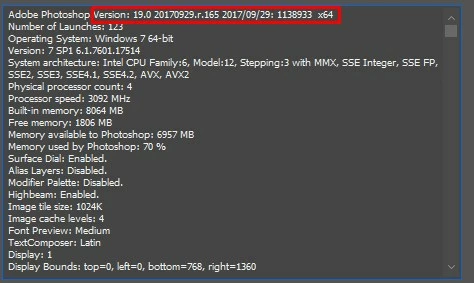
I am using the 19.0 2017 version Windows 7 Would it be version incompatibility?


At the very beginning, insert

var prefs;

var sourceFolder;

Change the function code to this (no var keyword)

////// locliza  psts 

fd_btn.onClick  = function() {   

prefs = new Object(); 

prefs.sourceFolder         = '~';  // default browse location (default: '~') 

sourceFolder = Folder.selectDialog('Please select the folder to be imported:', Folder(prefs.sourceFolder)); 

P.S. Also use the try { } catch (e) { }

3 replies

smithcgl9043167
Inspiring
August 26, 2018

Where am I going wrong?

The "fd_btn" button has the function of locating a folder (It worked perfectly)

The "but_Run" button has the function import each file however I am getting this error on line 36, how can I fix this error ??? All help is appreciated. Thank you

dlg=new Window("dialog","My Dialog",[0,0,345,250]); 


fd_btn=dlg.add("button",[32,43,122,63],"Select Folder"); 

txt_local=dlg.add("statictext",[130,46,330,66] ,"C:/Users/MyComputer....../Pictures"); 

check_sbf=dlg.add("checkbox",[30,22,230,42],"Include All Subfolder"); 

check_sbf.value=0 


pan_events=dlg.add("panel",[30,80,310,182],"My Events"); 

radio_1=pan_events.add("radiobutton",[23,19,113,41],"radiobutton 1"); 

radio_1.value=1 

radio_2=pan_events.add("radiobutton",[128,19,223,41],"radio button 2"); 

radio_2.value=0 

check_1=pan_events.add("checkbox",[24,49,104,69],"checkbox"); 

check_1.value=1 

downlist_1=pan_events.add("dropdownlist",[118,45,218,66] ,["  list_event 1","  list_event 2",""]); 

downlist_1.selection=0 


but_Can=dlg.add("button",[159,197,229,217],"Cancel"); 

but_Run=dlg.add("button",[238,197,308,217],"Run" , { name: "ok"}); 


////// locliza  psts

fd_btn.onClick  = function() { 

var prefs = new Object();

prefs.sourceFolder         = '~';  // default browse location (default: '~')

var sourceFolder = Folder.selectDialog('Please select the folder to be imported:', Folder(prefs.sourceFolder));

}

but_Run.onClick  = function() { 

dlg.close() 

    // add source folder to user settings

prefs.sourceFolder = sourceFolder;

// get a list of files

var fileArray = getFiles(prefs.sourceFolder);

// if files were found, proceed with import

if (fileArray.length) {

  importFolderAsLayers(fileArray, prefs);

}

// otherwise, diplay message

else {

alert("The selected folder doesn't contain any recognized images.", 'No Files Found', false);

}

function getFiles(sourceFolder) {

// declare local variables

var fileArray = new Array();

var extRE = /\.(?:png|gif|jpg|bmp|tif|psd)$/i;

// get all files in source folder

var docs = sourceFolder.getFiles();

var len = docs.length;

for (var i = 0; i < len; i++) {

var doc = docs;

// only match files (not folders)

if (doc instanceof File) {

// store all recognized files into an array

var docName = doc.name;

if (docName.match(extRE)) {

fileArray.push(doc);

}

}

}

// return file array

return fileArray;

}

function importFolderAsLayers(fileArray, prefs) {

// loop through all files in the source folder

for (var i = 0; i < fileArray.length; i++) {

// open document

var doc = open(fileArray);


         ////////////////////////

         // Meus scripts aqui


          alert ("My Scripts")

// close imported document

doc.close(SaveOptions.DONOTSAVECHANGES);

}

  }


dlg.center(); 

dlg.show(); 

Geppetto Luis
Legend
August 26, 2018

I do not receive any errors

photoshop cc2018 on imac high sierra

smithcgl9043167
Inspiring
August 26, 2018

I am using the 19.0 2017 version Windows 7 Would it be version incompatibility?

JJMack
Community Expert
Community Expert
August 24, 2018

You may want to reads Adobe Script Image Processor which is installed with Photoshop.  That script can do what you want to do. All you need do is record a one step action menu File>Scripts>YourScript.    Then use menu File>Scripts>Image Processor. Fill in the dialog check run action and select your action that runs your script.. The image processor can only save a jpg psd and Tiff

There a more powerful Plug-in script you can download and install Image Processor Pro.  Once install you access via men File>Automate>Image Processor Pro...

These script can also be run from Adobe Bridge and process files selected in bridge.

JJMack
smithcgl9043167
Inspiring
August 25, 2018

JJMackWhat a fantastic idea! I've written an action to run the various scripts I use in my workflow. Thanks for the sugestion!

Known Participant
August 24, 2018

This script only imports from the folder.

File.prototype.fileExt = function () {

   return this.name.replace(/^.*\./, '');

};

var inputFolder = Folder.selectDialog("Please select the input folder");

if (inputFolder != null) {

    var fileList = inputFolder.getFiles();

   for (var a in fileList) {

   if (fileList instanceof File) {

   var fileExtension = fileList.fileExt();

   if (fileExtension === "png", "tif", "psd") {

    open(fileList);

} } }}

I'm a beginner I could not get it into the inside function but_Run.onClick = function ()

Let's see if anyone else after a light for you!

smithcgl9043167
Inspiring
August 25, 2018

Ps-Design thanks for the script! At first my idea would be to create a custom window for this purpose, but I think this is too complex.