Answered
Help with Photoshop auto-numbering - Using alternative numbers
Need help auto-numbering in Photoshop using alternative numbers (need the files to end in 300-850 instead of 1-550).
HELP! Thank you!

Need help auto-numbering in Photoshop using alternative numbers (need the files to end in 300-850 instead of 1-550).
HELP! Thank you!
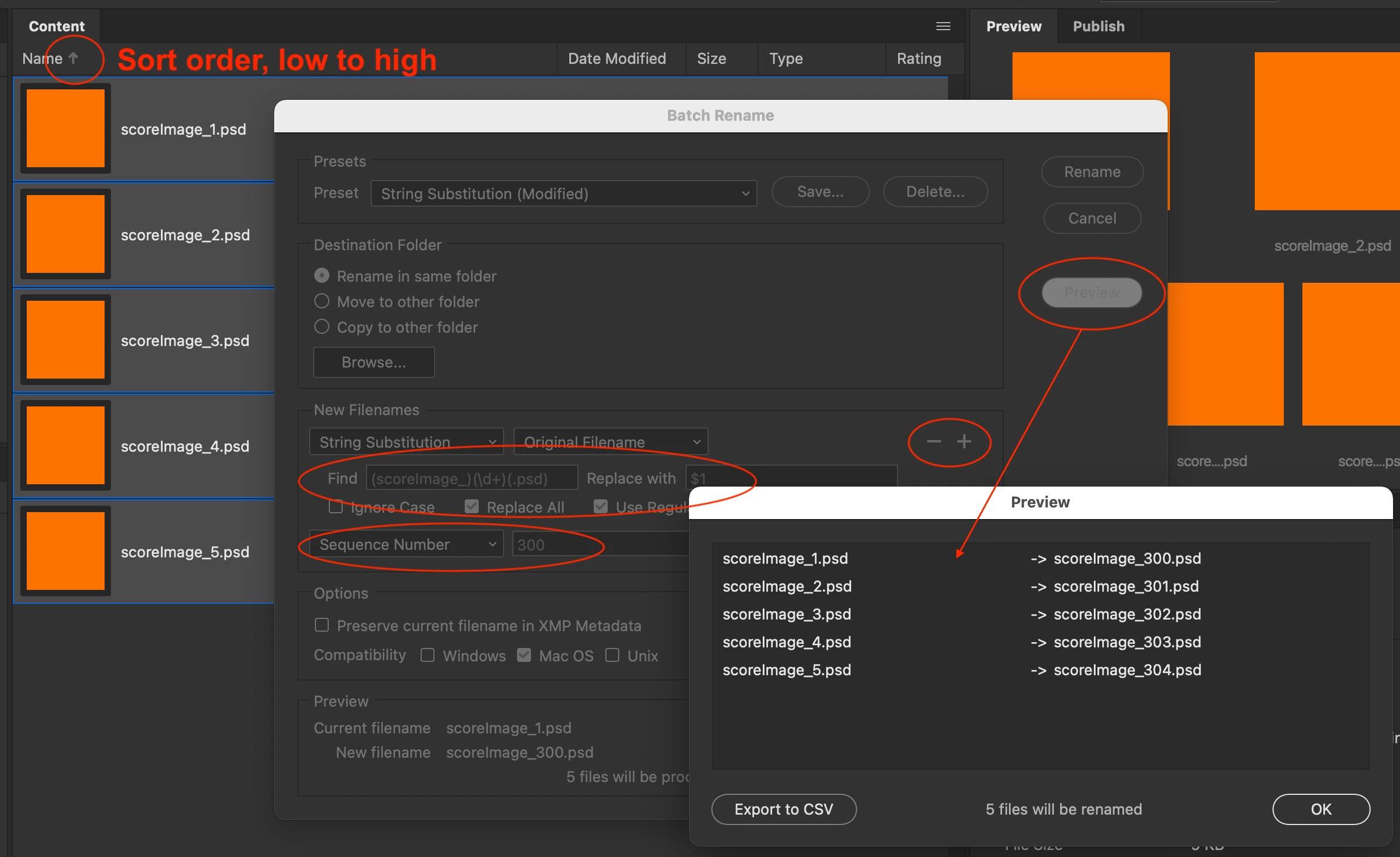
In Adobe Bridge, ensure that you are viewing the files in the appropriate Ascending Filename order.
This is very similar to my original guess in the earlier screenshots. In the Adobe Bridge Batch Rename – String Substitution area –
Find field:
(scoreImage_)(\d+)(.psd)
Replace With field:
$1
Ensure that the use Regular Expression is checked/ticked.
Use the + sign (Add more text to the filename) to add another row, using a sequential number start of 300.
You may wish to check/tick the "Preserve filename in XMP metadata" option so that you can recover the original filenames if something goes wrong. It may also be a good idea to work on duplicated files, just in case.
Do double-check using the Preview button to ensure that all files will be renamed as expected.
Already have an account? Login
Enter your E-mail address. We'll send you an e-mail with instructions to reset your password.
 AdChoices