Copy link to clipboard
Copied
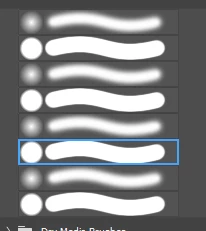
Hi, how would i get my brushes from
to
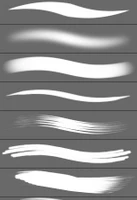
again?
All my brushes seems to have all round edge and don't have that athestic pointing look since 2 days ago. I have tries multiple solution but to no avail.
Thank.

Copy link to clipboard
Copied
Are you using a tablet and stylus? Check with the manufacuter if there is an updated driver available.
Copy link to clipboard
Copied
I checked and i have the lasted updated. I'm clueless on how to get it back. I literally did not do anything.
Copy link to clipboard
Copied
I tried uninstall and reinstall both wacom drive and photoshop and still doesn't work. (cursing removed)
Copy link to clipboard
Copied
(cursing removed)
(abuse removed)
Copy link to clipboard
Copied
Someone please help me with this. I'm going crazy.
Copy link to clipboard
Copied
Open "Brushes" panel (F5 or Window -> Brush from menu) and then click "hamburger" menu icon in top right corner of the panel and select "Legacy Brushes" from the menu to re-load all Photoshop's default brushes
Copy link to clipboard
Copied
Nope. Still doesn't work. It just imports a bunch of brushes.
Copy link to clipboard
Copied
Go to brush settings and make sure 'Shape Dynamics' is checked for your brush.
If it is, click on the words 'Shape Dynamics' so you see the associated options.
Make sure 'Control' is set to 'Pen Pressure' and Minimum Diameter is set to 0% If you see a warning triangle it means that Photoshop is not seeing the input from your pen & tablet. If that is the case please tell us what pen & tablet you are using.
Dave
Copy link to clipboard
Copied
I tried and still doesn't work. The brushes softness is working fine. It IS responding to the pen & tablet. My issue is that the brushes diagraph doesn't responding to the pen sensitivity. For example, i used to be able to tell because whenever I was using a mouse the brushes diagraph would all have round edge and whenever I was using a pen it would have that softness & pointing apperance accordingly.
I am not talking about the brushes setting, it IS working fine. I'm talking about the brushes on GUI. I'm sorry if i'm not making sense.
Find more inspiration, events, and resources on the new Adobe Community
Explore Now